
This article may contain affiliate links. As an Amazon Associate, we may earn from qualifying purchases at no extra cost to you.
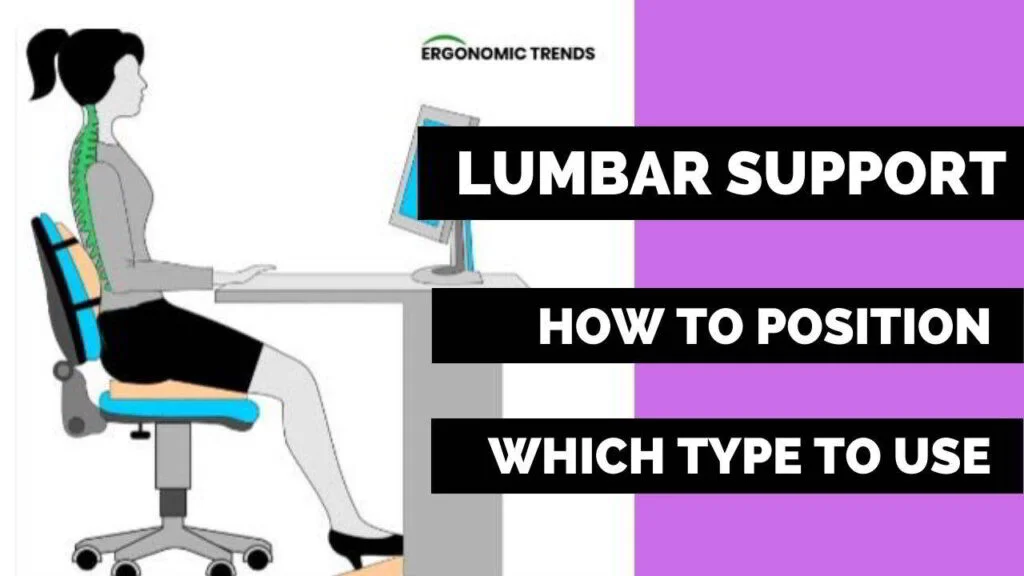
If you’re wondering where to put lumbar support on a chair, place it at the small of your back, where your lower spine curves inward. The support should sit around your belt line, with the thickest part centered between the bottom of your ribcage and the top of your pelvis. This placement helps your spine stay in a neutral “S” shape, reduces slouching, and eases pressure on your lower back during long sitting sessions.
What Is Lumbar Support?
Lumbar support is any feature or cushion that fills the natural inward curve of your lower back. It keeps your spine aligned and prevents your pelvis from rolling backward, which can lead to slouching. Good office chair lumbar support helps you sit upright with less effort and strain.
It can be built into a chair or added as a separate lumbar cushion. Either way, it should be adjustable in height and depth so it fits your unique body shape.
Why Proper Lumbar Support Placement Matters
Your lumbar spine (L1–L5) carries much of your upper body weight. When support is placed too high or too low, your spine loses its natural curve. That adds pressure to discs, muscles, and ligaments. Over time, this can mean tight hips, sore backs, and early fatigue.
Correct placement supports a neutral spine. This helps with better sitting posture, stable core muscles, and improved comfort at the desk. It also makes it easier to keep your shoulders relaxed and your head aligned over your torso.
Where Should Lumbar Support Sit on a Chair?

lumbar support
Aim for the small of your back—the deep inward curve just above your belt line. A simple test: sit tall, place your fist in the curve of your lower back. That’s where the thickest part of the lumbar support should rest.
Key points:
- Center the support between the bottom of your ribcage and the top of your pelvis.
- The bottom edge of the support should meet the top of your hips.
- The support should fill the gap without feeling like it pushes you forward too much.
If your chair has a sliding or height-adjustable lumbar, raise or lower it until it matches this spot.
How to Adjust Lumbar Support Correctly
Set up in this order. It helps your whole posture work together:
- Sit back and press your hips into the chair. Keep 2–3 fingers space behind your knees.
- Adjust seat height so your feet rest flat and your knees are level with or just below your hips.
- Set backrest angle to a slight recline (90–110 degrees).
- Now set lumbar support height so it fills the small of your back at the belt line.
- Adjust lumbar depth so you feel contact, not pressure.
For chairs with built-in lumbar
- Slide the lumbar pad up or down while seated.
- Stop when you feel the support meet your lower back curve without lifting your ribs.
For external lumbar cushions
- Place the cushion with the thickest bulge at your belt line.
- Strap it so it stays put when you move.
- If it feels too thick, try a thinner cushion or reduce chair recline slightly.
Signs Your Lumbar Support Is Too High or Too Low
Use your body as feedback:
Too high:
- Pressure under your ribs
- Upper back feels pushed forward
- Lower back still feels hollow
Too low:
- Pressure on your tailbone
- You slump or slide down
- Hip or hamstring tension builds fast
Just right:
- Even contact across the small of your back
- Pelvis feels upright, not tucked
- You can sit tall with less muscle effort
Best Sitting Position for Lower Back Support
Pair proper lumbar support with a smart sitting posture:
- Feet flat on the floor or a footrest
- Knees level with or slightly below hips
- Hips to the back of the seat, not perched on the front
- Small gap (2–3 fingers) between the front of the seat and your calves
- Shoulders relaxed, elbows near your sides at 90–110 degrees
- Screen top at or slightly below eye level to avoid leaning forward
This ergonomic chair setup keeps your spine stacked and your lower back supported.
Common Lumbar Support Mistakes
Avoid these frequent errors:
- Placing the support on your mid-back instead of your lower back
- Using a thick cushion that pushes you forward off the backrest
- Setting lumbar depth high but seat height too low
- Ignoring seat pan depth, causing pressure behind the knees
- Leaning forward to see a low monitor, which defeats lumbar support
Fixing these issues improves your lower back support and overall sitting posture.
Can Lumbar Support Help Back Pain?
Yes, when placed and adjusted well. It helps maintain the spine’s natural curve and reduces pressure on discs and muscles. Many people feel less strain within days of using correct office chair lumbar support.
But lumbar support is not a cure-all. Pair it with:
- Short movement breaks every 30–45 minutes
- Light stretches for hips and hamstrings
- Proper desk posture and screen height
- A seat that fits your body size
Types of Lumbar Support for Office Chairs
You have several options based on budget and chair style:
- Built-in adjustable lumbar: Found on many ergonomic chairs. Height and sometimes depth adjust.
- External lumbar cushions: Strapped to the backrest. Great for non-ergonomic or dining chairs.
- Inflatable lumbar pads: Let you fine-tune depth for different users.
- Dynamic lumbar systems: Flex and move with you, helpful for active sitting.
Quick picks
- Everlasting Comfort Lumbar Cushion: Thick memory foam, good for firm chairs.
- Samsonite Adjustable Lumbar Pillow: Slimmer profile, fits smaller frames.
- Herman Miller Aeron or Steelcase Series 1: Chairs with reliable, adjustable lumbar options.
Choose the size and depth that match your body. A petite frame may prefer a thinner pad. Broader backs may need a deeper cushion.
How to Test if Your Lumbar Support Is Positioned Correctly
Run this 60-second check:
- Sit back and relax your shoulders.
- Take a slow breath. Your chest should not feel blocked.
- Slide a hand behind your lower back. You should feel firm, even contact at the belt line.
- Try a small forward lean, then sit back. The support should “catch” you in the same spot.
- After five minutes, note any hot spots or tailbone pressure. If yes, raise or lower slightly.
If you feel balanced with less effort and no pinching, your lumbar support position is likely correct.
FAQ
Q: How high should lumbar support be?
A: Align it with the small of your back, around your belt line. The bottom edge should meet the top of your hips.
Q: Why does my lower back hurt while sitting?
A: Common reasons include poor lumbar support position, seat too deep, weak core, or monitor too low causing a forward lean.
Q: How do I adjust an ergonomic chair for better support?
A: Start with seat height, then seat depth, backrest angle, lumbar height and depth, and finally armrests. See our ergonomic chair adjustment guide.
Q: Can lumbar support fix my posture?
A: It helps maintain a neutral spine but works best with regular breaks, light stretches, and proper desk posture.
Q: Is a thicker lumbar cushion better?
A: Not always. It should fill the curve without pushing you forward. If it feels bulky, try a slimmer cushion.
Final Thoughts
Lumbar support works best when it sits at the small of your back, centered at the belt line, and matched to your seat height and backrest angle. A few small tweaks can turn long desk hours into a more comfortable, stable experience. Remember to pair good support with movement breaks, a well-placed monitor, and relaxed shoulders. Your lower back will thank you for the care and consistency.


