
Affiliate Disclosure: Some recommendations in this post may include affiliate links. If you decide to purchase through those links, we may earn a small commission at no extra cost to you. We only suggest products we believe can genuinely help you work with better posture and less strain.
This content is for informational purposes only and not medical advice.
Bad desk posture symptoms often start with nagging neck pain, lower back aches, shoulder stiffness, headaches, and general fatigue. These are early warning signs that your setup or sitting habits are off. If you ignore them, they can turn into chronic pain, reduced focus, and long-term joint or nerve issues.
You spend hours at your desk. Your body notices. Small posture slips—like slouching, craning your neck, or hunching your shoulders—add up fast. The result is a mix of pain, tightness, and low energy. The good news? These symptoms are early signals, not life sentences. With a few smart changes, you can feel better within days and protect your long-term health.
In this guide, you will learn what bad desk posture looks like, the most common symptoms to watch for, why they grow worse over time, and how to fix them with simple habits and ergonomic tools that actually work. Keep it simple and act early. Your back and neck will thank you.

What Is Bad Desk Posture?
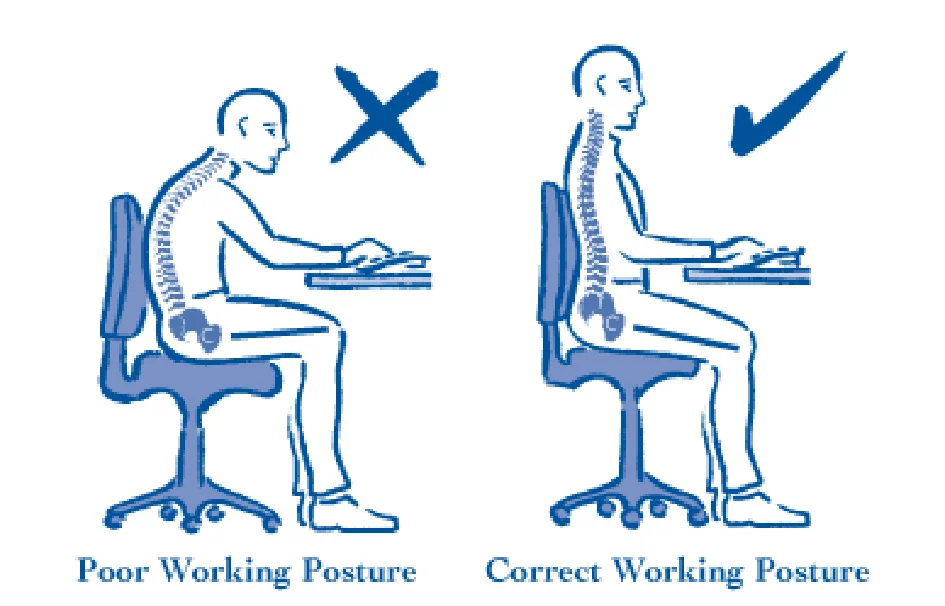
Bad desk posture means your head, neck, shoulders, and spine are not in a neutral, aligned position while sitting and working. It often shows up as rounded shoulders, a forward head, a tucked pelvis, and bent wrists. Many of us fall into these habits without noticing—especially when we get absorbed in work.
Common causes:
- Laptop screens that sit too low
- Chairs without lumbar support
- Desks that are too high or too low
- Long, static sitting with no breaks
- Reaching for the mouse or keyboard
- Phone or tablet use with a bent neck
- Stress and fatigue that lead to slumping
Bad Desk Posture Symptoms
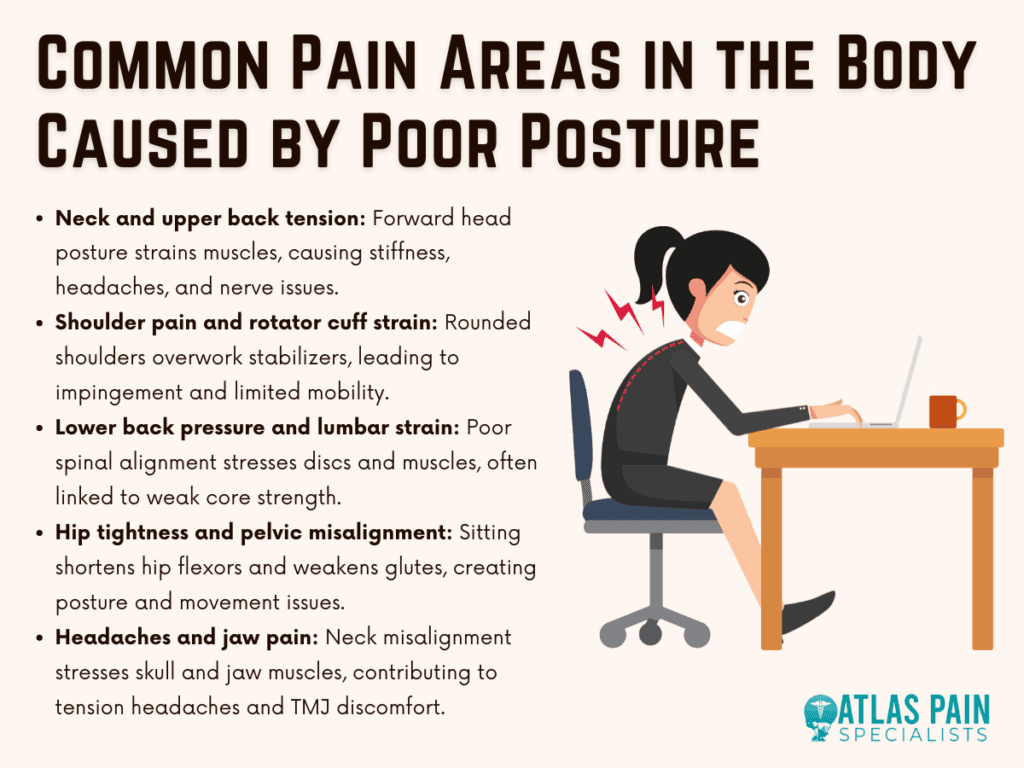
When posture is off, your body sends signals. Pay attention to these common bad desk posture symptoms. They are your early alerts before pain becomes a long-term problem.
- Neck pain: A forward head position strains the neck muscles. You may feel tightness at the base of the skull or soreness along the sides of your neck. Turning your head may feel stiff.
- Lower back pain: Slouching flattens or over-arches the lower spine. This loads small joints and discs. You may feel an ache across your belt line or a sharp pain after long sitting.
- Shoulder stiffness: Rounded shoulders and shrugged traps cause tension. You may notice a heavy, tight feeling in the upper back and shoulders, especially late in the day.
- Headaches: Posture-related tension can trigger headaches, often starting at the base of the skull and wrapping to the temples or behind the eyes. Screen glare and eye strain can add to it.
- Fatigue: Poor alignment wastes energy. Your muscles work harder to hold you up, so you feel drained. You may also notice brain fog from discomfort and shallow breathing.
Other warning signs:
- Tingling in hands or forearms from wrist or shoulder position
- Hip tightness from sitting with a tucked pelvis or crossed legs
- Mid-back soreness after typing or mousing
Early vs Serious Symptoms
Not all signals are equal. Know where you stand so you can act now, not later.

- Early symptoms (mild and reversible):
- Occasional stiffness that eases after a quick stretch
- A dull ache at the end of the workday
- Temporary headaches after long screen time
- Tired shoulders after meetings or deep-focus tasks
- Serious symptoms (need prompt attention and setup changes):
- Pain most days that lasts more than a few weeks
- Numbness, tingling, or weakness in arms or hands
- Sharp, shooting pain in the back, neck, or down a leg
- Headaches that affect sleep or daily function
- Pain that keeps you from normal work or exercise
If you notice serious symptoms, talk with a licensed clinician. Posture fixes help, but medical care can rule out other causes and guide safe recovery.
Why These Symptoms Get Worse Over Time
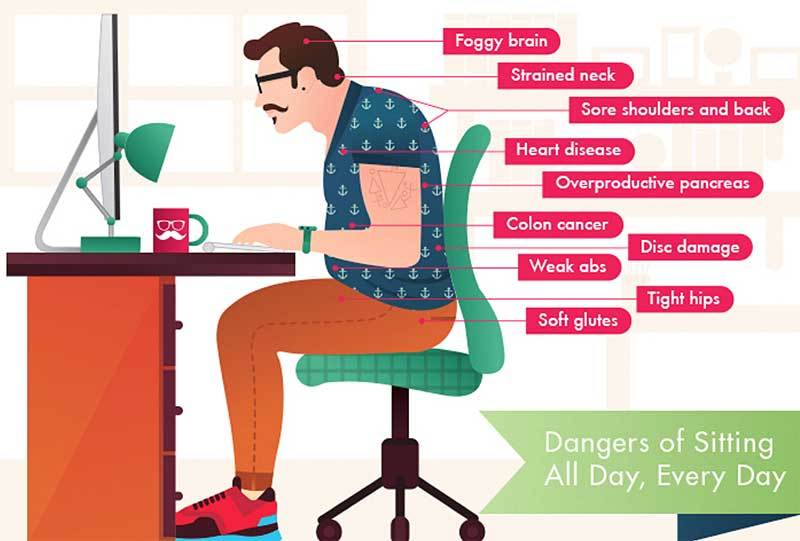
Bad posture loads your body the wrong way, all day. Over time, tissues adapt—but not in a good way. Muscles tighten, others weaken, and joints feel the strain. Your nervous system also becomes more sensitive to pain when stress and poor mechanics persist.

What happens under the hood:
- Forward head posture adds pounds of force to the neck with every inch forward
- Rounded shoulders shorten chest muscles and overwork the upper traps
- Slumping reduces core support and increases pressure on spinal discs
- Static sitting slows blood flow and limits joint lubrication
- Micro-strain repeats with every click and keystroke, building to macro-pain
Good news: the same body that adapts to poor alignment can adapt back. Small, steady changes can reverse many of these effects.
How to Fix Bad Desk Posture (Simple Steps)
You do not need a perfect posture. You need a better default posture and more movement. Start with these simple steps and build from there.
- Proper sitting position:
- Sit back in your chair with your hips all the way back.
- Keep a slight arch in your lower back (use a small lumbar cushion or rolled towel).
- Relax your shoulders down and back; let your arms rest.
- Keep your head level, chin slightly tucked.
- Screen height:
- Top of the screen near eye level; center of the screen about 15–20 degrees below eye line.
- Keep the monitor about an arm’s length away.
- If using a laptop, raise it and use an external keyboard and mouse.
- Keyboard and mouse:
- Keep elbows by your sides, bent about 90–110 degrees.
- Wrists neutral, not bent up or down.
- Move the mouse from the shoulder, not just the wrist.
- Foot support:
- Feet flat on the floor or on a footrest.
- Knees at or slightly below hip height.
- Movement breaks:
- Stand or walk for 2–5 minutes every 30–45 minutes.
- Try “micro-moves”: shoulder rolls, chin nods, ankle pumps.
- Quick resets:
- “Zip up” your posture: sit tall, breathe out, gently draw ribs down, relax traps.
- Set a timer or use a reminder app to cue posture checks.
Ergonomic Solutions That Actually Help
Ergonomics turns good habits into a stable work setup. You do not need to buy everything at once. Start with the biggest wins for your body and budget.
- Ergonomic chair:
- Look for adjustable seat height, seat depth, armrests, and lumbar support.
- The backrest should support the natural S-curve of your spine.
- Lumbar support:
- A simple memory foam roll or adjustable lumbar pad can reduce lower back strain fast.
- Footrest:
- If your feet dangle or your knees sit higher than your hips, a footrest helps align your spine and reduce pressure.
- Monitor riser or arm:
- Raise the screen to eye level and free up desk space.
- External keyboard and mouse:
- Essential if you use a laptop. They keep elbows close and wrists neutral.
Tip: Test one change at a time. Notice how your neck, shoulders, and back feel over a week. Keep what works.
Common Posture Mistakes to Avoid
Most desk pain comes from a few repeat errors. Fix these and you fix most of the problem.

- Slouching into the chair back with no lumbar support
- Leaning forward toward the screen (forward head posture)
- Hunching shoulders while typing or mousing
- Resting wrists on the desk edge (extended wrists)
- Using a laptop flat on the desk without raising it
- Perching at the front of the seat with no back contact
- Crossing legs for long periods
- Placing the mouse too far away, forcing a reach
Quick Posture Check (30-Second Checklist)
Use this mini-check. It is fast and works anywhere.
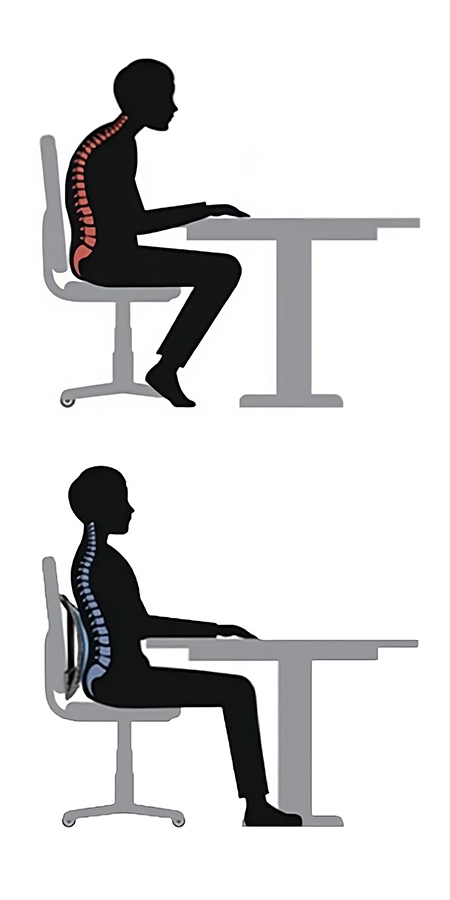
- Hips back in the chair, back resting on the backrest
- Lower back supported with a small curve
- Feet flat on floor or footrest
- Knees at or just below hip height
- Elbows by your sides, bent about 90–110 degrees
- Shoulders relaxed, not shrugged
- Screen top at or near eye level
- Chin tucked slightly, head stacked over shoulders
- Take one slow breath in and out; release jaw and tongue
FAQs
Q1: How long does it take to feel better after posture changes?
Most people notice less tension within a few days. Bigger gains build over 2–4 weeks as muscles rebalance. Stay consistent with small breaks, lumbar support, and screen height.
Q2: Can stretching alone fix bad desk posture symptoms?
Stretching helps, but it is not enough by itself. Combine gentle stretches with better alignment, movement breaks, and the right chair and screen setup for lasting relief.
Q3: What is the best sitting-to-standing ratio at work?
Aim to change position every 30–45 minutes. Try a mix like 20–30 minutes sitting, 10–15 minutes standing, then a 2–5 minute walk. The key is variety and movement, not one perfect pose.
Conclusion
Bad desk posture symptoms are warning lights, not your fate. Neck pain, lower back aches, shoulder stiffness, headaches, and fatigue often improve with simple changes. Sit back in your chair. Support your lower back. Raise your screen. Keep your feet grounded. Move often.
Start now: do the 30-second checklist, set a reminder for your next break, and make one ergonomic upgrade this week. Small steps today protect your body for years of focused, pain-free work.


