

This article may contain affiliate links. If you buy through the links on this page, we may earn a small commission at no extra cost to you. We only recommend gear we trust and use. This helps keep our guides free and useful—thank you for your support.
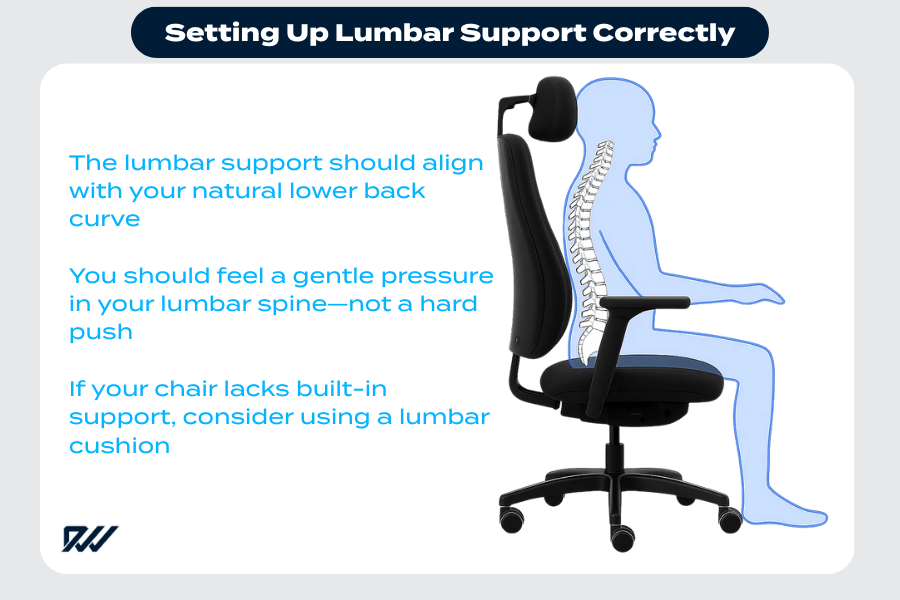
To use lumbar support correctly, place it at the natural curve of your lower back—just above belt level. Adjust the height and depth so it fills the arch without pushing you forward. Keep your hips fully back against the chair for proper support. Your ribs should stack over your pelvis while you relax your shoulders.
Most people buy a lumbar pillow or chair with built-in support. Then they place it too high, too low, or set it too thick. The result? A sore back and the belief that lumbar support “doesn’t work.” The good news: one small change can fix most setups fast. In this guide, you’ll learn the simple belt-line rule, the 60-second fix, and a step-by-step method that takes the guesswork out of support. You’ll also see how to set it up in an office chair, car, sofa, and gaming chair. By the end, you’ll stop wasting your chair’s best feature and enjoy lasting comfort.
Why Most People Use Lumbar Support Wrong
Most people get this wrong because they aim for where they feel pain, not where support belongs. Pain can sit higher or lower than the spot your spine needs help. That leads to trial, error, and sore days. The right setup is simple once you know a few rules.

Common mistakes:
- Placing it too high. It hits the mid-back and pushes the ribs forward. Your low back stays unsupported.
- Placing it too low. It sits near the tailbone and tilts the pelvis. Your upper body leans back and strains the hips.
- Making it too thick. It shoves you to the front of the seat. Your back loses contact with the backrest. Your core works too hard to hold you up.
- Leaving a gap. A small space between your low back and the backrest means no real support.
- Sitting on the edge. If your hips do not touch the backrest, the lumbar piece cannot do its job.
- Ignoring chair angles. A seat that tilts too far back or forward changes where the support touches your spine.
If you fix height, depth, and your hip position, you fix 80% of problems. The rest is small tweaks to angle and firmness.
Where Should Lumbar Support Be Placed? (Simple Belt-Line Rule)
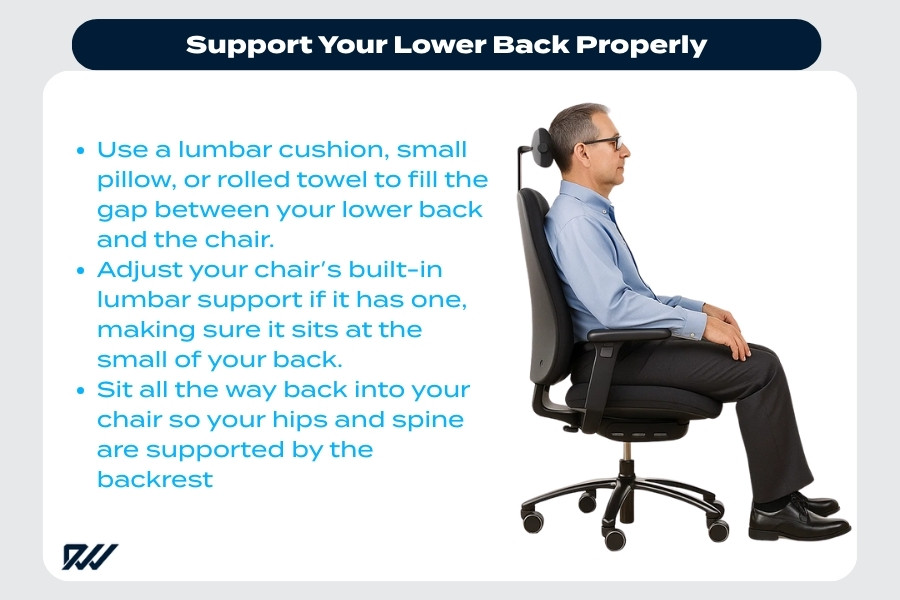
Use the simple belt-line rule: place the support so it sits at or just above your belt line. That lines up with the natural inward curve of your lower back (the lumbar curve). You should feel gentle contact in the “small” of your back, not on your tailbone and not in your mid-back.
How to use body landmarks:
- Find your belt line. If you do not wear a belt, find the top of your hips with your hands. The support should sit a finger or two above that level.
- Feel the small of your back. This is the slight inward curve between your ribs and your pelvis. That’s your target.
- Keep contact while seated. When you sit back, your low back should touch the support with a light, even pressure.
What to avoid:
- Pressure on the tailbone. That is too low.
- Pressure under your shoulder blades. That is too high.
Tip: Add a simple diagram to your setup guide or office handbook. Show a side view with correct vs. incorrect placement. Mark the belt line and the curve. A quick visual helps your brain lock in the right spot.
How to Use Lumbar Support Correctly (Step-by-Step Guide)
You can dial this in within minutes. Follow these steps the first time you set up a chair or pillow. Make small changes and test how it feels for a minute or two.

- Sit back fully
- Slide your hips all the way back until they touch the backrest.
- Do not perch on the front edge.
- Keep both feet flat on the floor or on a footrest.
- Align your lumbar curve
- Lean back so your ribs stack over your pelvis.
- Find the small of your back with your hand.
- Place the support so it fills that curve, not your mid-back.
- Adjust height
- If it is adjustable, move it up or down until it sits at your belt line or a bit higher.
- Too high? You feel pressure between your shoulder blades.
- Too low? You feel pressure on your tailbone or sit bones.
- Adjust firmness or depth
- Start thin. Add depth until your low back feels gently filled.
- You should feel supported but not pushed forward.
- If your butt slides forward, reduce thickness.
- Check posture in the mirror (or camera)
- Ears over shoulders, shoulders over hips.
- Ribs not flared. Belly not forced out.
- You can breathe deep without strain.
- Lock it in for your body
- If you are tall, you may need a slightly higher setting.
- If you are petite, a thinner, lower support often works best.
- Save the settings or mark the straps so you can return to them fast.
The 2-Minute Fit Test
Set a timer for two minutes. Sit in your normal work pose. Relax your legs and shoulders. Try three slow breaths. If it feels natural and you are not fighting the chair, it is right. If you keep shifting or bracing your core, it is too thick or too high. Tweak, then test again.

The 60-Second Fix You Can Do Right Now
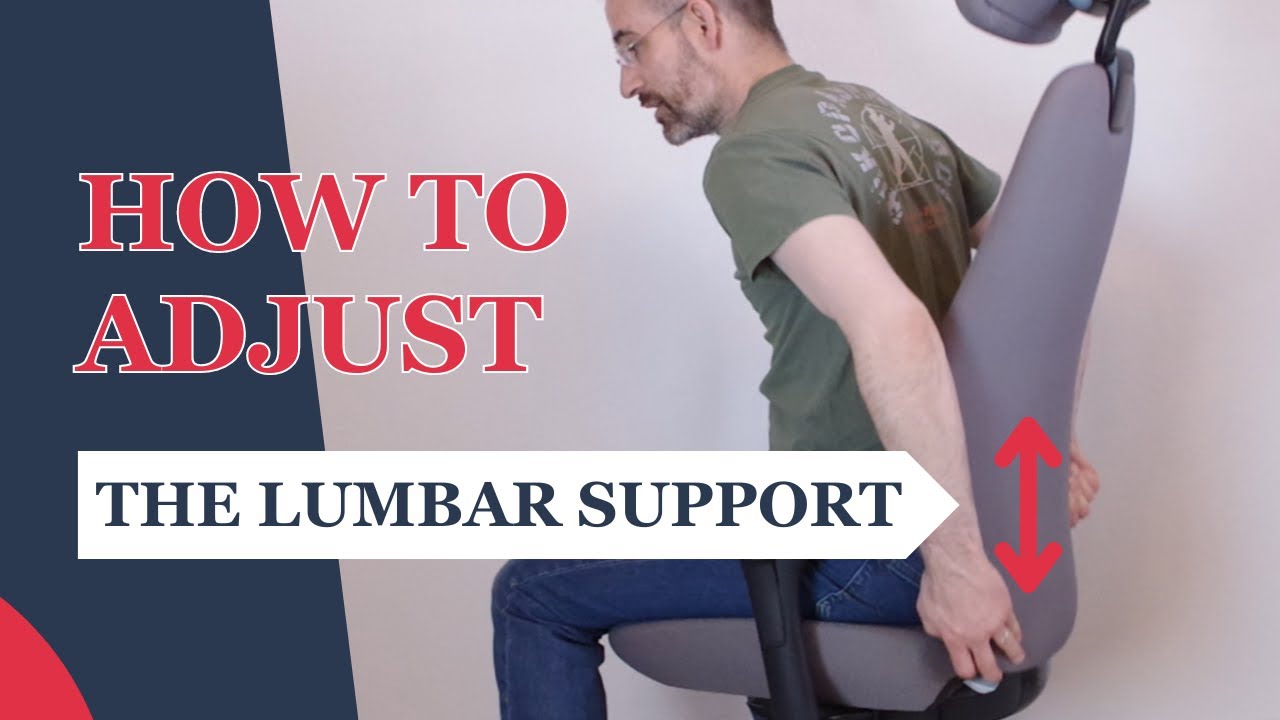
Got one minute? Try the 60-second fix. This quick reset solves most issues without tools. It helps you find the sweet spot by using your belt line and your hips as anchors.
- Slide hips all the way back.
- Find your belt line with one hand.
- Place or slide the lumbar support to touch the small of your back at belt level.
- Reduce depth so the support “meets” your back, not shoves it.
- Lean back and relax your shoulders.
- If your butt slides forward, thin the support by half.
- If you feel it under your mid-back, drop it an inch.
Do this each morning. It takes less than a minute and keeps your setup honest.
Common Lumbar Support Mistakes That Cause Pain
These are the fastest ways to turn good support into a bad day. Scan the list. If one sounds like you, fix that first before you blame the chair or pillow.

- Pushing you forward: The support is too thick. Your body fights it. You brace your core and feel tight by noon. Solution: Reduce depth until your back rests, not resists.
- Sitting on the edge: If your hips are off the backrest, the support cannot reach your spine. Solution: Slide back until your hips touch the backrest.
- Wrong height: Too high hits the mid-back. Too low shoves the pelvis. Solution: Use the belt-line rule and move it a notch at a time.
- Over-reclined seat: If you recline past 120°, the support may miss your curve. Solution: Use a slight recline (100–110°) for work.
- Worn-out foam: Old pillows collapse and create a gap. Solution: Replace or add a thin, firm roll.
- Bulky wallet or phone in back pocket: This tilts your pelvis and makes one side sore. Solution: Empty those pockets when you sit.
Lumbar Support for Different Situations
Different seats change how support hits your spine. The rules stay the same, but the adjustments shift. Here is how to set it up wherever you sit.
Office chair
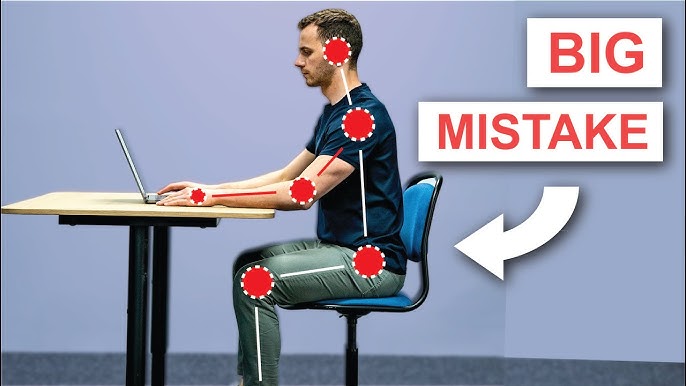
Office chairs often include adjustable lumbar support chair. Many folks leave it at the factory setting. That is a miss. Use the belt-line rule and small tweaks to fit your body.
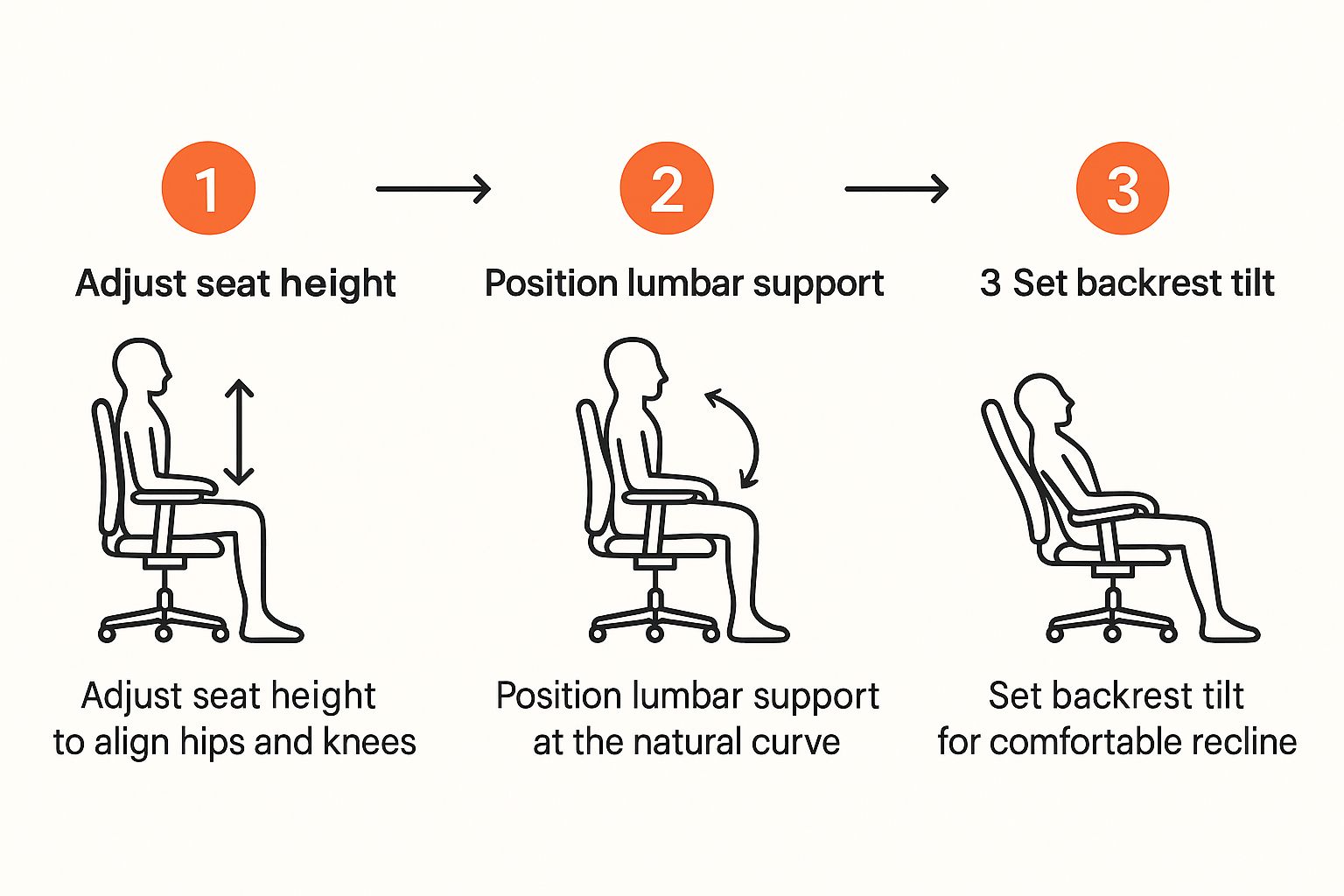
- Height: Slide the lumbar pad so it centers at your belt line.
- Depth: Start thin. Add only until your curve feels filled.
- Seat depth: Leave 2–3 fingers of space between the seat edge and your calves. If the seat is too deep, you will slouch to reach the backrest.
- Back angle: Aim for 100–110° recline. It reduces disc pressure and lets the lumbar do its job.
- Armrests: Set them low enough so your shoulders relax.
- Feet: If your feet dangle, add a footrest. This helps keep your hips back. See our footrest guide for options: /footrest guide
- Chair shopping: Want a model with great lumbar adjustability? See our ergonomic chair guide before you buy: /ergonomic-chair-guide
Car seat
Car seats are tricky. Seat angle, road bumps, and long trips all add stress. A small change makes a big difference here.
- Start with seat angle near level or slightly tilted forward. Avoid a steep bucket drop.
- Recline: 100–110° is a good start for city drives. For highways, you can add a bit more recline if your head stays supported.
- Distance: Sit close enough to bend elbows about 120°. If you reach, you round your back.
- Lumbar: Use the built-in dial. If it is weak, add a thin, firm lumbar roll. Place it at belt level.
- Breaks: Stop every 60–90 minutes. Stand, walk, and reset your hips.
- Pro tip: If you feel pressure on the tailbone, raise the back of the seat pan or add a small wedge. That brings your pelvis neutral and helps the lumbar pad find your curve.
Sofa
Sofas love to swallow your hips. That kills your low-back curve. You can still be comfy and supported with a few moves.
- Sit with your hips back against the cushion seam.
- Add a small pillow or folded towel at your belt line. Keep it thin.
- If the sofa is deep, add a firm cushion behind your mid-back to shorten the seat.
- For TV marathons, switch sides or positions every 30–45 minutes.
- Avoid long slouching with your neck propped forward. Your low back pays the price.
Gaming chair
Many gaming chairs ship with a thick lumbar pillow. It often sits too low or too high. You can make it work with small changes.
- Lower the pillow so it meets the small of your back, not your mid-back.
- If it is too thick, remove filling or swap to a thinner roll.
- Set a slight recline. Keep your screen at eye level to avoid neck strain.
- Adjust armrests to support your forearms without lifting your shoulders.
- If you stream for hours, use a timer to stand or stretch every hour.
Does Lumbar Support Really Help Back Pain?
For many people, yes—when used right. Lumbar support does not cure pain. But it reduces strain by helping your spine keep its natural curve. This spreads pressure more evenly across joints and discs. It also lets your back muscles relax.
Think of it like a helpful hand. It does not hold you stiff. It reminds your body where “neutral” is. Over time, that can mean less end-of-day soreness, fewer fidgets, and better focus. If you have ongoing or severe pain, ask a qualified clinician for advice that fits your body. Use this guide as a comfort tool, not a diagnosis.
Lumbar Support vs No Support (What Changes?)
With proper lumbar support, your lower back stays aligned, reducing strain and fatigue during long sitting. Without it, the spine tends to slump, increasing pressure on discs and muscles. This often leads to discomfort, poor posture, and faster fatigue—especially during extended desk work.
You can feel the difference in minutes. Try sitting with and without support and notice these shifts.
- Posture: With support, your pelvis sits more neutral. Your spine stacks like blocks. Without it, your low back tends to round.
- Pressure: With support, pressure spreads across a larger area. Without it, the load piles into the tailbone and lower discs.
- Comfort: With support, your back muscles can switch off more. Without it, they work hard to hold your trunk up.
- Fatigue: With support, you tire less and move more by choice. Without it, you fidget because of strain.
- Focus: With support, your brain pays less attention to your back. That frees you to focus on work or play.
Best Lumbar Support Options
Below are solid choices for most bodies and budgets. Choose the smallest change that solves your problem. Thin and well-placed often beats thick and fancy.
- Tralt Ergonomic Office Chair (Built-In Lumbar)
If you need a full chair upgrade, choose one with adjustable lumbar height and depth. Look for two-way (or three-way) lumbar control, a backrest that follows you as you recline, and a seat that adjusts in depth. This gives you the range to match your body, not force it. The result is steady support that moves with you, not against you. See our top adjustable chair picks in the ergonomic chair guide. - Memory Foam Lumbar Pillow (Medium)
A contoured memory foam pillow is a simple add-on. Pick one with a slim profile and an elastic strap. Place it at your belt line, then tighten the strap so it does not slide. Memory foam molds to your curve and fills small gaps well. If it feels too “sinky,” remove the cover and add a thin towel layer behind it to firm it up. CTA: Check current price and reviews before you buy. Choose a slim model first. - Thin, Firm Lumbar Roll (For Petite or Sensitive Backs)
Some bodies do better with less. A slim, dense roll offers support without bulk. It works great in office chairs, cars, and even on the sofa. Because it is firm, it holds shape for months, not weeks. It is also easier to place right at belt level. If other pillows push you forward, try this. CTA: Shop a thin roll with a washable cover and strong strap. - Car-Specific Lumbar Cushion (Shaped for Seats)
Car seats have angles that defeat many pillows. A car-ready lumbar cushion has a cut that matches the seat back. It also includes a grippy back so it stays put. Use it at belt level and pair it with a slight recline. Long trips feel more even and less twitchy. CTA: Look for a model with height markers so you can repeat your best spot.
Note: If your chair already has decent lumbar, try the 60-second fix first. Often, you do not need to buy anything new.
Quick Setup Checklist (Save This)
Print this and tape it near your desk. A 30-second reset each morning can save your back all week.
- Feet flat or on a footrest
- Hips all the way back
- Belt-line rule: lumbar meets the small of your back
- Support depth: fills the curve, does not push you forward
- Slight recline (100–110°)
- Shoulders relaxed, ribs stacked over pelvis
- Elbows at about 90–120°, wrists neutral
- Screen at eye level (top third of screen at or just below eye line)
- Take a quick stand or walk every 30–60 minutes
- Recheck lumbar height after you move the chair
FAQs
Should lumbar support be firm or soft?
Aim for “just firm enough.” It should hold shape and meet your curve without feeling hard. If it collapses, your back will round. If it feels like a rock, your body will fight it. Start thin and firm. Add depth only if you still feel a gap.
Why does lumbar support hurt at first?
It is often too high or too thick. You may also be sitting on the edge of your seat. Use the simple belt-line rule. Reduce thickness so your back rests, not braces. Give your body a few days to adjust. If pain stays sharp or grows, remove the support and ask a clinician.
Can lumbar support fix posture permanently?
No tool “fixes” posture for good. But good support guides your body toward a neutral shape. It reduces strain while you sit. Pair it with movement, breaks, and light core and hip work. Over time, your body will choose better positions more often.
Ready to Fix Your Setup? Do This Now
You do not need a new chair to feel better today. Do the 60-second fix. Place your support at belt level. Thin it until your back relaxes. Sit back and breathe. If your day improves, lock those settings in.
Want deeper help?
- Compare the best chairs with real lumbar control: /ergonomic-chair-guide
- Short legs or high desk? A footrest can change everything: /footrest-guide
- Build better habits at work and home: /posture-improvement-guide
Adjust your chair now. Then choose the smallest product that solves your gap. Your back will thank you by the end of the day.


