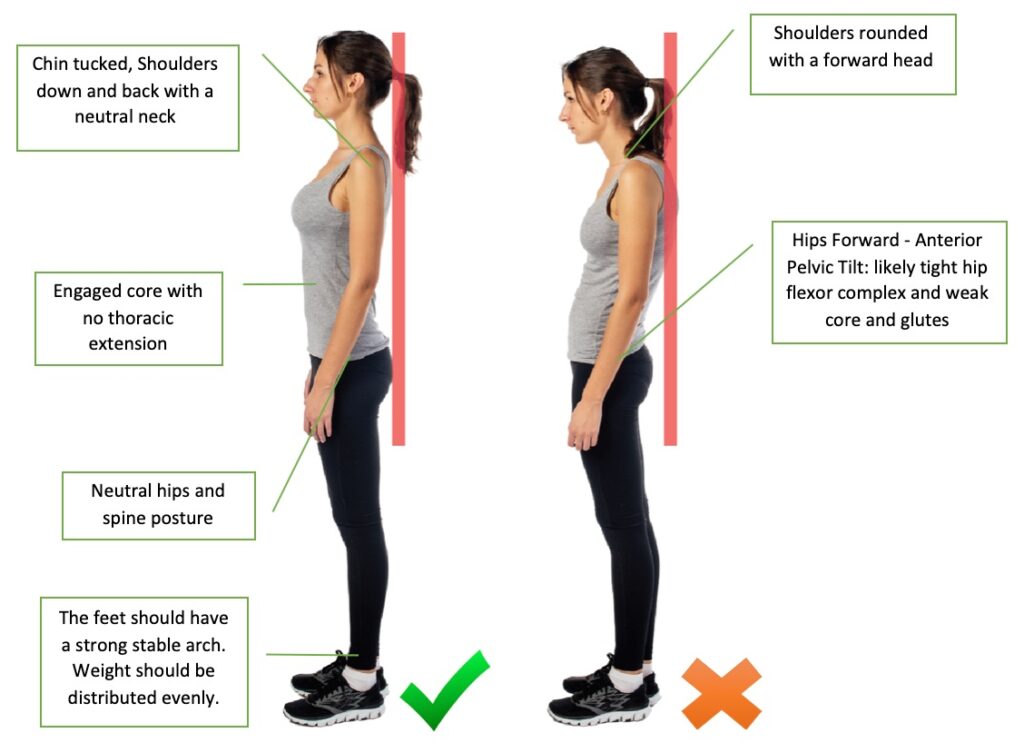
If you sit for most of the day, you’ve likely wondered if an ergonomic office chair can “fix” your posture. Here’s the twist most people miss: the chair is a tool, not a cure. A well‑designed chair can support a healthy sitting posture, but only if you set it up right and build a few simple habits. Think of it like good running shoes. They help, but you still need good form and movement. Let’s clear the myths, explain what works, and give you a simple setup you can use today.
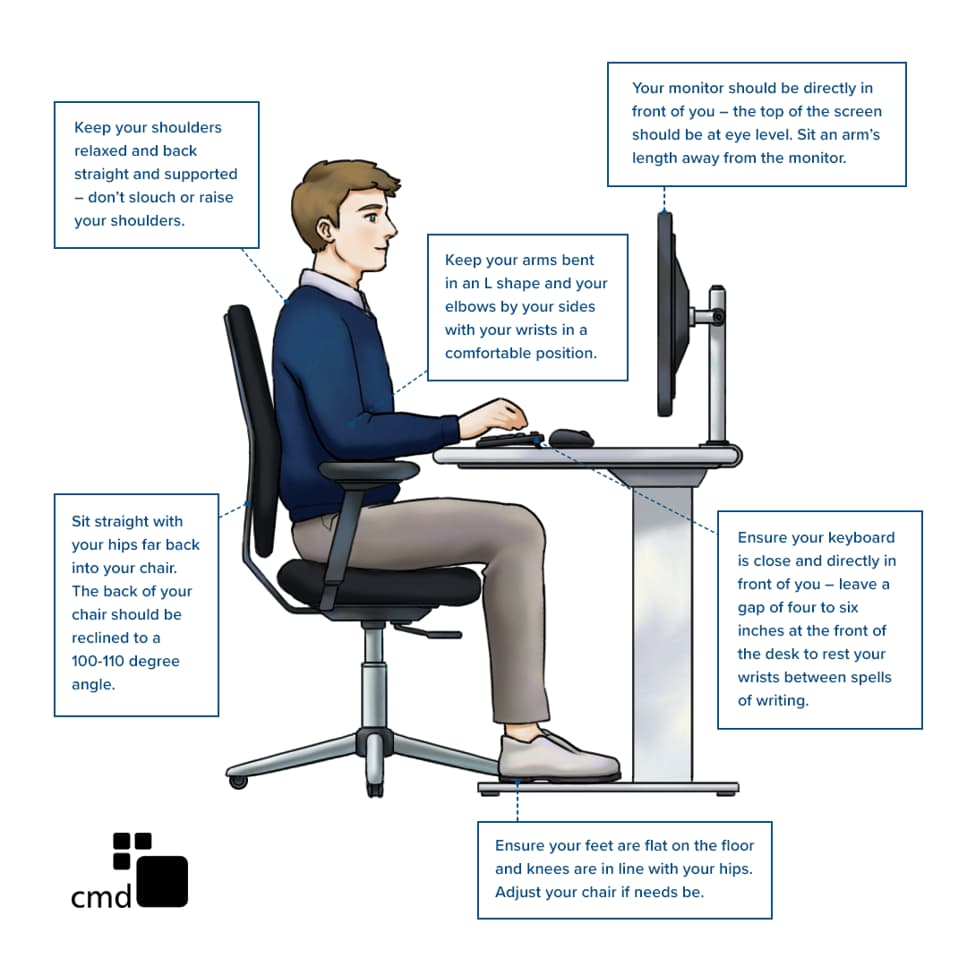
Yes, ergonomic chairs can improve posture—when you set them up right and use them well. Correct lumbar support at your natural lower‑back curve, a seat height that lets your feet rest flat, and an upright sitting position make the difference. Add short movement breaks for lasting results.
Affiliate disclosure: Some links in this guide may earn us a small commission at no extra cost to you. We only suggest gear we’d recommend to a friend.
Medical disclaimer: This article offers general information and isn’t medical advice; see a licensed clinician for personal guidance.
The Truth About Ergonomic Chairs and Posture
A true ergonomic chair is built to match your body, not the other way around. It supports your spine’s natural S‑shape. It lets you adjust seat height, lumbar depth, backrest angle, and armrests. This support can reduce strain and help you sit tall with less effort.
But here’s what most people get wrong: chairs do not fix habits. If you slouch, lean forward, or never move, even the best back support chair can feel bad. Posture is a dynamic pattern. Your body needs small changes all day. The right chair helps. Your habits make it work.
Why Many People Still Have Bad Posture (Even With a Good Chair) 🔥
If you bought a great chair and still feel tight or sore, you are not alone. This is why your chair isn’t working:
- Wrong lumbar position: The lumbar pad sits too high or too low. It should sit in the small of your back, not your mid back. If it hits your ribs, it will push you forward and cause slouching.
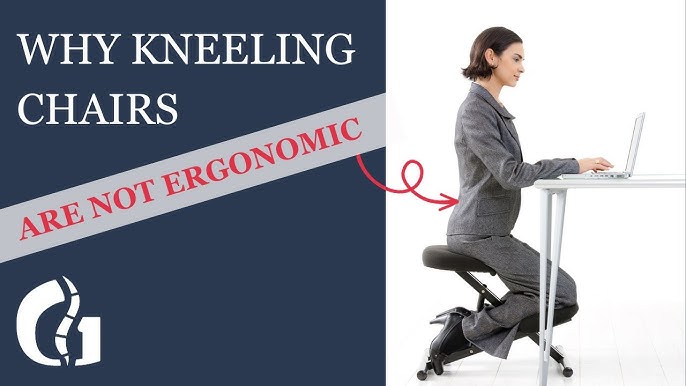
- Incorrect seat height: If your seat is too high, your feet dangle. Your hamstrings tense. Your lower back flattens. If it’s too low, your hips fold and your back rounds.
- No movement: Chairs help you sit well, but stillness is the enemy. Your tissues like fresh blood and gentle shifts. Without micro‑moves, any posture can ache.
- Backrest locked at 90°: A rigid upright angle can make you tire fast. A slight recline lets your back muscles rest.
- Armrests too high or too low: High rests hike your shoulders. Low rests make you reach. Both strain your neck.
- Desk and screen too low: You lean forward to see. That dumps weight on your neck and rounds your shoulders.
The fix? Adjust your chair to your body. Then match your desk and screen to your chair. Posture is a system.
How Ergonomic Chairs Actually Improve Posture
Let’s keep it simple. Here’s how an ergonomic chair supports healthy sitting posture in an office chair:
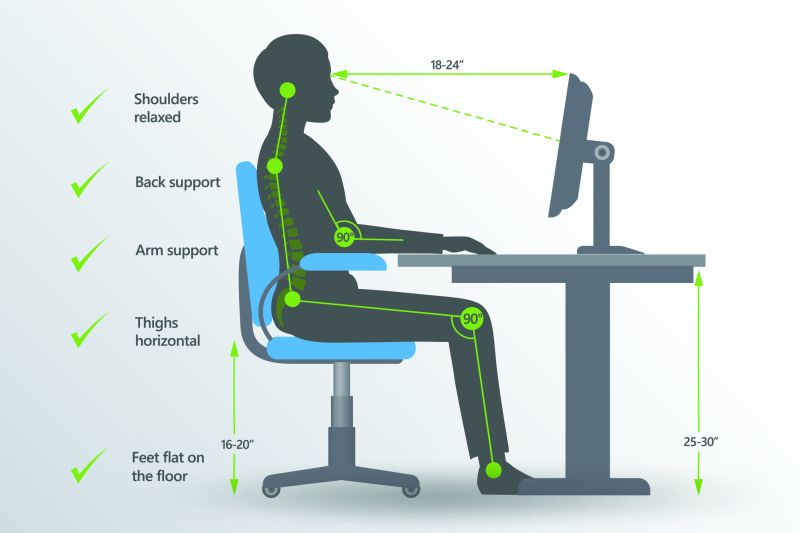
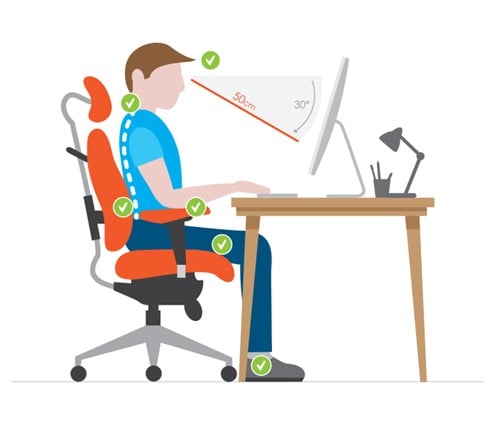
- Lumbar support: A gentle pad or curve fills the space in your lower back. It encourages your natural S‑curve. This reduces slouching and disc load. Aim for firm but not hard support.

- Backrest angle: A slight recline (100°–110°) spreads pressure across the backrest. It gives your spinal muscles a break. Many users find a relaxed, open hip angle more comfy than a strict 90°.
- Seat pan depth: Enough depth supports your thighs without pressing the back of your knees. A two‑to‑three‑finger gap from seat edge to calf is ideal.
- Armrest support: Height and width should let your shoulders drop. Your elbows should rest at about 90°. This reduces tension in the neck and traps.
- Seat height: When your feet rest flat, your knees land near 90°. This helps hip and back alignment.
- Breathable, stable base: A stable, five‑point base and a fabric that doesn’t make you slide help you maintain position.
These features don’t force posture. They make the right posture the easy choice.
How to Sit Properly in an Ergonomic Chair (Step‑by‑Step)
Do this once, then fine‑tune over a week. This simple fix works fast:
- Set seat height.
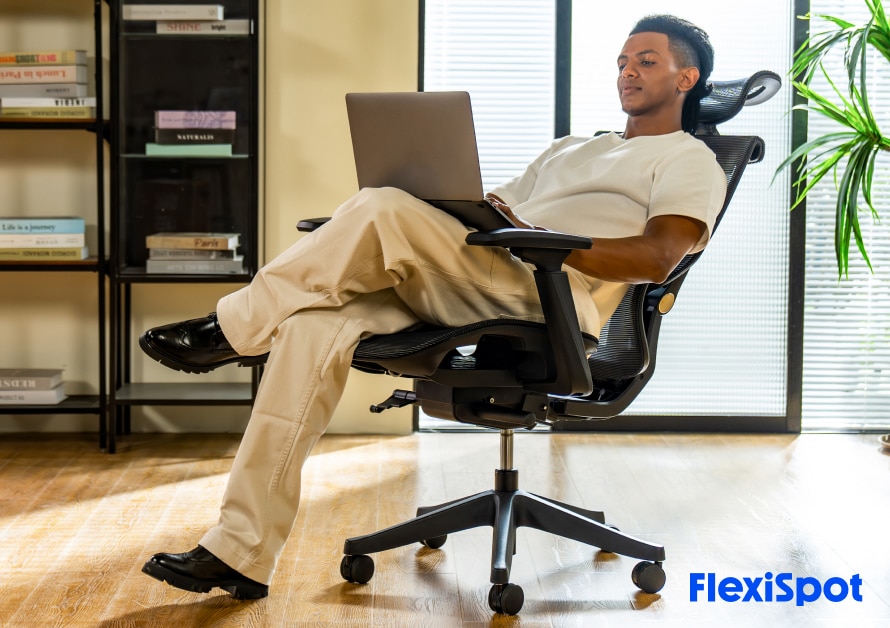
Stand in front of your chair. Raise or lower the seat so it hits just below your kneecap. Sit. Your feet should rest flat. Your knees should be near 90°.
Check price on Amazon
- Adjust seat depth.
Slide the seat so you have a two‑to‑three‑finger gap behind your knees. - Place lumbar support.
Find the small of your back. That’s the inward curve above your hips. Position the lumbar pad so it fills that curve, not your mid back. It should feel like gentle support, not a shove. - Set backrest angle.
Lean back to about 100°–110°. Keep contact with the lumbar area. If your chair has tilt tension, set it so you can recline with slight effort. - Dial in armrests.
Raise them to meet your relaxed elbows at about 90°. Keep your shoulders down. Bring the rests in so your arms fall naturally at your sides. - Screen at eye level.
Top of the monitor at or slightly below eye height. Keep the screen about an arm’s length away. - Keyboard and mouse close.
Elbows by your sides. Wrists straight. No reaching. - Sit back with support.
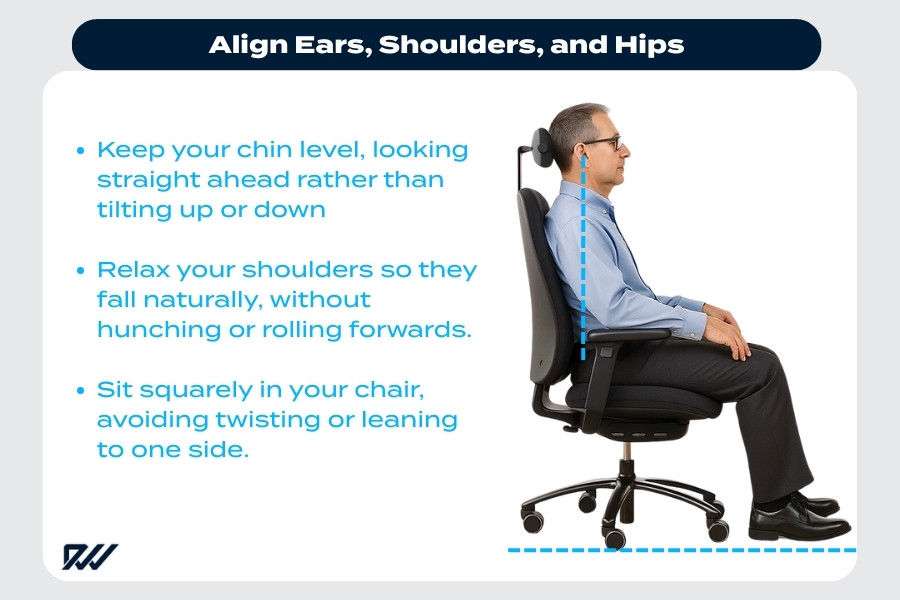
Hips deep in the seat. Back in contact with the backrest. Hinge at the hips, not the lower back. - Move often.
Stand or walk 1–3 minutes every 30–45 minutes. Micro‑moves count.
Common Mistakes That Cancel the Benefits (CTR BOOST)
Most people get this wrong. Avoid these traps:
- Slouching into the lumbar pad. It’s a support, not a pillow. Keep light contact, not a slump.
- Perching on the front edge. This cuts off thigh support and rounds the lower back.
- Leaning forward to read. Raise the screen, not your shoulders.
- Ignoring adjustments. Your body changes through the day. Tweak as needed.
- Locking the backrest at 90°. Use a gentle recline to reduce fatigue.
- Crossing legs for long periods. It tilts your pelvis and twists your spine.
Ergonomic Chair vs Regular Chair (Real Difference)
A regular chair often has a flat back, fixed height, and no lumbar curve. It forces a “one‑size” posture. You end up rounding your back or perching on the front edge. Long term, that can mean tight hips, a stiff neck, and a sore lower back.
An ergonomic chair gives you fine control. You set height, depth, angle, and support. This reduces hot spots and pressure. It also helps you keep a neutral spine with less effort. The real difference is choice. You can match the chair to you, not you to the chair.
When an Ergonomic Chair Is Worth It (Buying Insight)
Who should buy:
- Office workers and students who sit 5–10 hours daily
- People with recurring lower‑back or neck tightness
- Anyone who wants support to build better habits
Who might not need it:
- People who sit less than 2 hours a day
- Those with a working setup and no discomfort
- People who can split time between sitting and standing and feel fine
Quick buying tip:
- Must‑have features: adjustable lumbar, seat height, seat depth, backrest recline, height/width armrests
- Good signs: five‑point base, breathable fabric, solid warranty
- Budget smart: you don’t need the most expensive model. You do need the right fit.
For deeper buying signals, see our posture guide: /posture-guide
Tools That Improve Posture Even More
You can level up your setup with small tools. These add comfort and make good posture stick:
- Lumbar cushion: If your chair’s support is weak, add a shaped cushion. Pick one with a slight curve, not a sharp ridge. Straps help keep it in place. See our lumbar support article: /lumbar-support-guide
- Footrest: If your feet don’t sit flat at your ideal desk and footrest height, use a footrest. It relieves pressure on your thighs and supports a neutral spine. Our footrest guide has top picks: /best-footrests
- Monitor stand or arm: Brings the screen to eye level without stacking random books that wobble.
- Keyboard tray: Helps keep elbows by your sides, which reduces reach and shoulder strain.
- Timer app: Prompts movement breaks every 30–45 minutes. Even 60 seconds helps.
- Seat wedge (with care): A slight wedge can open the hip angle. Test for comfort with your lumbar support.
- Soft reminders: A sticky note that says “feet flat, back supported, relax shoulders” can help more than you think.
Soft affiliate note: When helpful, we link to products we trust. If you buy through a link, we may earn a small commission at no cost to you.
Signs Your Chair Setup Is Wrong
Your body gives fast feedback. Look for:
- Back pain or tightness after 30–60 minutes
- Neck strain when reading the screen
- Numbness in the thighs or tingling in the feet
- Shoulder or trap fatigue by midday
- Hips sliding forward on the seat
- Needing to crane your head toward the monitor
- Red marks at the back of your knees
Fix one variable at a time. Start with seat height, then lumbar, then screen.
Quick Posture Checklist (1‑Minute Fix)
Run this once in the morning and after lunch:
- Feet flat, hip‑width apart
- Knees near 90°, two‑to‑three‑finger gap behind knees
- Hips deep in the seat, back fully supported
- Lumbar pad in the small of your back, firm but gentle
- Backrest reclined slightly (100°–110°)
- Elbows near 90°, shoulders down, armrests close
- Screen top at or just below eye level
- Keyboard and mouse close, wrists straight
- Breathe and relax your jaw
- Set a 45‑minute movement timer
FAQs
Do ergonomic chairs fix posture permanently?
No. They support better alignment and reduce strain, but posture is a habit. Combine a good chair with small breaks, simple stretches, and mindful setup for lasting change.
How long should I sit at once?
Aim for 30–45 minutes max before a short break. Stand, walk, or do a 60‑second reset. Your back likes variety more than any one “perfect” pose.
Is an expensive chair necessary?
Not always. You need the right adjustments: seat height, seat depth, lumbar, recline, and armrests. Many mid‑range chairs offer these. Test fit if you can.
What is the best sitting posture in an office chair?
Neutral spine with light lumbar contact. Feet flat. Knees near 90°. Hips deep in the seat. A slight recline. Elbows by your side. Screen at eye height. Move often.
Conclusion
Ergonomic chairs are good for posture, but only when set up and used well. Think alignment first, then habit. Adjust your chair today. Raise your screen. Relax your shoulders. Take small breaks. Improve a little each week. Your back will thank you, and your work will feel easier.