
An ergonomic chair supports your spine by aligning curves, easing pressure, and encouraging movement.
If you have ever wondered how does an ergonomic chair support the spine, you are in the right place. I help teams set up healthy workstations, and I’ve tested dozens of chairs. In this guide, I’ll break down how design, fit, and daily habits come together to protect your back. You’ll learn what matters, what doesn’t, and how to make your chair work for you.

What “spine support” really means
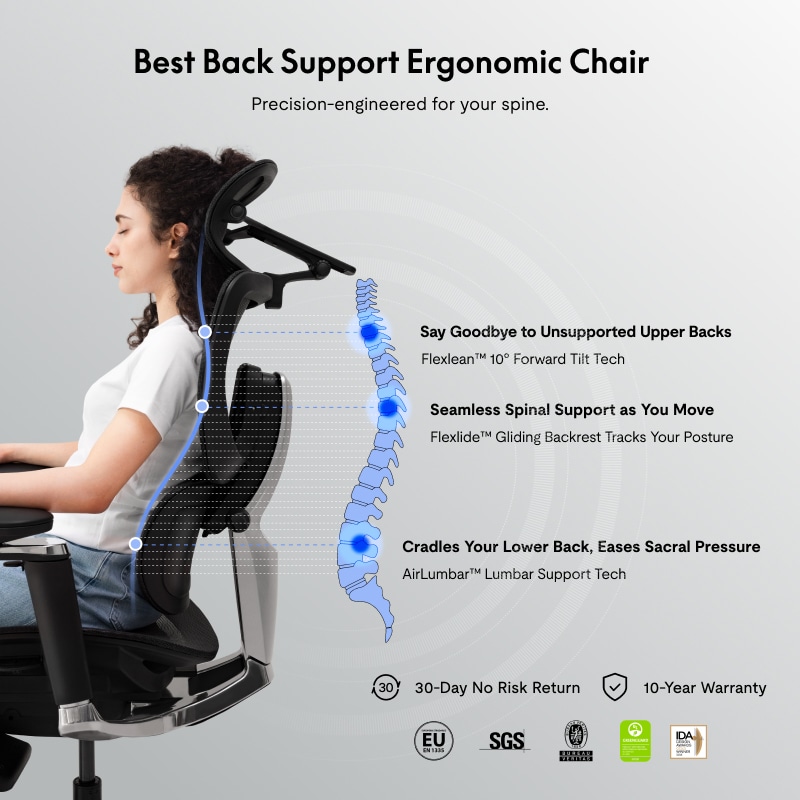
Your spine has three natural curves. There is a small inward curve at your neck, a gentle outward curve at your mid-back, and a stronger inward curve at your lower back. This S-shape spreads load and protects discs.
Support means two things. First, the chair keeps those curves in line. Second, it allows small moves all day. That is how does an ergonomic chair support the spine without forcing a stiff pose.
When a chair holds your pelvis upright, the rest stacks well. When it lets you recline a bit, disc pressure drops. Research shows that small changes in angle can ease strain. The right chair helps you do both all day, not just for a few minutes.

Feature-by-feature: how the chair helps your back
Below are the parts that do the real work. When tuned well, they share the load so your back does not have to fight gravity alone. This is the heart of how does an ergonomic chair support the spine.
Adjustable lumbar support
The lumbar pad fills the curve in your lower back. It stops your pelvis from rolling back. Aim for firm, even contact. It should feel present but not pokey. This is where how does an ergonomic chair support the spine becomes clear in daily use.
Seat depth and waterfall edge
Your seat should support your thighs without hitting the back of your knees. Leave a two to three finger gap. A waterfall edge keeps blood moving. Short folks often need a shorter seat. Tall folks need more depth.
Backrest shape and height
A backrest that follows the S-shape is your friend. If it is too flat, your spine has to hold itself up. If it is too curvy, it can push you into odd angles. Adjust height so the lumbar hits your waistline, not your mid-back.
Dynamic recline and tilt tension
Sitting bolt upright all day is hard on discs. A slight recline, around 100 to 110 degrees, can ease pressure. Set tilt tension so you can lean back with gentle effort. Locking the backrest flat defeats the point.
Armrests that actually help
Arms take load off your neck and shoulders. Set them low enough that your shoulders relax, and close enough to keep elbows under you. If arms are too high or far out, they push you into a shrug or a lean.
Headrest (if you use one)
Not everyone needs it. It helps when you recline to read or think. It should touch the back of your head, not your neck. No pushing your chin down.
Breathable materials and firm foam
Mesh breathes and molds a bit. Foam gives steady support. Either can work. What matters is even contact and no hard pressure points after an hour.
Setup checklist: dial your chair to your spine
Follow this quick list. This is the fastest path for how does an ergonomic chair support the spine in real life.
- Set seat height so feet are flat and knees are level.
- Slide seat depth to leave a small gap behind your knees.
- Raise backrest so the lumbar fits your lower back curve.
- Adjust lumbar depth to firm, even contact without pain.
- Set recline to 100–110 degrees and tune tilt tension.
- Raise armrests to relax shoulders; bring them close to your sides.
- Keep screen top at or just below eye level to avoid neck strain.
- Nudge hips back to the backrest and sit on your sit bones.
- Stand, stretch, or walk for one to two minutes every 30–45 minutes.

Benefits you can expect (and limits to know)
Here is what a good fit can do when you sit for hours. This is where how does an ergonomic chair support the spine pays off at work and at home.
Benefits:
- Less low-back and neck pain by keeping curves aligned.
- Lower disc pressure with gentle recline and steady support.
- Better blood flow to legs with the right seat edge and height.
- Less shoulder strain with arms that share the load.
- Better focus since you move less to fight aches.
Limits:
- A chair is not a cure. Movement is still key.
- Fit matters. One size does not work for every body.
- Setup takes time. Expect a week or two to adapt.
- Quality varies. Try before you buy when you can.
- Chairs help posture, but stress, sleep, and fitness matter too.
Common mistakes and how to fix them
Small tweaks can make or break support. These fixes help lock in how does an ergonomic chair support the spine all day.
- Sitting on the front edge. Fix: Scoot hips back to the backrest.
- Lumbar too low or too hard. Fix: Raise it and soften depth until contact feels even.
- Arms too high. Fix: Drop them until shoulders relax and elbows rest near 90 degrees.
- Knees higher than hips. Fix: Raise the seat or lower the desk to level the thighs.
- Locked upright backrest. Fix: Unlock and use a light, active recline.

Real-life insights from the field
A design lead I worked with had nagging mid-back pain. We moved her screen down a touch, tuned tilt tension, and raised armrests by half an inch. Pain eased in a week. This is a simple story of how does an ergonomic chair support the spine when paired with small, smart changes.
I also learned this the hard way. I set my lumbar too deep at first. It felt strong for an hour and awful by lunch. I backed it off until it felt like a gentle hand, not a push. Since then, I keep a note: comfort that lasts two hours is the right test. This is my daily proof of how does an ergonomic chair support the spine without forcing it.

Frequently Asked Questions of how does an ergonomic chair support the spine
What is the single most important chair feature for back support?
Adjustable lumbar that matches your lower back curve. It keeps your pelvis upright and reduces disc strain.
How high should my chair be for proper spine alignment?
Set it so feet are flat and thighs are level. Your hips should be at or slightly above your knees.
Does reclining hurt or help my spine?
A light recline helps most people. It lowers disc pressure and lets back muscles rest.
Do I need a headrest for good spinal support?
Not always. It helps during recline, but neutral head posture and screen height matter more.
How long does it take to feel results after setup?
Many feel relief in days. Give it one to two weeks for your body to adapt.
Can a good chair fix chronic back pain?
It can reduce strain, but it is not a cure. Mix it with movement, breaks, and, if needed, medical care.
Are mesh backs better than padded backs for the spine?
Both can work. What matters is shape, adjustability, and even support over time.
Conclusion
A well-fitted ergonomic chair aligns your natural curves, spreads load, and lets you move. That is how does an ergonomic chair support the spine in a simple, daily way. Pair smart features with good setup, and you can sit longer with less pain.
Try the setup checklist this week. Make one change each day and note how you feel. If this helped, share it with a friend, subscribe for more tips, or drop your questions in the comments.


