

Ergonomic risk factors include force, repetition, awkward postures, contact stress, vibration, cold, and time.
If you lead safety, HR, or operations, you know how small body strains add up. I have spent years fixing workstations and workflows. In this guide, I explain what ergonomic risk factors include, how to spot them fast, and how to fix them with simple, proven steps. The goal is a clear, practical path to fewer injuries and better work.
Source: osha.gov
What ergonomic risk factors include
Ergonomic risk factors include anything in a job that strains the body. They raise the chance of muscle, tendon, and nerve issues. These issues are also called musculoskeletal disorders.
At the core, ergonomic risk factors include:
- Force. High effort to push, pull, lift, or grip.
- Repetition. The same motion many times per minute or per shift.
- Awkward or static postures. Twisted, bent, or fixed positions.
- Contact stress. Hard edges pressing on hands, arms, or legs.
- Vibration. Tools or vehicles that shake the body.
- Cold. Chilled hands and tight muscles.
- Time. Long task duration and not enough recovery.
When you look across jobs, ergonomic risk factors include single hazards and mixed ones. A task can be safe on one factor but risky when two or more stack up. That is why we assess tasks, not just tools.

Source: therapyinsights.com
The core ergonomic risk factors explained
Force and load
Force strains muscles and tendons. Think heavy boxes, tight torque, or stiff triggers. High peak loads and sudden starts make it worse. Use tools or design to cut force at the source.
Repetition and pace
High-cycle work tires small muscles fast. Even light tasks get risky at high rates. Watch out for fast lines, data entry bursts, and click-heavy workflows.
Awkward and static postures
Joints like neutral angles. Bent wrists, raised shoulders, and twisted backs add stress. Static holds starve muscles of blood. Even sitting still too long causes pain.
Contact stress and compression
Hard edges press on soft tissue. Desk edges on wrists, tool handles on palms, or knee contact on floors all count. Padding and rounded edges help a lot.
Hand–arm and whole-body vibration
Power tools and vehicles send shock into the body. Over time this can numb fingers or jar the spine. Reduce exposure time and pick low-vibration tools.
Cold and environmental stressors
Cold lowers grip strength and blood flow. Tasks feel harder and risk goes up. Keep hands warm and cut time in cold spaces.
Duration, recovery, and work-rest cycles
Even low force tasks cause strain if they never stop. Microbreaks and task variety help tissue recover. Track total exposure, not just single lifts.
Psychosocial load and work design
Tight deadlines, low control, and long shifts change how people move. They rush and skip good form. Good planning and clear roles reduce that risk.
Across all of these, ergonomic risk factors include more than one hazard at a time. The stack is what often triggers injury. Reduce the stack, and you reduce harm.
Source: askfilo.com
How to assess risk in your workplace
Start simple. Walk the floor and watch the work. Ask people where it hurts and when it starts.
Use a clear process:
- Map tasks. Break jobs into steps. Note force, posture, and time.
- Score risk. Tools like RULA, REBA, or the NIOSH lift guide can help.
- Measure where needed. Use force gauges, video, or wearables for key tasks.
- Review data. Look at reports, near-misses, and turnover by job.
- Prioritize. Fix the worst mix of force, posture, and time first.
Keep notes. Take photos. Small facts beat big hunches. In every review, call out what ergonomic risk factors include for that task. This keeps the team focused.
Practical controls and design fixes
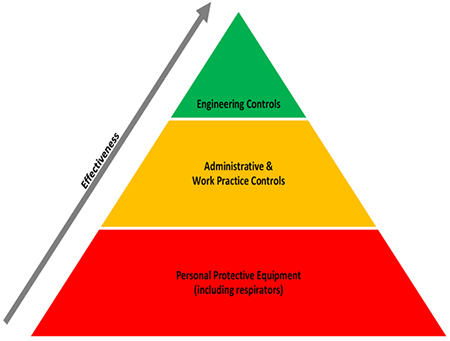
Use a simple order: remove, replace, redesign, and only then train.
Engineering controls:
- Raise or lower work to elbow height. Use height-adjust tables and lift tables.
- Shorten reaches. Slide parts closer. Use gravity feed racks.
- Cut force. Add hoists, conveyors, carts, or power tools with better leverage.
- Improve grips. Use thicker, non-slip handles that fit the hand.
- Reduce edges. Add pads or roundovers to desk and machine edges.
- Limit vibration. Choose low-vibration tools and keep them well tuned.
- Manage environment. Warm gloves, anti-fatigue mats, and good lighting help.
Administrative controls:
- Rotate smart. Change muscle groups, not just location.
- Pace the work. Add microbreaks of 20–30 seconds each 20–30 minutes.
- Train simple cues. Neutral wrist, close reach, power grip, and smooth pace.
- Set safe limits. Define max loads and team-lift rules.
- Plan staffing. Match skills and fit up-front to cut risk.
When you plan fixes, say what ergonomic risk factors include for each job. Then link each fix to one factor. This makes impact clear and helps with buy-in.
Industry-specific examples and fixes
Office and remote work
- Risks: static sitting, neck flex, wrist contact stress.
- Fixes: sit-stand desks, monitor at eye height, split keyboard, forearm support.
Warehousing and logistics
- Risks: heavy lifts, long carries, twist while stacking.
- Fixes: pallet lifts, turntables, glide sheets, staging to avoid twists.
Healthcare
- Risks: patient transfer, awkward holds, fast pace.
- Fixes: ceiling lifts, slide sheets, team transfer rules, lift coach role.
Construction
- Risks: force, overhead work, vibration from tools.
- Fixes: extension tools, support rigs, anti-vibration gear, warm-up drills.
Food processing
- Risks: cold, repetition, knife grip force.
- Fixes: heated grips, sharper knives, paced rotation, glove liners.
Across each space, ergonomic risk factors include the same core set. The shape changes, but the fix logic stays the same.
Personal lessons learned from the field
- A small height change pays big. We raised a packing bench by two inches. Reported shoulder pain dropped in weeks. Output rose with no extra staff. The fix matched what ergonomic risk factors include for that task: reach and posture.
- Do not rotate for the sake of it. We once rotated people between two high-force jobs. Pain moved, not reduced. Real rotation changes muscle groups and force, not just location.
- Tools must fit hands. A team used thin-handled pliers. We switched to spring-open pliers with bigger grips. Grip force fell and speed went up.
- Microbreaks beat long breaks. We added short, timed pauses. People felt better and errors fell. Short rests add up fast.
These wins came from simple asks: What do ergonomic risk factors include here? How do we cut two of them today?
Measuring success and ROI
Track what matters:
- Discomfort surveys by body area, monthly.
- Recordables, restricted duty days, and first-aid cases.
- Quality, rework, and pick or line rates.
- Overtime, turnover, and training time.
- Claim counts and costs.
Set a baseline. Pilot one area. Then scale. Teams that name what ergonomic risk factors include can show which hazards dropped and by how much. That builds trust and budget.
Limitations, myths, and nuances
- It is not just about chairs. Many injuries start in material flow and reach.
- Gadgets are not cures. A bad process stays bad with a new tool.
- One size does not fit all. Hands, heights, and tasks differ. Offer ranges and options.
- Rotation is not a fix on its own. It must change force, posture, and pace.
- Remote work has risks too. Laptops on couches strain necks and wrists.
There is always some uncertainty. People vary. Tasks shift. Be open about what ergonomic risk factors include, what you changed, and what you still do not know. Keep testing and learning.
Frequently Asked Questions of ergonomic risk factors include
What does ergonomic risk factors include in simple terms?
It includes the job features that strain muscles, tendons, and nerves. Think force, repetition, awkward posture, contact stress, vibration, cold, and time.
How do I know if my job has high ergonomic risk?
Look for pain that builds during a shift or eases on rest days. High force, fast pace, and fixed postures are red flags.
Do sit-stand desks solve ergonomic risk?
They help reduce static sitting, but they are not a cure. You still need right monitor height, keyboard setup, and movement breaks.
How long should a microbreak be?
Aim for 20–30 seconds every 20–30 minutes. Shake out hands, change posture, and reset your eyes.
What is the fastest low-cost fix?
Remove sharp edges and shorten reaches. Small moves like pads, tool tethers, and part chutes cut risk fast.
Are psychosocial factors part of what ergonomic risk factors include?
They are not “physical,” but they affect movement and recovery. High stress and low control can raise injury risk.
How often should we reassess ergonomic risks?
Do a quick review each quarter and a full review after process changes. New tools or layouts can add new risks.
Conclusion
Safer work starts with clarity. When you name what ergonomic risk factors include, you can design tasks that fit people. Start with a walk-through, ask where it hurts, and fix the worst mix of force, posture, and time. Small changes today prevent big injuries tomorrow.
Pick one job this week. Map the steps, choose one fix, and measure the change. If this guide helped, share it with your team, subscribe for more practical tips, or leave a comment with your toughest task—we will solve it together.


