

If you sit for hours and your lower back aches by lunch, you are not alone. Office workers and students feel it most. The first fix many people try is a lumbar pillow or the built-in support on a chair. Here is the hard truth: lumbar support can help, but most people get this wrong.
The good news? When you place it right and sit back into it, the relief is real. It reduces pressure on the base of your spine. It nudges you into a better posture. It helps you sit longer with less fatigue. This simple fix works fast when you stop sitting the wrong way.
Yes—lumbar support helps reduce pressure and improves posture by filling the natural curve of the lower back. It works best when placed at belt-line height, centered on the spine, with your hips all the way back. Wrong use—too high, too thick, or sliding forward—often means no results.
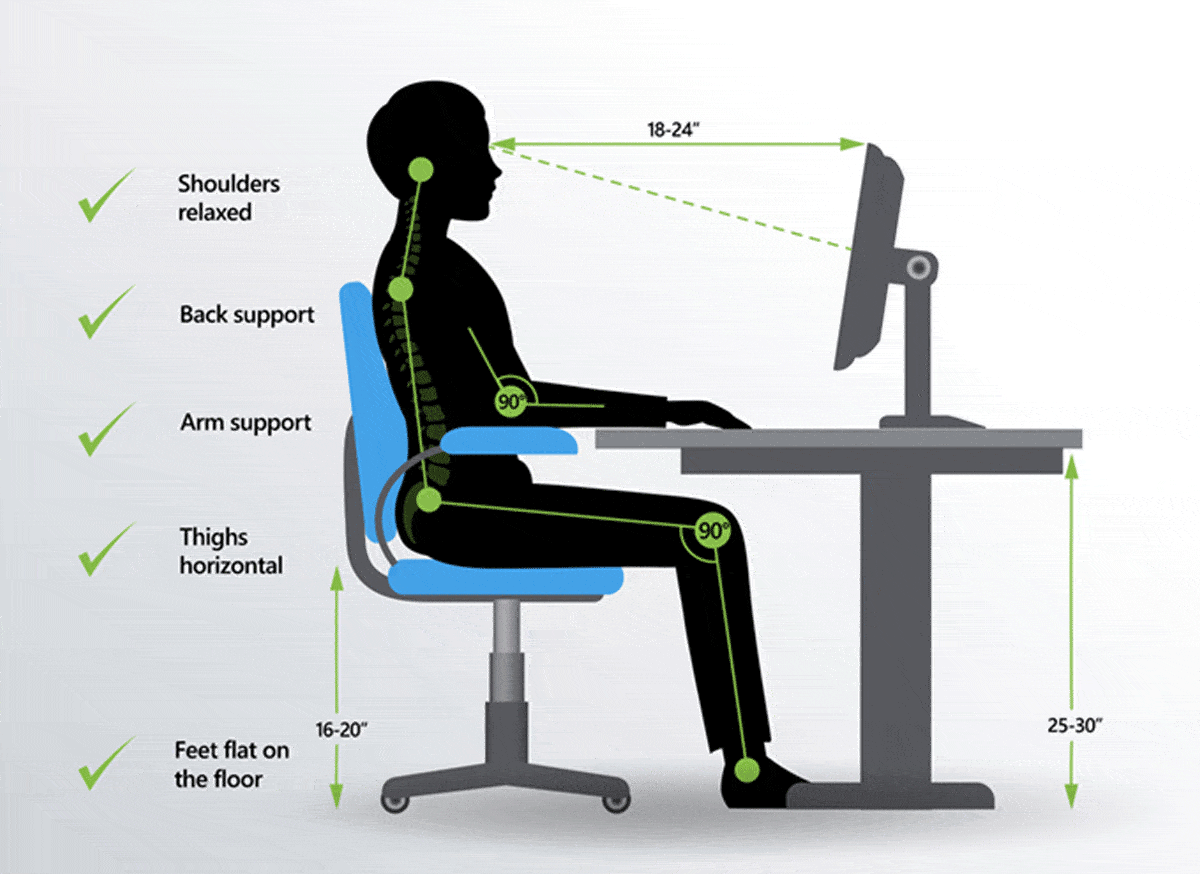
How Lumbar Support Actually Reduces Lower Back Pain
Lumbar support does not “fix” your back. It helps your body hold a healthy shape while you sit. Your lower spine has a gentle inward curve. When that curve collapses, pressure builds on discs and small joints. Support keeps that curve from flattening.

- Spine alignment: The support fills the gap at your lower back. This keeps your pelvis from tilting back. Your spine stacks in a tall, neutral line. It takes strain off the muscles that fight to hold you up.
- Reduced pressure: When you slouch, the pressure on your lower discs spikes. Add a firm cushion at the lumbar curve and that pressure spreads across more surface. The load drops at the painful spot.
- Better sitting posture: With the curve supported, your rib cage sits over your hips. Your head lines up with your shoulders. Muscles work less to keep you upright. Less work means less fatigue and fewer pain signals during the day.
- More movement, not less: Good support is a base, not a brace. It should let you shift and breathe. You can still rock back, change angles, or stand up often. The key is a stable start point that your body can return to with ease.
Why Lumbar Support Doesn’t Work for Some People
Many people buy a pillow, strap it on the chair, and wait for magic. No change. Here is why the “simple fix” fails. Most people get this wrong because the setup is off. The good news: small tweaks solve it fast.
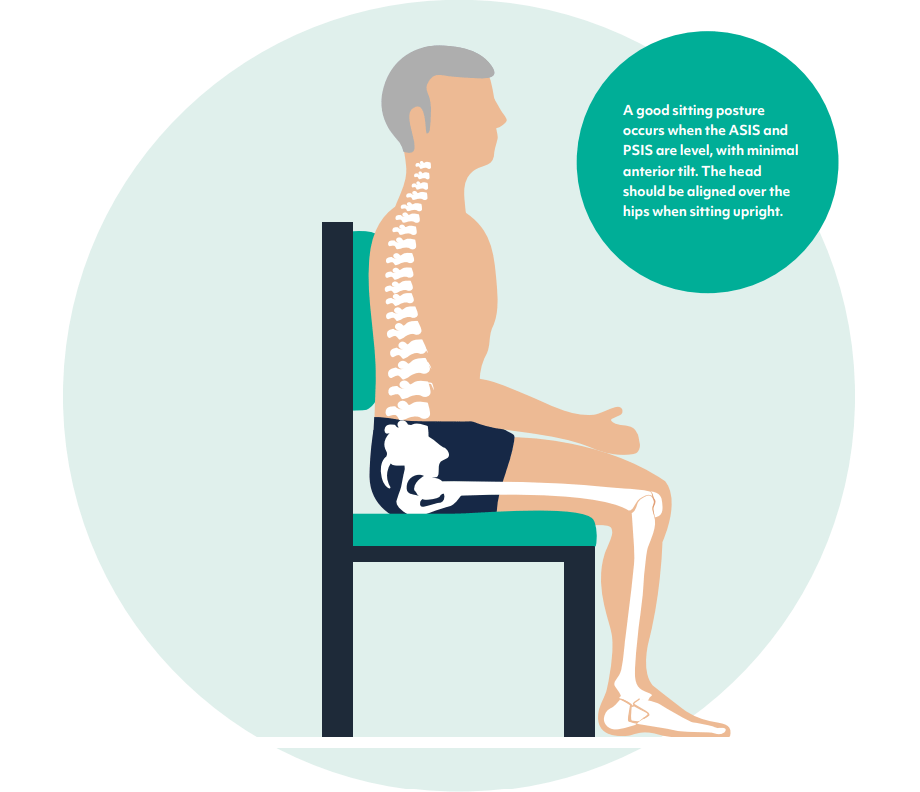
- Wrong placement: If the cushion sits above your waist, it presses on your ribs, not your lumbar curve. That drives your chest forward and your hips back. Pain gets worse.
- Too thick cushion: A big pillow can shove your lower back too far forward. That over-arches the spine. Muscles tighten to fight the push. You feel sore by mid-day.
- Sitting on the edge: If your hips slide to the front of the seat, your pelvis tips back. The lumbar support is now behind you, not under you. It cannot help if you are not in contact with it.
- Loose straps or sliding pad: If the support moves each time you shift, your body never settles. You keep bracing. That muscle tension adds up.
- Chair angle mismatch: A seat pan that tilts back a lot can dump you into a slouch. Even great support cannot beat bad angles if the backrest is far away from your spine.
Where Should Lumbar Support Be Placed? (Belt-Line Rule)
Use the Belt-Line Rule. Sit with your hips all the way back. Feel your waist where your belt would sit. Place the thickest part of the support right at or just above that line, centered on your spine. That is your lumbar curve.

- Aim for L3–L5 region: In plain words, that is the lower third of your back.
- “Fill the hollow”: Reach behind your back. Find the hollow above the back of your pants. The support should fill that space, not press above it.
- Sit first, then place: Your spine shape changes once you settle in. Always seat yourself, then set the support.
- Fine-tune height by half inches: Start at belt level. Move up or down in small steps until it “disappears.” You should feel contact, not a shove.
How to Use Lumbar Support Correctly (60-Second Fix)
Here is the 60-second fix most people skip. It is simple and works fast. Do this each time you sit for work or study.
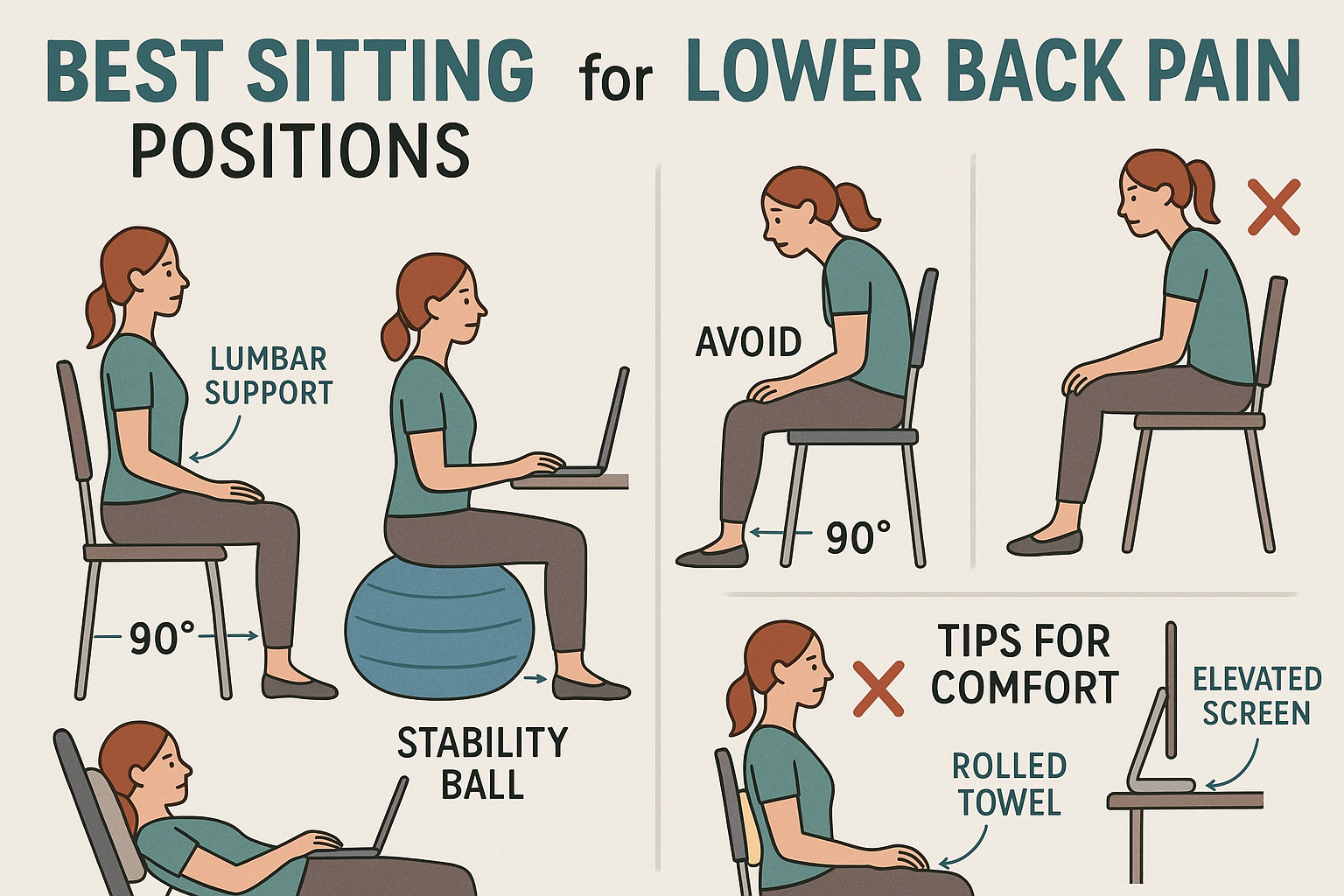
- Sit back fully
- Slide your hips all the way to the back of the seat. No gap.
- Keep your feet flat and your knees level with or slightly below your hips.
- Place at your lower back curve
- Put the thickest part of the support at your belt line.
- Center it on your spine. Do not angle it to one side.
- Adjust height
- Raise or lower the support in small steps until you feel even contact across your lower back.
- If it pokes your ribs, it is too high. If it hits your pelvis, it is too low.
- Check posture
- Relax your belly and breathe. Your back should feel “held,” not forced.
- Look forward. Your head should stack over your chest, not jut out.
- If your chest pops up and you tense, the support is too thick.
- Lock the setup
- Tighten straps so it does not slide.
- Lean back into it and keep your keyboard close so you do not reach and lose the curve.
Common Mistakes That Make Lower Back Pain Worse
You can buy a great lumbar pillow and still hurt. Here are the setup errors that undo the benefits—and how to swap them for a sitting back pain fix that lasts.

Check on Amazon
- Too high: If the cushion boosts your mid-back, you arch your chest and pinch the lower spine. Drop the support to belt height.
- Too low: If the cushion sits across the back of your pelvis, it tilts your hips forward. That over-arches the spine. Raise it by an inch.
- Pushing forward: If you crank the support until your back feels jammed, your muscles fight it. Loosen it until your back makes gentle, even contact.
- Cushion too soft: A plush pillow feels nice at first. Then it squashes flat. You lose support and slouch again. Pick firm, slow-rebound foam or a shaped plastic/mesh shell.
- Sitting on the edge: Perch posture beats the support. Always slide back first.
- Reaching for your keyboard: Long reaches pull you off the backrest. Bring tools within forearm reach. Keep elbows near your sides.
- No breaks: Support is not a seatbelt. Stand, stretch, or walk for 1–2 minutes every 30–45 minutes.
Where Should Lumbar Support Be Placed? (Belt-Line Rule) — Quick Visual Cue
Place the lumbar support so the fattest part rests at your belt line while you sit back. If your ribs touch it, it is too high. If your hips press on it, it is too low. Aim to “fill the hollow,” not force a big arch.

Lumbar Support vs No Support (Real Difference)
What changes when you get the setup right? A lot. Here is the real-world difference felt by people who sit 4–10 hours a day. This small change reduces pain and improves focus.

- Fatigue
- No support: Your back muscles do the work of a brace all day. They tire fast.
- With support: The seat and backrest share the load. Muscles can relax. You last longer without burning out.
- Posture
- No support: Pelvis tips back. Spine flattens. Head and shoulders creep forward.
- With support: Pelvis stays neutral. Natural curve holds. Head and shoulders align over your hips.
- Pain level
- No support: Pressure pools at the lower discs and small joints. Pain builds over hours.
- With support: Pressure spreads out. Micro-movements feel easier. Soreness fades or comes later and milder.
- Focus and energy
- No support: Discomfort steals focus. You shift to chase relief.
- With support: You settle. Fewer pain signals. Clearer mind for longer tasks.
Note: Lumbar support is one pillar. Chair height, desk reach, and screen level matter. For a full chair setup, see our ergonomic desk setup.
Best Lumbar Support for Lower Back Pain (Top Picks)
You do not need an expensive chair to get this right. A good, firm lumbar pillow or a thin roll can do the job. Pick support that is firm, adjustable, and breathable. Here are top picks used by real desk workers and students.
Affiliate Disclosure
Some links or products below may be affiliate recommendations. If you buy through them, we may earn a small commission at no extra cost to you. We only suggest items we believe offer real value. This helps fund our free guides and testing.
Original McKenzie Lumbar Roll (by OPTP)
A classic, firm roll that targets belt-line height well. Great for straight-back chairs, dining chairs, and car seats. Best for people who need a thin, shaped boost without a big push.
- Firm foam keeps its shape all day
- Strap holds it steady on most chairs
- Simple cylinder fits the “fill the hollow” rule
- Breathable cover; easy to move between seats
- Why it works: Slim, firm, and precise. It prevents over-arching and holds a clean curve.
LoveHome Memory Foam Lumbar Support Pillow
A contoured cushion that covers a wider area of your lower back. Good for mesh task chairs and home office setups that need more contact.
- Medium-firm memory foam with slow rebound
- Two straps to prevent sliding on mesh backs
- Breathable, removable cover
- Contour centers on the lumbar curve
- Why it works: Wider contact spreads pressure and improves comfort for long sits.
Everlasting Comfort Lumbar Support Pillow
A budget-friendly option with generous coverage and solid firmness. Works well if your chair back is flat or if you want a fuller feel.
- High-density foam resists flattening
- Ventilated mesh cover for airflow
- Adjustable straps for more chairs
- Good for people who want to feel “held”
- Why it works: Firm yet cushioned, ideal if you need more than a small roll.
Adjustable Mesh Lumbar Pad (Generic/Office Chair Add-On)
A flexible plastic-mesh frame with an adjustable center pad. Great for people who run hot or dislike foam.
- Breathable mesh that stays cool
- Curved frame fits many backs
- Center pad adjusts up/down for belt-line aim
- Easy to clean and move
- Why it works: Firm elastic mesh that “gives” just enough while keeping shape.
Tip: Want a deeper dive on choosing the perfect support for your body and chair type? See our lumbar support guide: /lumbar-support-guide.
Quick Setup Checklist (1-Minute Fix)
Keep this list by your desk. Run it each time you sit. This is the sitting back pain fix that many skip, and it works.
- Feet flat on the floor or a footrest
- Hips all the way back in the seat
- Knees level with or slightly below hips
- Lumbar support at belt-line, centered
- Backrest angle at 90–110 degrees
- Keyboard and mouse close; elbows near sides
- Screen top at or just below eye level
- Relax shoulders; keep jaw loose
- Stand or walk 1–2 minutes every 30–45 minutes
FAQs
Does lumbar support fix back pain permanently?
No. It reduces stress while you sit and helps you build better posture. Pain often eases a lot, but real change comes from a mix of good support, better movement, breaks, and simple strength work for hips and core. Think “manage and improve,” not “cure overnight.”
Should lumbar support be hard or soft?
Choose firm over soft. Soft cushions collapse and make you slouch. Firm foam, shaped plastic, or taut mesh keep the curve stable without jamming you forward. You should feel even contact, not a poke.
How long should I use it?
Use it any time you sit more than 15–20 minutes. Your back will learn the position over weeks. Many people keep it for long tasks and car rides. Some can taper as posture and strength improve. But there is no harm in using it daily.
Conclusion
Lumbar support does help lower back pain—if you use it the right way. Place it at your belt line. Sit back fully. Keep it firm, centered, and steady. When you do that, pressure drops, posture improves, and you can work longer with less pain.
Do the 60-second fix now and stop sitting the wrong way. Adjust your setup. Test the position. Then get back to work or study with a calmer back and a clearer mind. If you want product help or a deeper setup guide, check our lumbar support guide and ergonomic chair guide.


