

Comfort-first vertical grip with smooth tracking and painless switching across up to three devices.
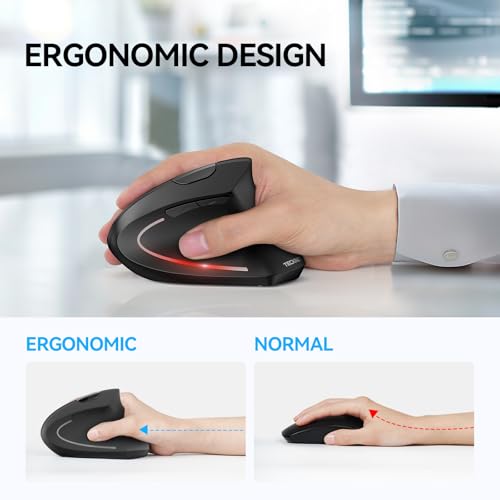
Long desk days can leave your wrist tight and your shoulder sore. A vertical mouse changes that by placing your hand in a handshake pose that feels natural. If you bounce between a laptop, desktop, or tablet, a tri-mode wireless design also keeps your workflow smooth. That is exactly what this TECKNET ergonomic vertical mouse aims to solve, with a tall profile, easy DPI control, and silent clicks that do not distract your team or family.
Affiliate Disclosure: This article may contain affiliate links. ErgonomicZone may earn a commission at no extra cost to you if you purchase through these links.

Is TECKNET 4800 DPI Wireless Bluetooth Vertical Ergonomic Mouse Good?
Yes. It is a strong pick if you need comfort, quick device switching, and fine cursor control at a fair price. The TECKNET ergonomic vertical mouse suits office work, web use, and light creative tasks. It shines for people who feel strain with flat mice or who work across a laptop and desktop every day.
I first used it during a week of travel. I switched between my MacBook and a Windows tower without hunting for dongles. My wrist felt relaxed, even after long edits in Google Sheets. On a busy Monday, I mapped the side buttons for back/forward in Chrome. That small tweak saved me hundreds of clicks by day’s end.

My First Impression for TECKNET 4800 DPI Wireless Bluetooth Vertical Ergonomic Mouse
It arrived in a clean, compact box with simple inserts. The mouse has a matte shell that resists fingerprints and a clear ridge for your thumb. The build feels solid with a soft, quiet click. Pairing over Bluetooth took under a minute. Switching devices is done with a small button that cycles links fast.
My first laps in Excel and Figma felt steady. The 4800 DPI range gave me easy fine-tuning for design and fast glides for browsing. I felt a small joy when my shoulder stayed calm after an afternoon sprint. It met my hopes for comfort and beat them on ease of setup.

What Makes It Stand Out / Key Features
- Vertical ergonomic shape that supports a natural handshake grip.
- Up to 4800 DPI with quick on-mouse switching for speed or precision.
- Multi-device wireless (Bluetooth and wireless receiver) with 3-device switching.
- Quiet click buttons and smooth scroll for shared or quiet spaces.
- Forward/Back side buttons for faster web and file navigation.
- Textured thumb rest for better control and reduced slip.
- Plug-and-play setup on common desktop and laptop platforms.

What I Like
- Neutral wrist angle that eases strain during long work blocks.
- Quick tri-device switching that fits a hybrid setup.
- Smooth sensor with a wide DPI range for both speed and detail.
- Silent clicks that keep calls and meetings quiet.
- Side buttons that save time when browsing and filing.
- Grippy finish that stays steady in warm hands.
- Great value versus many premium vertical mice.
What Could Be Better
- Large hands may want a taller shell for full palm support.
- Left-handed users need a mirrored model; this one is right-hand only.
- Heavy gaming users may prefer a dedicated gaming shape and software.
My Recommendation
If you work long hours at a desk, the TECKNET ergonomic vertical mouse is a smart buy. It gives you comfort, clean device hopping, and a wide DPI range in one tool. I recommend it to remote workers, analysts, students, and creators who value ease and focus. The TECKNET 4800 DPI vertical mouse delivers strong everyday value and is easy to find online.
| Best for | Why |
|---|---|
| Desk workers with wrist fatigue | Vertical grip reduces twist and eases strain in long sessions |
| Multi-device users | Fast 3-device switching keeps work flowing across laptop and desktop |
| Students and remote teams | Quiet clicks and steady tracking aid focus in shared spaces |

Alternative Products You Can Consider
Logitech MX Vertical — Best for users who want premium build and deep software control. The shape is tall with a soft rubber texture. It pairs to three devices and has excellent battery life. It costs more but offers robust customization through Options+ software.
Logitech Lift Vertical — Great for small to medium hands. It keeps the gentle angle but in a shorter shell. The clicks are quiet, and the wheel is smooth. If your hands are smaller, it may fit better than many other vertical mice.
Anker Wireless Vertical Mouse — A budget-friendly pick for basic comfort. It has a simple layout and a relaxed grip. It does not offer tri-device switching, but it gets the job done for web and office tasks at a low cost.
| Product | Best For | Key Difference |
|---|---|---|
| TECKNET 4800 DPI Wireless Bluetooth Vertical Ergonomic Mouse | Comfort + tri-device switching on a budget | Strong value, wide DPI range, quiet clicks |
| Logitech MX Vertical | Power users who want premium feel and software | Higher price, advanced customization, tall body |
| Logitech Lift Vertical | Small to medium hands seeking a snug fit | Shorter shell, very quiet, friendly design |
| Anker Wireless Vertical Mouse | Budget seekers who want core comfort | Lower cost, fewer features, single-device focus |

Final Verdict: Which Should You Buy?
If you need comfort, solid tracking, and easy device switching at a fair price, the TECKNET ergonomic vertical mouse is the sweet spot. It lowers wrist twist, stays quiet, and moves cleanly between your laptop and desktop. For most office and study needs, it is the right mix of features and cost.
Choose Logitech MX Vertical if you want a premium shell and rich software tuning. Pick Logitech Lift if your hands are small and you prize a compact, silent fit. On a tight budget and only need basics? The Anker vertical model will still ease strain without extras.
FAQs Of TECKNET 4800 DPI Wireless Bluetooth Vertical Ergonomic Mouse
Does it work with both Windows and macOS?
Yes. It pairs over Bluetooth or a wireless receiver with common desktop and laptop platforms. Setup is plug-and-play in most cases.
Can I switch between three devices quickly?
Yes. Tap the device switch button to cycle links. It takes a second or two to hop between your devices.
Is the DPI adjustable for precision tasks?
Yes. You can toggle DPI on the mouse to match slow, precise edits or fast browsing.
Is it good for gaming?
It works for casual play. For competitive gaming, a dedicated gaming mouse with tuned software may suit you better.
Will it help with wrist pain?
Many users feel less strain thanks to the handshake grip. For medical issues, speak with a professional for advice.


