

Feet flat, hips back, ears over shoulders; adjust chair, screen; take micro-breaks.
If you want to know how to correct posture at desk, you are in the right place. I’ve coached hundreds of professionals through simple desk tweaks that cut pain and boost focus fast. In this guide, I’ll show practical steps, science-backed tips, and real-world habits you can use today. Stick with me and you’ll learn how to correct posture at desk with less guesswork and more results.
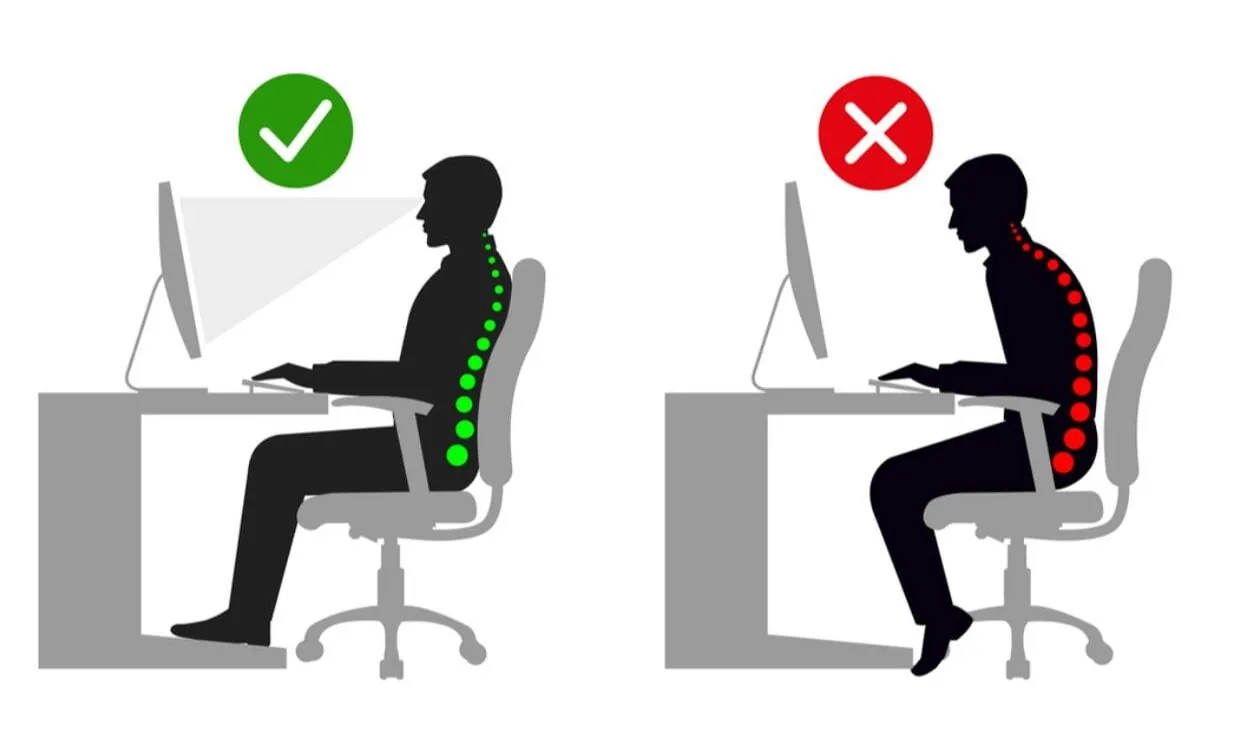
Why desk posture matters
Good desk posture is not about looking rigid. It is about stacking joints so your body works with less strain. When joints line up, muscles share the load and your brain can focus on work.
Poor setup can lead to neck pain, back pain, tight hips, and numb hands. Research links long sitting and awkward angles to more musculoskeletal issues. The good news: small changes add up. You will see quick wins once you learn how to correct posture at desk and keep moving a bit more.
My experience? After dozens of on-site desk audits, most fixes took under 10 minutes and cut pain within a week.
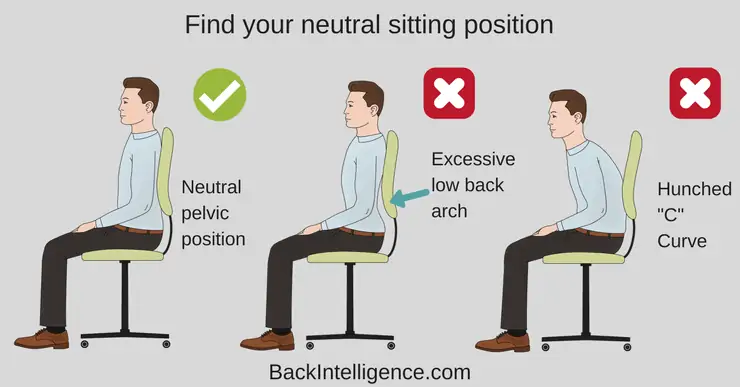
How to Correct Posture at Desk: Quick Setup Checklist
Use this simple list to reset your station. It works at home or in the office.
- Feet flat on the floor. Use a footrest if your feet dangle.
- Knees at about 90 degrees. Hips level or slightly above knees.
- Hips back in the chair. Sit on your sit bones, not your tailbone.
- Low back supported. Adjust lumbar support to meet the curve of your spine.
- Backrest reclined 90–110 degrees. Light contact, not a stiff lean.
- Ears over shoulders. Chin level. Keep your head tall, not tilted down.
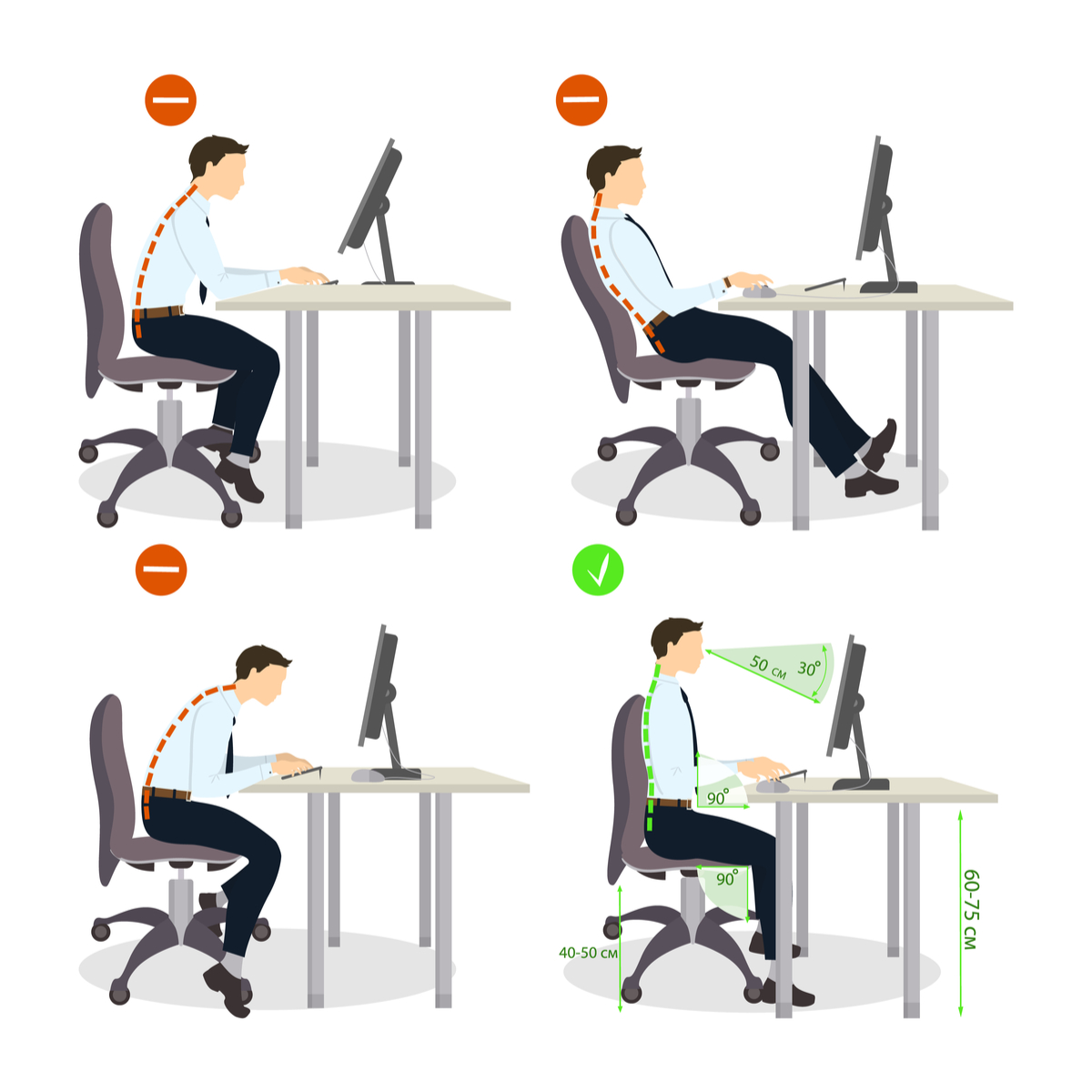
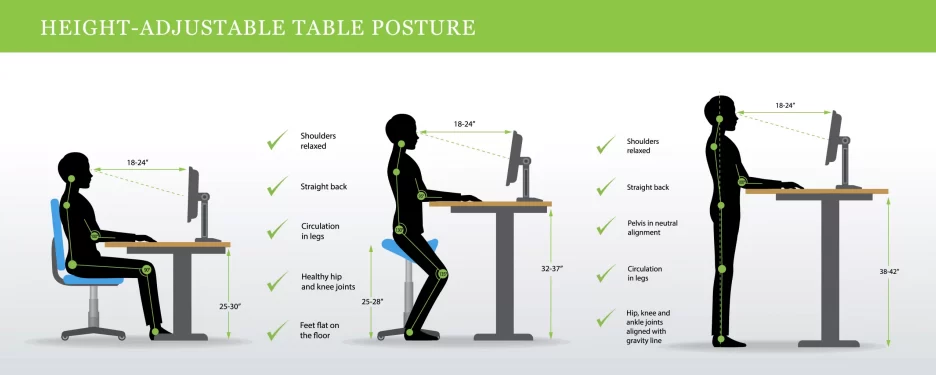
- Monitor top near eye level. Screen about an arm’s length away.
- Keyboard and mouse close. Elbows near your sides. Wrists straight and relaxed.
- Keep items in the easy reach zone. Avoid twisting for phones or files.
- Reduce glare. Use soft, even light. Increase text size if you squint.

Step-by-Step: How to Correct Posture at Desk Every Day
Follow these steps in order. It takes two minutes.
- Plant your feet. If the floor is far, add a box or footrest.
- Slide your hips back. Find your sit bones. Let the backrest meet you.
- Set lumbar support. Fill the small of your back, not the mid back.
- Adjust seat height. Aim for elbows at keyboard height.
- Bring the keyboard close. Keep elbows under your shoulders.
- Place the mouse next to the keyboard. Avoid reaching.
- Raise the monitor. Top bezel near eye level. Tilt the screen slightly back.
- Relax your shoulders. Drop them away from your ears.
- Level your chin. Imagine a string lifting your crown.
- Do a 10-second reset. Breathe low and slow. Unlock your jaw and hands.
Repeat this reset after every break. This is the core of how to correct posture at desk that sticks.
Chair, desk, and monitor setup that works
Getting the hardware right makes posture easy. Here is how to correct posture at desk by dialing in your gear.
Chair
- Seat depth: You want two to three fingers of space behind your knees.
- Height: Thighs level or sloping a little down. Heels can rest easy.
- Lumbar: Meet the natural curve of your low back.
- Recline: Use a slight recline for pressure relief during long work.
Desk
- Height: With shoulders relaxed, elbows bend about 90 degrees over the keyboard.
- Armrests: If you use them, set just below elbow height to avoid shrugging.
Monitor
- Single screen: Top of screen near eye height. Distance about an arm’s length.
- Dual screens: Pick a main screen. Face it head-on. Angle the second one slightly.
- Glasses wearers: If you use progressive lenses, drop the monitor a bit to avoid neck strain.
Laptop users should add an external keyboard and mouse, then place the laptop on a stand. This one swap solves most neck and shoulder pain for mobile workers.

Keyboard, mouse, and laptop tips
Most wrist and shoulder pain comes from reach and angle. Here is how to correct posture at desk with small input tweaks.
- Keep devices within shoulder width. Close gaps so your elbows stay near your sides.
- Use shortcuts and voice dictation to reduce clicks and typing load.
- Keep wrists neutral. Use a flat keyboard. Avoid big wrist pads that bend wrists up.
- Try a vertical mouse if you have forearm pain. It can ease grip strain.
- On a laptop, always use an external keyboard and mouse if you work longer than 30 minutes.
Watch for hover-hand. Rest your forearms on the desk edge gently or on chair armrests to offload your shoulders.
Micro-breaks, movement, and stretches that reset posture
You cannot hold one “perfect” pose all day. Your best posture is your next one. Here is how to correct posture at desk with smart breaks.
- Use the 20-8-2 rhythm. Every 30 minutes: sit well for 20, stand for 8, move for 2.
- Follow the 20-20-20 eye rule. Every 20 minutes, look 20 feet away for 20 seconds.
- Do two micro-moves per hour:
- Chin tuck for 5 slow reps.
- Shoulder blade squeeze for 5 breaths.
- Stand and hip hinge 5 times.
- Calf raises for 10 reps.
These quick resets keep blood flowing and calm tight spots before they shout at you.
Strength and mobility to support good desk posture
Posture is a team sport. Strong, mobile tissues hold shape with less effort. Here is how to correct posture at desk by training the base.
Do this short circuit three times a week:
- Dead bug or hollow hold, 3 sets of 8 slow reps.
- Bird dog, 3 sets of 6 each side.
- Side plank, 3 sets of 20–30 seconds each side.
- Row or band pull-apart, 3 sets of 12.
- Thoracic extension over a foam roller, 60–90 seconds.
Research shows strength work can reduce neck and back pain in desk workers. Start light. Focus on smooth, pain-free moves. If pain spikes, stop and seek care.

Habits, cues, and workflows that make it stick
Tools help, but habits lock it in. This is how to correct posture at desk for the long term.
- Use cues. Place a note that says “Ears over shoulders.” It works.
- Stack habits. After each email batch, do one posture reset.
- Set timers. A 30-minute chime beats willpower when you are deep in work.
- Drink water. A full bottle means more stand breaks and better focus.
- Walk your calls. Use a headset and pace for short meetings.
- Review weekly. Snap a photo of your setup. Compare it to the checklist and tweak.
My own rule: I never do two deep-focus hours in a row without a walk. My neck stays quiet and my mind stays sharp.

Troubleshooting common pain spots and mistakes
When pain hangs on, check one variable at a time. This is how to correct posture at desk when things still hurt.
Neck and shoulders
- Sign: Head jutting forward, shoulders tense.
- Fix: Raise the monitor. Bring the keyboard closer. Do chin tucks and shoulder squeezes.
Lower back
- Sign: Ache after 30–60 minutes.
- Fix: Add lumbar support. Slide hips back. Use a slight recline. Stand for short blocks.
Wrists and forearms
- Sign: Tingling or sharp pain with mouse use.
- Fix: Neutral wrist. Closer mouse. Light grip. Try a larger mouse to reduce pinch.
Hips
- Sign: Tight front hips or pinching when you stand.
- Fix: Raise seat a little. Stand more often. Do a gentle hip flexor stretch.
Eyes and head
- Sign: Squinting and leaning in.
- Fix: Increase font size. Reduce glare. Push the monitor back to arm’s length.
Common mistakes
- Chasing a “perfect” frozen pose. Aim for aligned and relaxed, then move often.
- Resting wrists on hard edges. Pad the edge or float the wrists lightly.
- Skipping breaks. Set a timer. Breaks protect your posture and your output.
If how to correct posture at desk is not fixing your pain, note patterns, then talk with a clinician. You may need a screen of your neck, back, or nerves.
Frequently Asked Questions of how to correct posture at desk
How long does it take to improve my desk posture?
Many people feel better in a week once they adjust chair, screen, and habits. Deeper changes in strength and mobility take 4–8 weeks.
What is the best sitting angle for my back?
A slight recline of 100–110 degrees often reduces pressure on the spine. Keep low-back support in contact and avoid slouching.
Can I fix my posture without buying new gear?
Yes. You can raise a screen with books, add a pillow for lumbar support, and use a box as a footrest. Start with what you have.
Is standing all day better than sitting?
No. All-day standing can cause its own pain. Switch between sitting and standing and add short movement breaks.
How high should my monitor be?
Place the top of the screen near eye level at arm’s length. If you wear progressives, drop it a bit to keep your neck neutral.
What is the quickest way for how to correct posture at desk during a busy day?
Do a 60-second reset: feet flat, hips back, shoulders down, chin level, deep breath. Then adjust monitor height and pull the keyboard close.
Do posture braces help?
They can cue you, but they are not a long-term fix. Build strength and habits so your body holds shape on its own.
How often should I take breaks?
Aim for a brief change every 30 minutes. Even 60 seconds of movement helps.
Conclusion
You now have a simple, proven path to sit and work without the ache. Start with feet flat, hips back, screen up, and soft shoulders. Layer in short breaks, a few strength moves, and small habits. That is how to correct posture at desk in real life, on busy days.
Pick one fix today and try it for a week. Your body will notice. Want more guides like this? Subscribe, share your setup in the comments, or ask your next question and I will help you dial it in.


