

Common office injuries include strains, sprains, back and neck pain, eye strain, and falls.
If you spend hours at a desk, you are at risk. This guide explains common office injuries in clear terms and shows how to prevent them with simple steps. Drawing on current safety standards and ergonomic best practices, it offers proven strategies that help teams cut risk and work with less pain. Keep reading to learn what causes common office injuries, how to fix your setup, and when to seek help.

Source: injurytrialattorneys.com
What are common office injuries?
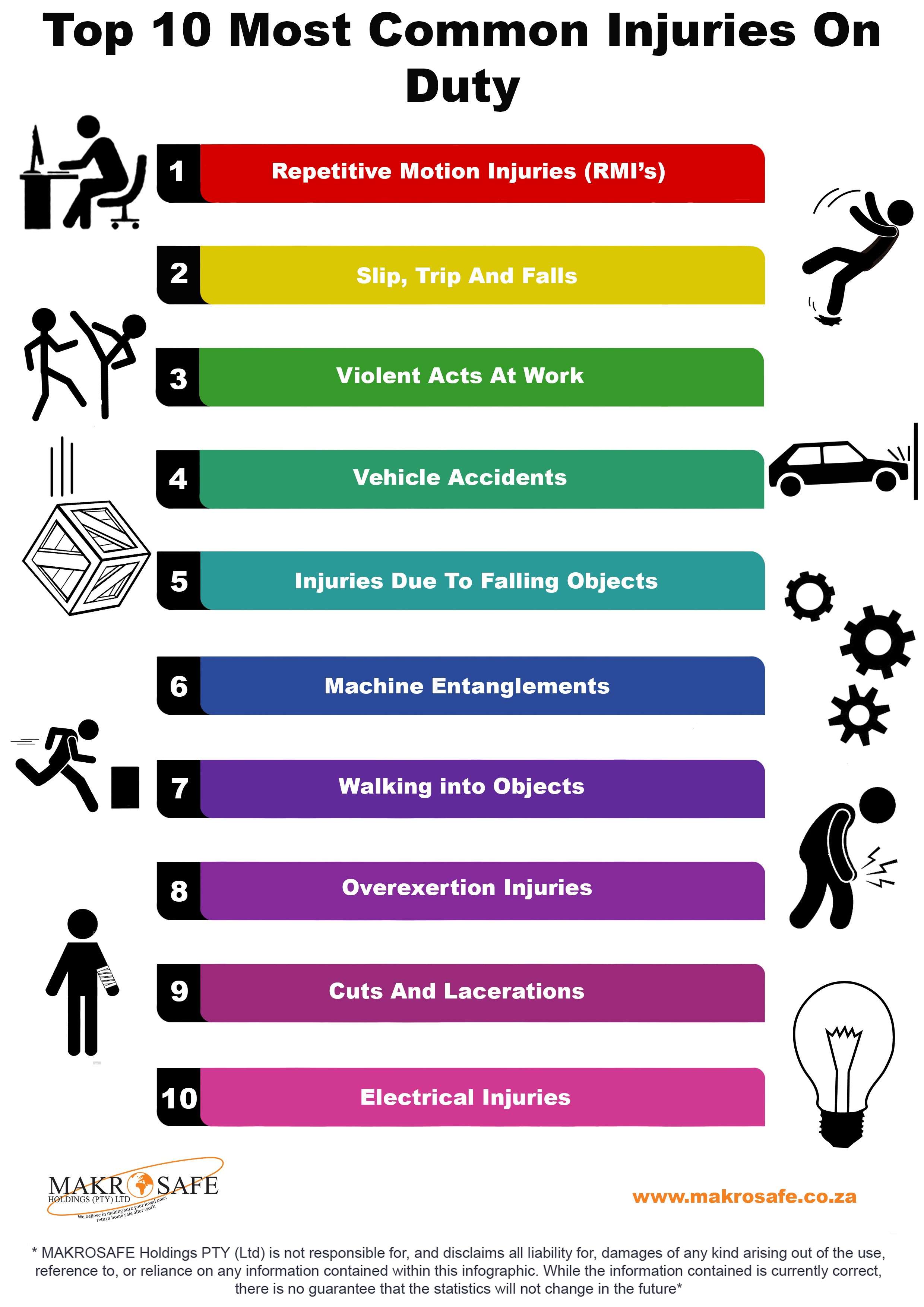
Common office injuries are physical harms that happen during desk and administrative work. Most are musculoskeletal disorders. These include strains, sprains, tendon pain, and joint issues from posture and repetition. Others come from slips, trips, falls, and contact with office fixtures. Eye strain and headaches from screens are also frequent.
Safety agencies report that sprains and strains top the list in office settings. Many cases build up over time, not in a single event. That is why early action and good ergonomics matter. A few minutes of change can prevent months of pain.

Source: co.uk
Key risk factors in modern workplaces
Small risks add up during long workdays. Know the main drivers that lead to common office injuries.
- Static sitting for hours reduces blood flow and weakens postural muscles.
- Poor desk setup forces joints into awkward angles and adds strain.
- Repetition without breaks irritates tendons and nerves.
- Glare, harsh lights, and small fonts trigger eye strain and headaches.
- Cluttered floors, loose cables, and wet areas raise slip and trip risk.
- High workload and stress reduce body awareness and delay reporting.
Research from occupational health groups links these factors to higher injury rates. Good design, breaks, and tidy spaces lower risk fast and at low cost.
Source: co.uk
The most common office injuries and how they happen
Repetitive strain injuries (RSIs)
These include carpal tunnel syndrome, tendinitis, and trigger finger. They come from many small tasks done often. Typing, mousing, and texting are typical triggers. Early signs include tingling, tight forearms, and night pain.
Prevention tips:
- Keep wrists straight and relaxed when typing or using a mouse.
- Use a light touch. Avoid pounding keys or gripping the mouse.
- Switch tasks every 30 to 60 minutes to rest tissue.
Neck and lower back pain
Long sitting and a slouched spine strain discs and ligaments. A low monitor or a laptop on a desk pulls the head forward. That adds load to the neck and upper back.
Prevention tips:
- Set the top of the screen at or just below eye level.
- Keep hips a bit higher than knees. Use a footrest if needed.
- Stand or walk for a few minutes each hour.
Shoulder and elbow pain
Mouse shoulder and tennis elbow show up with overuse and reach. Reaching forward or wide for the mouse pulls on the shoulder and forearm.
Prevention tips:
- Keep the mouse close to your body at elbow height.
- Try a keyboard with a negative tilt and a compact layout.
- Alternate hands for the mouse if you can.
Slips, trips, and falls
Even in offices, these events cause lost time and serious harm. Common causes include wet floors, curled mats, open drawers, and cords across walkways.
Prevention tips:
- Keep walkways clear and drawers closed.
- Use cable management and floor cord covers.
- Wear shoes with good grip. Clean spills right away.
Eye strain and headaches
Screen glare, small text, and poor lighting stress the eyes. Dry air and low blink rates make the problem worse.
Prevention tips:
- Follow the 20-20-20 rule. Every 20 minutes, look 20 feet away for 20 seconds.
- Enlarge text and boost contrast. Use matte screens or filters if needed.
- Place the monitor about an arm’s length away.
Contact injuries and minor cuts
Banged shins, door bumps, and paper cuts sound small but add up. They distract, break focus, and can get infected.
Prevention tips:
- Close cabinets and drawers after use.
- Use tools like letter openers and staple removers.
- Store heavy items between knee and shoulder height.
When you address these sources, the rate of common office injuries drops. Teams see fewer symptoms and better focus by the end of the week.
Source: propelphysiotherapy.com
Prevention strategies and ergonomic setup
Start with posture, then align your tools to fit you. Small, low-cost steps prevent common office injuries more than fancy gear alone.
Chair and posture
- Sit back with your back supported. Keep a two to three finger gap behind your knees.
- Adjust seat height so feet rest flat. Use a footrest if feet dangle.
- Keep shoulders down and relaxed. Elbows rest near your sides.
Desk and keyboard
- Float hands over the keys with neutral wrists.
- Keep the keyboard close to avoid reaching.
- Use a split or compact keyboard to narrow reach to the mouse.
Mouse and pointing devices
- Set pointer speed higher so you move less.
- Try a larger mouse, trackball, or pen tablet if pain persists.
- Keep the mouse at the same height and distance as the keyboard.
Screens and lighting
- Place the main monitor straight ahead. Use side monitors at slight angles.
- Align the top of the screen near eye level.
- Add task lighting. Cut glare with blinds and screen filters.
Movement and breaks
- Use microbreaks of 30 to 60 seconds each 20 to 30 minutes.
- Stand for calls. Walk to talk when possible.
- Do gentle neck, wrist, and back mobility moves each day.
Housekeeping and layout
- Route cables along walls or under desks.
- Keep bags and boxes out of walk paths.
- Place the items you use most within easy reach.
These basics align with guidance from ergonomics and safety bodies. They are easy to test, measure, and adjust over time.

Source: hsseworld.com
First aid, early reporting, and when to seek care
Early care limits downtime from common office injuries. It also prevents small issues from turning chronic.
Immediate steps
- For sore tendons or minor sprains, rest and use cold packs in short intervals.
- For eye strain, blink often and use artificial tears if dry.
- For slips or falls, check for head impact, severe pain, or swelling. Seek help if present.
When to get medical attention
- Numbness, burning pain, grip loss, or night symptoms that wake you up.
- Back pain with leg weakness or changes in bladder or bowel control. This is urgent.
- Any fall with head strike, confusion, or vision changes.
Smart reporting
- Tell a supervisor early. Early reports support faster fixes and better outcomes.
- Document tasks that make symptoms worse. Note time of day and setup details.
- Ask about ergonomic review and temporary task changes.
Source: co.za
Reporting, workers’ compensation, and employer duties
Clear reporting helps both staff and the business. It supports safe work, fair claims, and legal compliance.
- Most states require employers to carry workers’ compensation for job injuries.
- OSHA and related rules ask employers to keep injury logs and fix hazards.
- Employees should report incidents right away, even if pain seems mild.
- Return-to-work plans can include adjusted schedules, alternate tasks, or new tools.
Good records show patterns behind common office injuries. They guide spending on the fixes that matter most.

Source: watsondc.com
Building a safety culture and training
Culture reduces risk more than any single tool. Make safety a daily habit, not a once-a-year event.
- Onboard with an ergonomic setup checklist for every new hire.
- Refresh training each year and after office moves or software changes.
- Encourage near-miss reporting without blame. Near misses predict injuries.
- Leaders model breaks, tidy workspaces, and proper use of equipment.
- Track simple metrics like reported discomfort and completed fixes.
When people feel safe to speak up, hazards get solved fast. That is how teams prevent common office injuries before they start.
Tools, checklists, and daily routines
Use simple tools and routines to keep risk low.
Helpful tools
- Seat cushion or lumbar support for neutral spine.
- Adjustable footrest for stable, flat-foot posture.
- External keyboard and mouse for laptop users.
- Document holder to reduce neck twist.
- Cable clips and floor covers to keep paths clear.
Two-minute daily check
- Are feet flat and hips slightly above knees?
- Are elbows near your sides with relaxed shoulders?
- Is the screen at eye level and an arm’s length away?
- Can you reach mouse and keyboard without a forward lean?
- Is the floor clear of cords and bags?
Weekly actions
- Review task mix. Add variety to reduce repetition.
- Clean screens and adjust lighting for comfort.
- Log any aches. If pain lasts more than a week, seek help.
These habits build strong defenses against common office injuries. They take little time but deliver lasting gains.
Frequently Asked Questions of common office injuries
What are the most common office injuries?
Sprains, strains, and repetitive strain injuries are most common. Slips, trips, falls, and eye strain also lead to lost workdays.
How can I prevent carpal tunnel at work?
Keep wrists straight, lower typing force, and take frequent microbreaks. If symptoms persist, ask for an ergonomic review and see a clinician.
How often should I take breaks from the computer?
Use a short break every 20 to 30 minutes and a longer break each hour. Even 30 seconds of movement lowers strain.
Are standing desks better than sitting?
Standing desks help when used in balance with sitting and walking. Rotate positions and keep screens and input devices at the right height.
What is the best monitor height to avoid neck pain?
Place the top of the screen at or just below eye level. Center the main monitor straight ahead about an arm’s length away.
When should I see a doctor for back pain from work?
Seek care if pain lasts more than a week, spreads down a leg, or comes with numbness or weakness. Go right away for severe or sudden symptoms.
Does blue light cause eye damage?
Blue light can affect sleep but is not a proven cause of eye disease at office levels. Eye strain is more about glare, dryness, and poor ergonomics.
Conclusion
Office work should not hurt. With smart setups, short breaks, tidy floors, and fast reporting, most common office injuries can be avoided or reduced. Small daily changes add up to big wins in comfort and focus.
Start today. Adjust your chair and screen, clear your floor, and set a timer for microbreaks. Share this guide with your team, subscribe for more workplace health tips, and leave a comment with your top question so we can help you solve it next.


