
If your body hurts after a long day at the desk, you’re not alone. Sitting is quiet and still, but it loads your joints in sneaky ways. Your hips stiffen. Your back works too hard. Your neck cranes toward the screen. The good news: simple fixes work fast. You can sit with less pain today.
This guide is different. It blends posture, movement, angles, and setup fixes that most people ignore. You’ll find bite-size moves you can do while you sit. You’ll see exact sitting angles that protect your joints. You’ll also get a desk checklist and product picks to lock in comfort. By the end, you’ll have a no-pain playbook for your workday.
Before we dive in, here’s a short plan: improve your angles, add micro-movements, and change position on a schedule. You’ll fix pain at the source. You’ll also boost focus and energy. Let’s make your desk a place your body likes again.

Featured Snippet: Why Sitting Causes Pain and How to Avoid It (45 words)
Sitting for long hours limits blood flow and locks joints in one position. This strains the lower back, hips, neck, and legs. To avoid pain, use neutral posture, set hip and knee angles near 100° and 90–100°, keep the monitor at eye height, and move every 30 minutes.
Medical Disclaimer: This guide is educational and not a substitute for medical advice. If you have pain, numbness, or symptoms that worry you, see a healthcare professional.
Why Sitting All Day Triggers Pain (And What Actually Helps)
Your body is built to move. When you sit still, muscles switch off and joints stiffen. Your hip flexors shorten. Your hamstrings tighten. Your lower back picks up the slack. Blood flow slows in the legs. Nerves get cranky. Small posture errors add up hour after hour.
Here’s what helps right away:
- Keep your body near neutral angles. No extreme curves or twists.
- Move more than you think you need. Even tiny movements help.
- Set your desk and chair to match your body, not the other way around.
- Use props that guide posture: lumbar support, footrest, and monitor arm.
Pro tips most people ignore:
- Your feet control your pelvis. Fix your feet first.
- Armrests matter. They offload the neck and shoulders.
- Micro-movements cut stiffness without leaving your chair.
- A 30-60-5 rhythm keeps your joints happy all day.
Micro-Movements That Prevent Pain
Most people think you need long breaks. You do. But micro-movements fix pain between breaks. These are tiny moves you can do while typing or on calls. They keep blood flowing. They feed your joints. They wake up sleepy muscles without killing your focus.
Use this menu during the day:
- Ankle pumps: Heel down, lift forefoot 10 times. Then toes down, lift heel 10 times. Boosts calf pump and circulation.
- Toe yoga: Spread your toes. Press big toes down, lift the others. Then switch. 10 reps. Helps arches and knee tracking.
- Pelvic tilts: Rock your pelvis forward and back on your sit bones. Small range. 10 slow reps. Feeds the lower back discs.
- Glute squeezes: Tighten both glutes for 5 seconds. Relax for 5. Do 10. Stabilizes the pelvis.
- Scapular slides: With elbows by your sides, slide shoulder blades down and back. Hold 3 seconds. 8–10 reps. Eases neck strain.
- Chin nods (micro): Tuck your chin a few millimeters. Hold 3 seconds. 10 reps. Resets head position.
- Desk calf stretch (seated): Extend one leg. Pull toes toward you. Hold 10 seconds. Switch. 3 rounds each.
- Figure-4 switch: Cross ankle over opposite knee for 10–20 seconds. Switch sides. Light stretch for hips and piriformis.
- Wrist rolls and finger flicks: 10–20 seconds between tasks. Keeps forearm tension low.
Sitting Pain by Body Area
Pain is not one-size-fits-all. Target the spot that hurts, then tune your setup. Fix the root, not just the symptom.

Lower Back: Compressed and Overworked
Sitting flattens or over-arches the low back. Both strain tissues. A gentle lumbar curve is the sweet spot. Hips slightly open, pelvis neutral, back supported.
Quick fixes:
- Lumbar support: Place a small cushion at belt-line height. It should fill the space, not push too hard. See our lumbar support guide for picks and placement: /lumbar-support-guide
- Hip angle: Open to 100–110°. This shifts load from the discs to the seat back.
- Seat depth: Leave 2–3 finger widths behind your knees. If the seat pan is long, slide it back or add a small back cushion.
- Foot contact: Feet must rest flat or on a footrest. This locks the pelvis in place.
- Micro-moves: 10 pelvic tilts each hour. 10 scapular slides. 10 glute squeezes.
Stretch and reset:
- Standing hip flexor stretch: 30 seconds each side.
- Child’s pose or desk-supported forward fold: 20–30 seconds.
- “Hip hinge” sit down: Lead with hips when you sit. Keep spine long.
When to get help:
- Pain that shoots down a leg, numbness, or weakness. See a clinician.
Neck and Shoulders: The Screen Pull
A low screen and floating elbows pull the head forward. Each inch forward adds loads of pounds to the neck. Arm support and eye-level screens cut that load fast.

Quick fixes:
- Monitor height: Top of screen at or slightly below eye level. If you wear progressives, drop the screen a bit more.
- Distance: About an arm’s length away.
- Armrests: Adjust so your shoulders feel “heavy” and relaxed. Elbows at 90–100°.
- Keyboard and mouse: Close to your body, same height as elbows. Keep wrists neutral.
- Micro-moves: Chin nods, scapular slides, and 20–30 second door-frame chest stretch.
Pain pattern tip:
- Ache at the base of the skull = screen often too high or you crane forward.
- Burning between shoulder blades = elbows too far from body or mouse too far away.
Hips and Glutes: The Tightness Trap
Hips like range. Sitting steals it. Tight hip flexors and piriformis can tug on the low back and limit stride. Open the angle. Change leg positions often.

Quick fixes:
- Hip angle: 100–110° recline or slight forward tilt on the seat pan.
- Knee turnover: Alternate feet flat, one foot slightly back, then the other. Keeps hips from locking.
- Seat height: Raise until knees are level with or just below hips.
- Micro-moves: Figure-4 switch for 20 seconds, then heel-toe rocks.
Stretch and strengthen:
- Standing quad and hip flexor stretch.
- Mini lunges at the desk. 5 each side.
- Glute bridges on the floor before or after work. 2 sets of 10–15.
Legs and Feet: Circulation and Nerves
Still legs mean slow blood flow. Pressure at the seat edge can irritate nerves behind the thigh. Feet that dangle tilt the pelvis and stress the back. Fix foot contact first.

Quick fixes:
- Feet supported: Use a footrest if feet do not reach the floor flat. See our footrest guide: /footrest-guide
- Seat edge: Keep 2–3 fingers of space behind the knees. If numbness or pins-and-needles, check seat depth and height.
- Ankle pump routine: 20–30 reps each hour. Calf is your second heart.
- Alternate stance: Stand for calls. Shift weight every minute.
Red flags:
- One calf swollen or painful, unexplained warmth, or shortness of breath. Seek urgent care.
Ideal Sitting Angles
Angles matter. They define load paths through bones and soft tissue. Small tweaks make big gains. Use these data-backed targets, then fine-tune to your comfort.

Use this checklist:
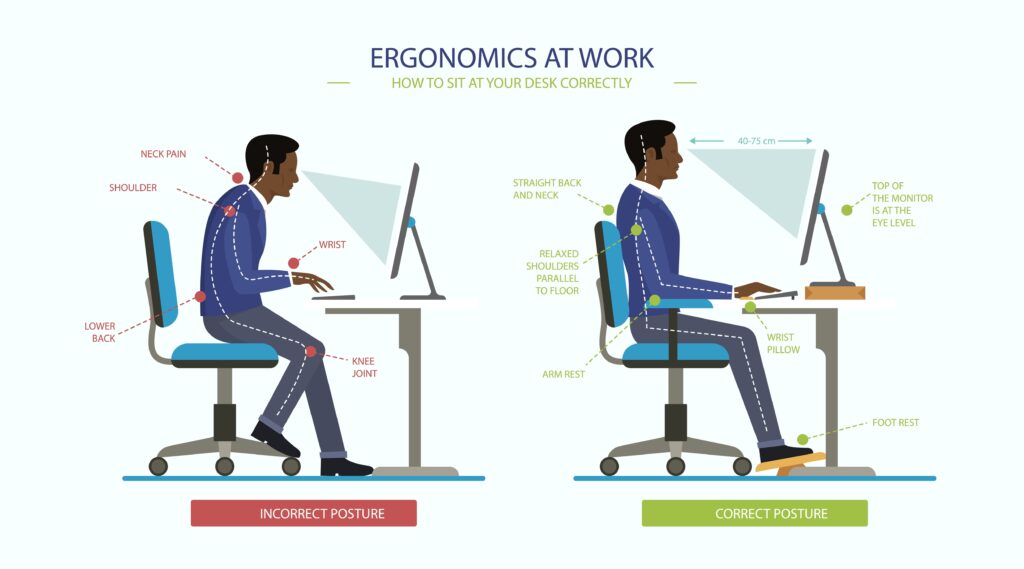
- Hips: 100–110° angle. A slight recline reduces disc pressure more than upright sitting.
- Knees: 90–100° angle. A little open is better than tight.
- Ankles: 90° or slightly open. Heels under knees or a bit forward.
- Elbows: 90–100° with forearms supported.
- Wrists: Straight, not bent up or down.
- Backrest: 100–110° recline with gentle lumbar support.
- Screen: Top of display at or just below eye level. Center of screen should be about 15–20° down from your eyes.
- Distance: Arm’s length (about 20–28 inches), adjusted for font size and vision.
How to measure fast:
- Use a phone inclinometer app. Sit, then check thigh and torso angles.
- If your chair tilts, set a small recline you can hold all day.
- Adjust in this order: seat height → seat depth → backrest recline → lumbar support → armrests → desk/keyboard height → monitor.
Simple wins:
- If you only fix one thing today, match desk height to elbow height and set the screen to eye level. Those two changes remove most neck and shoulder strain.
Foot Position & Circulation Fix
Your feet are your base. If they dangle or drift, your pelvis tilts, your back arches or slumps, and your blood flow dips. Most people ignore feet. Don’t. Fixing foot position is one of the fastest ways to cut pain.
Why it matters:
- Stable feet lock in a neutral pelvis.
- Calf pumps keep blood moving and reduce swelling.
- Proper foot angle reduces hip rotation and knee stress.
The setup:
- Feet flat on floor or a footrest. Toes point forward or slightly out (5–10°).
- Heels under knees or a bit forward by 1–2 inches.
- Avoid crossing legs for long periods. It can compress nerves and veins.
Short vs. tall:
- Shorter folks: Use a footrest so knees hit 90–100° and thighs are supported without pressure behind the knees.
- Taller folks: Raise the desk and chair to fit elbow height. If thighs press into the desk, raise desk or lower chair and add a footrest to restore hip angle.
Footrest role:
- Brings the floor up to you. Offloads the back. Lets you micro-move.
- Look for a tilt feature (10–20°) to allow ankle pumps.
- See our in-depth footrest article for picks and fit tips: /footrest-guide
Daily moves:
- 30 seconds per hour: heel digs, toe taps, ankle circles.
- End of day: 1–2 minutes legs-up on a wall or ottoman to drain fluid.
The 30-60-5 Rule for Sitting
You don’t need fancy tools to feel better. Follow this simple rhythm. It is the antidote to long sitting pain. It boosts focus, too.
The rule:
- Sit 30 minutes: in neutral angles.
- Move 60 seconds: micro-movements or a short stand.
- Stretch 5 minutes: every 2–3 hours. Hit hips, chest, calves, and back.
Sample day:
- 9:00–9:30: Sit with micro-moves.
- 9:30: Stand 60 seconds, walk to refill water.
- 10:30: 60 seconds again.
- 11:30: 5-minute stretch block.
- Repeat after lunch and mid-afternoon.
What to stretch in 5 minutes:
- 1 minute: hip flexor stretch (30 seconds each side).
- 1 minute: chest opener in a doorway.
- 1 minute: calf stretch both sides.
- 1 minute: hamstring stretch (one foot on a stool).
- 1 minute: spinal rotations or child’s pose.
Desk Setup Mistakes That Cause Pain
Most desk pain comes from a few simple errors. These are the daily habit mistakes that sneak up on you. The fixes are fast. Tackle these and most aches fade.
Top mistakes and simple fixes:
- Chair too high: Your feet dangle. Fix: Lower the chair or add a footrest. Aim for knees at 90–100° and feet flat.
- Screen too low: Your neck cranes down. Fix: Raise the monitor so the top sits at eye level.
- No lumbar support: Your back rounds. Fix: Add a lumbar pillow or adjust the chair support to fill your lower back curve.
- Desk too high: You shrug your shoulders. Fix: Raise the chair so elbows are at desk height and use a footrest to keep hip and knee angles in range.
- Mouse too far: You reach and twist. Fix: Keep mouse close to keyboard, elbows near your sides.
- Seat pan too deep: Cuts circulation behind knees. Fix: Adjust seat depth or add a small back cushion to shorten the seat.
- Armrests too wide or high: Pushes shoulders out or up. Fix: Set width to keep elbows near your sides. Height to lightly support forearms.
- Static posture: You never move. Fix: Use the 30-60-5 rule and micro-moves.
Quick reset checklist (2 minutes):
- Feet supported? Check.
- Hips open to ~105°? Check.
- Elbows at 90–100° with armrests? Check.
- Screen at eye level, arm’s length? Check.
Best Ergonomic Setup for Long Sitting
Affiliate Disclosure: Some links below may be affiliate links. If you buy through them, we may earn a small commission at no extra cost to you. We only suggest products that fit the ergonomics principles in this guide and can help you sit with less pain.
A strong setup locks in good posture and makes movement easy. These picks solve the most common pain triggers fast: sagging low backs, low screens, floating elbows, and unsupported feet. Choose what fits your space and budget.
Best Overall: Adjustable Ergonomic Chair (with real lumbar and 4D arms)
- Why it works: A good chair gives you back support and arm relief. That drops neck, shoulder, and lower back pain fast. Look for seat depth, lumbar height and firmness, tilt lock, and 4D armrests.
- Example options:
- Branch Ergonomic Chair
- HON Ignition 2.
Supporting Picks
- Why: Fills the gap in the lower back. Keeps a gentle curve. Great for dining chairs or old office chairs.
- What to look for: Adjustable strap, breathable cover, medium-firm foam, slight wedge shape.
- Example: Everlasting Comfort Lumbar Pillow
- Under-Desk Footrest (tilting or rocking)
- Why: It brings the floor up to you, stabilizes the pelvis, and boosts circulation with ankle pumps.
- What to look for: Tilt 10–20°, textured surface, stable base. Rocking designs invite micro-moves.
- Example: ComfiLife Foot Rest
- Sit-Stand Desk or Converter
- Why: Alternating sitting and standing changes joint load and ups movement. Standing is not a cure-all, but the change helps.
- What to look for: Stable frame, quick lift, memory presets.
- Examples:
- Seat Cushion (if your chair is too firm or deep)
- Why: Relieves pressure under sit bones and shortens the seat pan. Can help if your seat cuts behind the knees.
- What to look for: High-density foam or gel, waterfall front edge, non-slip base.
- Example:
Simple “Set-and-Forget” Posture Guide
Good posture is not a stiff pose. It is a range that you return to between moves. Think stacked, light, and supported.
Use this 60-second reset:
- Feet: Flat or on footrest. Heels under knees.
- Hips: Slide back until your sit bones touch the back of the seat. Slight recline.
- Lumbar: Cushion fills your low back curve.
- Shoulders: Down and back, heavy on armrests.
- Head: Ears over shoulders. Chin slightly tucked.
- Wrists: Straight, floating over keys.
Refresh every 30 minutes. Then add your 1-minute micro-move set.
A 5-Minute Stretch Block That Actually Works
When you stretch, target what sitting shortens and what gets stiff. Keep it simple. Breathe slow. Aim for easy, not max.
Try this:
- Hip flexor lunge: 30 seconds each side. Squeeze the back glute to protect the low back.
- Calf wall stretch: 30 seconds each side. Knee straight, then bent.
- Doorway chest opener: 30 seconds total. Elbows at 90°, step forward.
- Seated hamstring on a stool: 30 seconds each side. Back long, hinge at hips.
- Spinal rotation: 10 slow breaths per side or child’s pose for 60 seconds.
Do this 2–3 times a day. Add a short walk after if you can.
The Workday Blueprint: No-Pain Routine
You do not need a perfect day. You need a rhythm. Stack small wins. They compound.
Here’s a sample plan:
- Start: 2 minutes to set angles. Feet supported, screen at eye height.
- Each 30 minutes: 1 minute of micro-moves.
- Twice in the morning, twice in the afternoon: 5-minute stretch block.
- Lunch: 10-minute brisk walk. If indoors, march in place.
- Calls: Stand or stroll when you can.
- End of day: 2-minute check of hips, chest, and calves.
Your weekly upgrade:
- 2–3 strength sessions (20 minutes). Focus on glutes, hamstrings, core, and upper back. Bridges, rows, deadlifts with light weights or bands, face pulls, and planks.
- Daily step goal: 6,000–8,000+ steps helps offset sitting load.
Work-From-Home vs. Office: Tailored Fixes
The place you work changes the pain you feel. Tweak your setup for your space.
Home office:
- Dining chair? Add lumbar pillow and a seat cushion. Use books to lift the screen. Add a budget footrest or even a sturdy box.
- Laptop use: Always add an external keyboard and mouse. Raise the laptop to eye height.
- Small space: A monitor arm frees space and fixes height in one move.
Corporate office:
- Ask IT or facilities for an ergonomic review.
- Use the 2-minute daily checklist. Chairs get “borrowed” and reset.
- If you hot-desk, carry a compact lumbar pillow.
Hybrid tip:
- Make a “go kit”: lumbar cushion, compact footrest, foldable laptop stand, travel mouse.
Long Sitting Health Risks (and How to Lower Them)
Pain is one part of the story. Metabolic and circulatory risks matter, too. The fix is not fear. It is frequent, small bouts of movement.
Know the risks:
- Reduced insulin sensitivity and lower calorie burn.
- Slower blood flow in legs, swelling, and clot risk in rare cases.
- Stiff hips, weak glutes, tight chest, and forward neck carriage.
Lower the risk:
- 250+ steps each hour is a helpful micro-goal.
- 2–3 short walking breaks per day beat one long workout for circulation.
- Stand for tasks that do not need fine typing.
- Hydrate. A full bladder is a built-in break timer.
Tip: Put your printer, trash bin, or water away from your desk. Force a few extra steps each hour.
Step-by-Step Ergonomic Setup (10 Minutes)
If you can spare 10 minutes, this order gives you the biggest relief for the least effort.
- Chair height:
- Sit, drop your arms. Raise or lower the chair so elbows meet desk height.
- If that lifts your feet, add a footrest.
- Seat depth:
- Slide your hips back. Adjust seat so you can fit 2–3 fingers behind your knees.
- Backrest and lumbar:
- Set recline to 100–110°.
- Adjust lumbar to fill the curve. Medium-firm works best.
- Armrests:
- Height: Lift until forearms rest and shoulders relax.
- Width: Bring close to your body so elbows are under your shoulders.
- Monitor:
- Raise so the top is at or just below eye level.
- Place at an arm’s length. If you lean in, bump font size or move closer.
- Keyboard and mouse:
- Center keyboard with your body.
- Keep mouse right next to it, at the same height.
- Foot support:
- Feet flat. If not, footrest time.
- Test and tweak:
- Type for 2 minutes. Scan for tension: neck, shoulders, low back, legs.
- Adjust 1–2 small things. Repeat once.
You’re done. Now layer in micro-moves and the 30-60-5 rhythm.
Micro-Workouts You Can Do Next to Your Desk
Short bursts keep your body tuned. No gym needed. Use these when you feel stiff.
Two-minute circuit:
- 10 bodyweight squats.
- 10 desk push-ups or wall push-ups.
- 10 hip hinges with hands on hips.
- 20 seconds of marching in place.
- Repeat if you have time.
Three times a day is plenty. Move easy. Breathe slow.
Real-World Examples: Fast Fixes by Height
Body size changes your setup. Use these quick guides.
If you’re shorter than 5’5″:
- Your feet likely dangle at standard desk height.
- Fix: Raise chair so elbows match desk. Add a footrest. Use a seat cushion if the seat is too deep.
If you’re 5’5″–6’1″ (average range):
- You can often match desk height and chair height well.
- Fix: Focus on seat depth, lumbar, and monitor height.
If you’re taller than 6’1″:
- Standard desks are usually too low.
- Fix: Raise desk or use a sit-stand desk. Keep chair high enough for elbow height, then add a footrest if needed.
Laptop-only user:
- You’re almost always looking down.
- Fix: Add a keyboard and mouse. Raise the laptop to eye level with a stand or books.
Dual monitors:
- Use one as primary, placed directly in front. Keep equal height. If you swap tasks all day, center the bezels on your nose and angle them in.
FAQs
How can I sit all day without back pain?
- Keep hips open to 100–110°, support your lumbar curve, and use a footrest if your feet dangle. Place the monitor at eye height and move every 30 minutes.
What is the best sitting position for long hours?
- A slight recline with a supported low back, knees at 90–100°, feet flat or on a footrest, elbows at 90–100°, and a screen at eye level.
Should my knees be higher than my hips when sitting?
- No. Hips slightly higher than or level with the knees is better. Aim for a hip angle around 100–110° to reduce disc pressure.
Do I need a footrest?
- If your feet do not rest flat with elbows at desk height, yes. A footrest improves pelvic and circulation.
How high should my monitor be?
- The top of the screen should be at or just below eye level. The center of the screen should sit about 15–20° below your eye line.
Is standing better than sitting?
- It is different, not always better. Alternating is best. Use the 30-60-5 rule and switch positions often.
How often should I take breaks from sitting?
- Every 30 minutes, take a 60-second movement break. Add a 5-minute stretch block every 2–3 hours.
What’s the fastest fix most people ignore?
- Raise the monitor to eye height and support your feet. These simple fixes cut neck and back strain fast.
Conclusion
Sitting does not have to hurt. Small, smart changes add up. Set your angles. Support your feet and low back. Lift your monitor. Then move on a rhythm. Use micro-movements to stay loose. Layer in the 30-60-5 rule. When needed, add tools that lock in comfort: a solid chair, a footrest, and a lumbar pillow.
Start with one or two fixes today. Check your feet and screen. Then build your routine from there. Your body will reward you with less pain, better focus, and more energy at the end of the day.


