

Sit tall with ears over shoulders, adjust your setup, and move every 30 minutes.
If you want practical, real-world advice on how to maintain upright posture desk all day without pain, you’re in the right spot. I’ve coached teams, tested dozens of setups, and fixed my own slouchy habits. This guide explains how to maintain upright posture desk in plain language, with simple steps, smart tools, and quick routines you can start today.
What Upright Posture At a Desk Really Means
Upright posture is not a rigid soldier pose. It is a relaxed, neutral alignment you can hold with little effort.
Here is the simple picture:
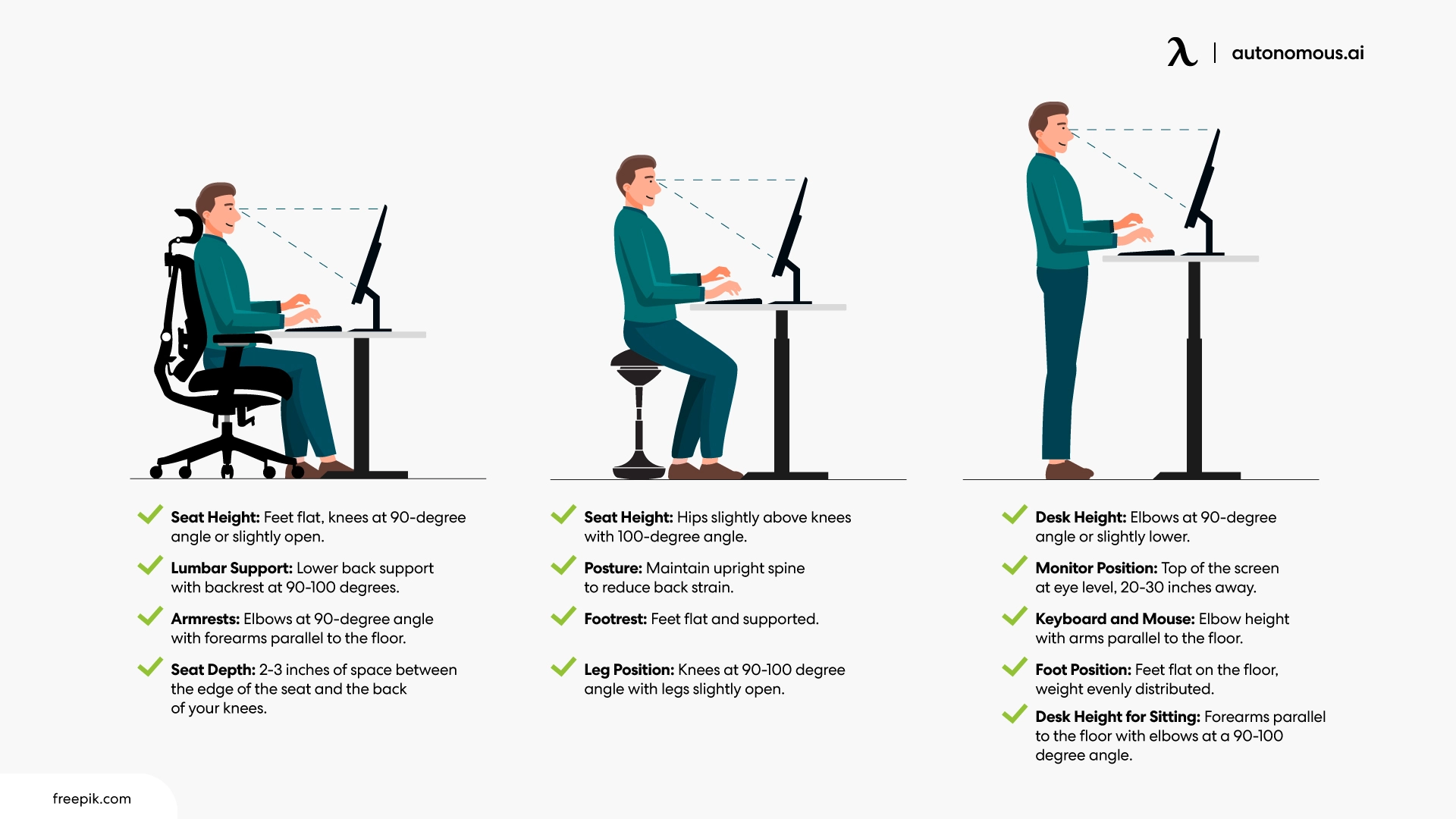
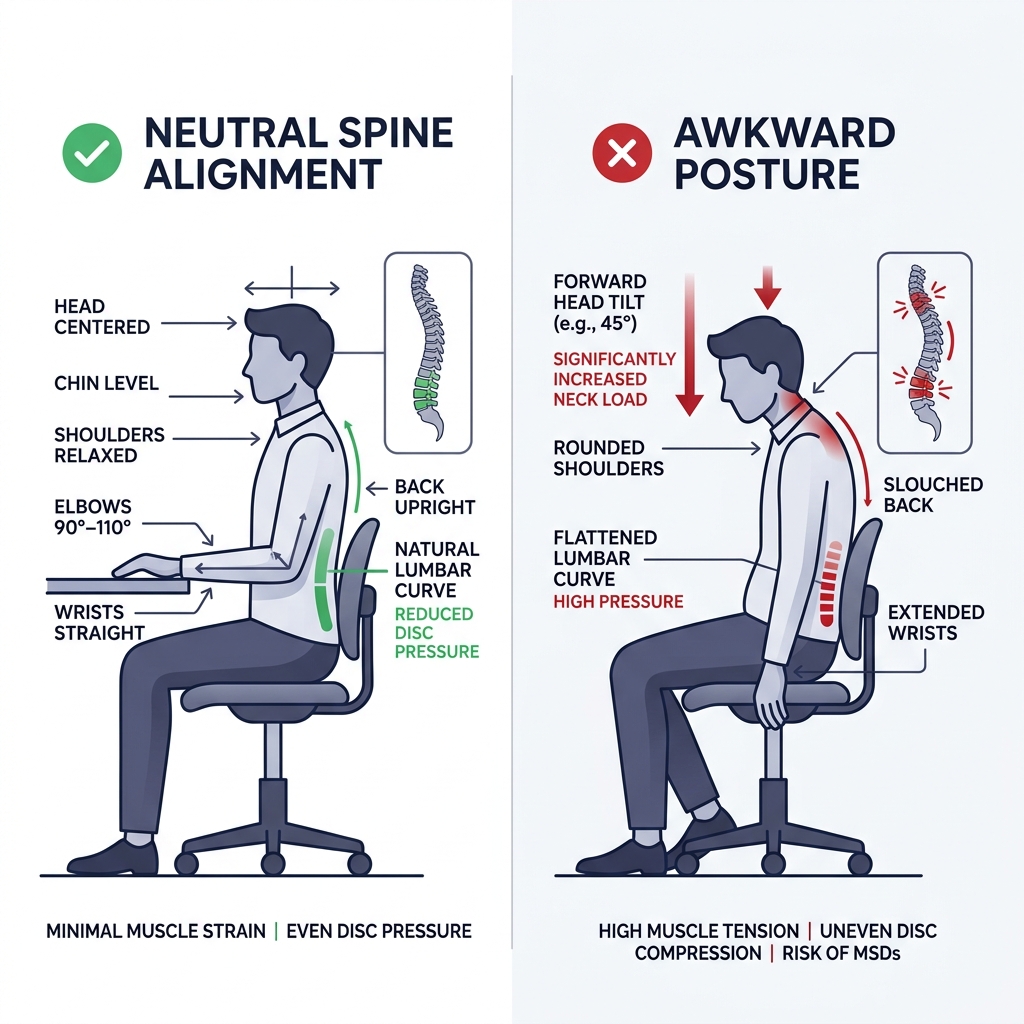
- Ears stack over shoulders.
- Shoulders rest down and back, not pinned.
- Ribs sit over pelvis.
- Hips, knees, and ankles bend around 90 degrees.
- Feet rest flat, with weight spread across the whole foot.
Think of your spine like a spring. It needs gentle curves, not stiff lines. A neutral spine lets your core and back share the load. This is the foundation for how to maintain upright posture desk during long work sessions.

Why Posture Matters: Health And Performance
Good posture is about more than looks. It helps you feel better and work better.
Benefits you can expect:
- Less neck and back strain by keeping joints in neutral positions.
- Fewer headaches linked to forward head posture.
- Better breathing, which helps focus and energy.
- More comfort, which boosts focus and typing speed.
Research suggests neutral sitting lowers pressure on discs and reduces muscle fatigue. It also shows that short movement breaks reduce discomfort more than long, static sitting. This fits the heart of how to maintain upright posture desk: align well, then move often.

Step-By-Step Desk Setup Checklist
Set your desk once, reap the rewards daily. Use this five-minute checklist.
- Adjust seat height so knees and hips are level, and feet are flat.
- Sit back so your pelvis touches the backrest.
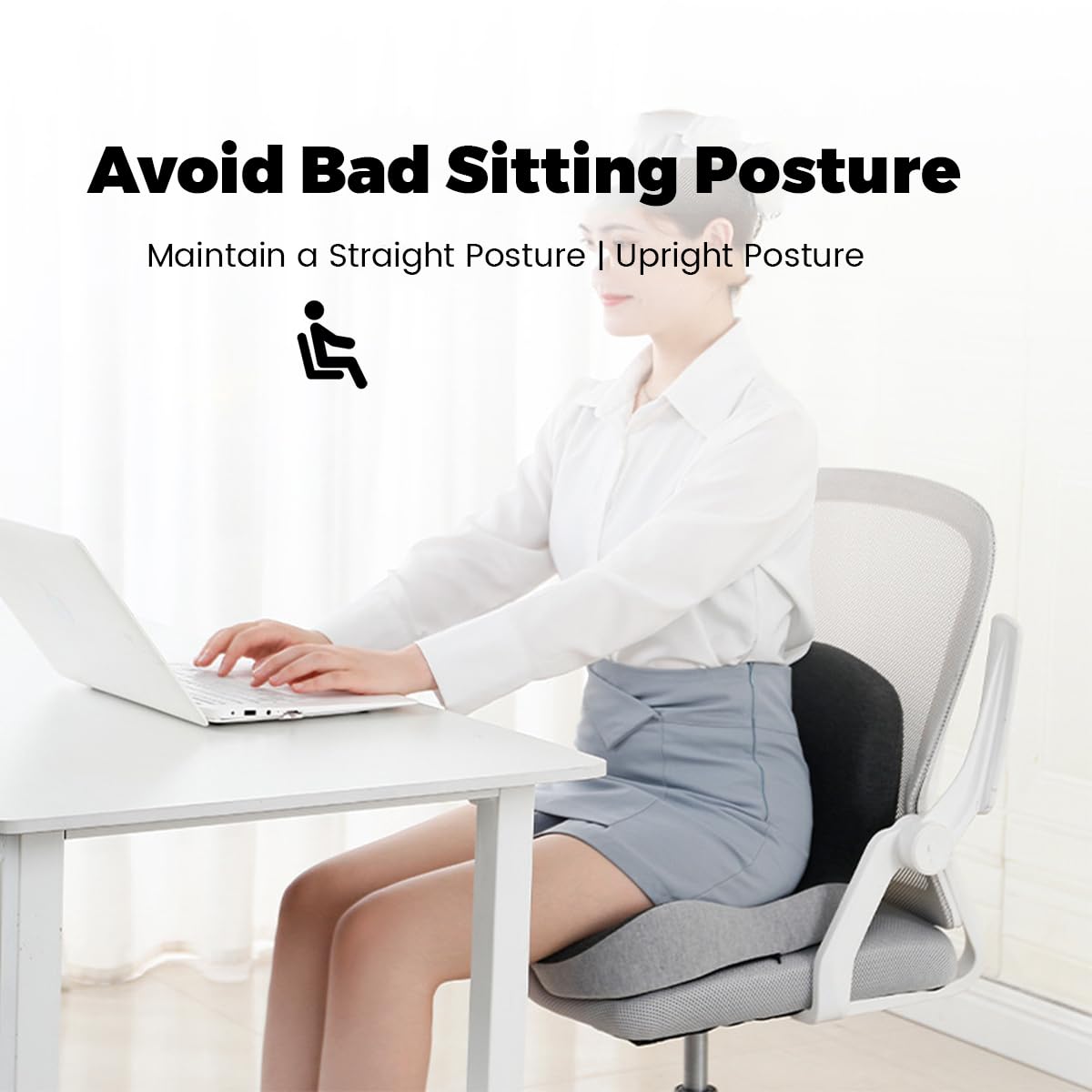
- Set lumbar support at the small of your back. It should feel like a gentle hand, not a shove.
Desk
- Height should let shoulders relax, elbows near 90 degrees, and forearms level.
- If your desk is fixed and too high, raise your chair and use a footrest.
Monitor
- Top of screen at or slightly below eye level.
- Arm’s length away, or enlarge text if you lean forward to read.
- For laptops, use a stand and an external keyboard and mouse.
Keyboard and Mouse
- Keep both close and at elbow height.
- Wrists straight, not bent up or down.
- Use light grip pressure. Glide from the shoulder, not the wrist.
Foot Support
- Feet flat on the floor. If not, add a footrest or a firm box.
Lighting and Glare
- Place the screen at a right angle to windows.
- Increase text contrast and brightness to reduce squinting and neck craning.
Phone and Notebook
- Keep them close to avoid twisting.
- Use a headset or speaker for calls.
This setup anchors how to maintain upright posture desk with less effort. Save a photo of your ideal setup and compare weekly.
Daily Habits That Keep You Upright
Posture is a habit, not a one-time fix. These small moves make it stick.
- Use the 30-2 rule. Sit for 30 minutes, then stand or walk for 2 minutes.
- Do one breath check each hour. Inhale through your nose, expand ribs all around, exhale long. This resets your ribcage over your pelvis.
- Set a cue. I keep a sticky note on my monitor that says “Ears over shoulders.” It reminds me how to maintain upright posture desk without thinking.
- Keep water handy. Sipping often nudges you to move and rest your eyes.
- Park tools within reach. If you stretch forward all the time, your posture will follow.
I learned the hard way: I used to arch my lower back too much. A soft lumbar cushion and the breath check fixed it in a week. This is the quiet power of how to maintain upright posture desk through simple, repeatable habits.
Simple Desk Stretches And Micro-Exercises
You do not need a gym. Two minutes can reset tight spots.
Neck Reset
- Gently slide your head back like making a double chin.
- Hold 5 seconds, relax. Do 5 reps.
Upper Back Opener
- Clasp hands, reach forward, and round the upper back slightly.
- Breathe in the back of your ribs for 3 slow breaths.
Chest Stretch
- Place forearm on a doorframe. Turn your chest away.
- Hold 20–30 seconds each side.
Hip Flexor Break
- Stand and take a small lunge.
- Tuck pelvis slightly. Hold 20–30 seconds.
Core And Sit Bones Check
- Sit tall. Feel both sit bones on the seat.
- Exhale and gently draw the lower belly in for 5 breaths.
These moves support how to maintain upright posture desk by easing tight chest and hips, the two big posture bullies.

Ergonomic Tools That Help (And What To Skip)
You do not need fancy gear, but the right tools can help.
Helpful
- Adjustable chair with real lumbar support.
- Laptop stand plus external keyboard and mouse.
- Footrest if your feet do not reach the floor.
- Monitor arm to fine-tune height and distance.
- Timer app for movement breaks.
Use With Care
- Posture braces. They can teach position but may weaken muscles if worn all day.
- Cushions. Great for comfort, but find the smallest one that works.
Skip
- Overly soft chairs that swallow your pelvis.
- Gadgets that promise perfect posture without movement.
The best tool for how to maintain upright posture desk is the one you use daily. Start simple and build up.

A 14-Day Posture Reset Plan
Small steps add up. Try this plan and track how you feel.
Days 1–3
- Set up your chair, desk, and monitor.
- Add the 30-2 movement rule.
Days 4–7
- Do the five stretch moves twice per day.
- Add a sticky-note cue on your screen.
Days 8–10
- Add one standing block of 20–30 minutes in the morning or afternoon.
- Walk during one call per day.
Days 11–14
- Film a 10-second side view at your desk. Check ears over shoulders and ribcage over pelvis.
- Adjust one thing each day. Keep notes.
This is a simple way to learn how to maintain upright posture desk and lock it in.

Troubleshooting Common Posture Problems
Rounded Shoulders
- Cause: Tight chest, weak mid-back.
- Fix: Chest stretch and upper back opener. Keep elbows close when typing.
Forward Head
- Cause: Screen too low, leaning to read.
- Fix: Raise the monitor. Do the neck reset every hour.
Swayback Or Big Low-Back Arch
- Cause: Pelvis tilts forward, ribs flare up.
- Fix: Exhale to stack ribs over pelvis. Use a small lumbar roll.
Fidgeting Or Restlessness
- Cause: Static sitting.
- Fix: More breaks. Try a sit-stand cycle of 30–60 minutes sitting and 15–20 minutes standing.
Hand Or Wrist Tingling
- Cause: Wrist extension, pressure on the palm.
- Fix: Lower keyboard, keep wrists flat, relax grip.
If pain is sharp, spreads, or lingers, see a licensed clinician. Posture helps, but pain has many causes. A pro can tailor how to maintain upright posture desk to your body and job.
Frequently Asked Questions of how to maintain upright posture desk
How often should I take breaks to keep good posture?
Move for 1–2 minutes every 30 minutes. Short, frequent breaks beat long, rare breaks.
Do I need a standing desk to improve posture?
No. A good sitting setup plus regular movement works well. A sit-stand desk adds options but is not required.
Where should my monitor sit to reduce neck strain?
Keep the top of the screen at or slightly below eye level. Place it about an arm’s length away.
What is the fastest way to reset my posture at work?
Do a neck reset, shoulder roll, and one big exhale to stack ribs over pelvis. It takes under a minute.
Can exercise fix my desk posture if my setup is bad?
Exercise helps, but setup comes first. Pair a solid setup with daily micro-moves for the best results.
Is a posture brace a good idea for work?
Use it only as a reminder for short periods. Rely on strength, alignment, and breaks for long-term change.
What if I still ache after changing my setup?
Adjust one variable at a time for a few days. If symptoms persist, consult a qualified professional.
Conclusion
You now have a clear plan to sit tall, breathe easier, and work without the nagging ache. Align your setup, sprinkle in micro-breaks, and use quick resets to keep your body fresh. Most wins come from simple, steady habits.
Pick one change today. Raise your screen, set a 30-2 timer, or add the neck reset. Want more tips on how to maintain upright posture desk and work pain-free? Subscribe for weekly guides, or drop a comment with your desk challenge and I’ll help you troubleshoot.


