

If you’re tall, a “standard” standing desk can feel like a bad rental car: it works, but not for you. A low desk forces you to hunch. A low screen makes your neck crane. In minutes, your shoulders tense and your lower back starts to ache. The fix is simple: set your desk to your body, not the other way around. Let’s dial in a height that fits you, so you can stand longer without pain.

Quick answer for tall users: Set desk height to your elbow height so your elbows sit at about 90 degrees with relaxed shoulders and straight wrists. Keep your monitor at eye level so you’re looking straight ahead, not down. Use this as your baseline, then adjust slightly for comfort.
Why Most Standing Desks Feel Wrong for Tall People
Most desks are built for the “average” person, not someone 5’10” to 6’5″. When a desk tops out too low, tall users bend their backs and crane their necks to reach keys and see the screen. That posture loads the spine and traps and can cause quick fatigue and pain.

This mismatch makes you work to fit the desk. Your shoulder blades lift. Your wrists cock up. Your head slides forward. The fix is not more willpower. It is a small, exact setup that puts your body in neutral.
The Correct Standing Desk Height Rule (Simple Method)
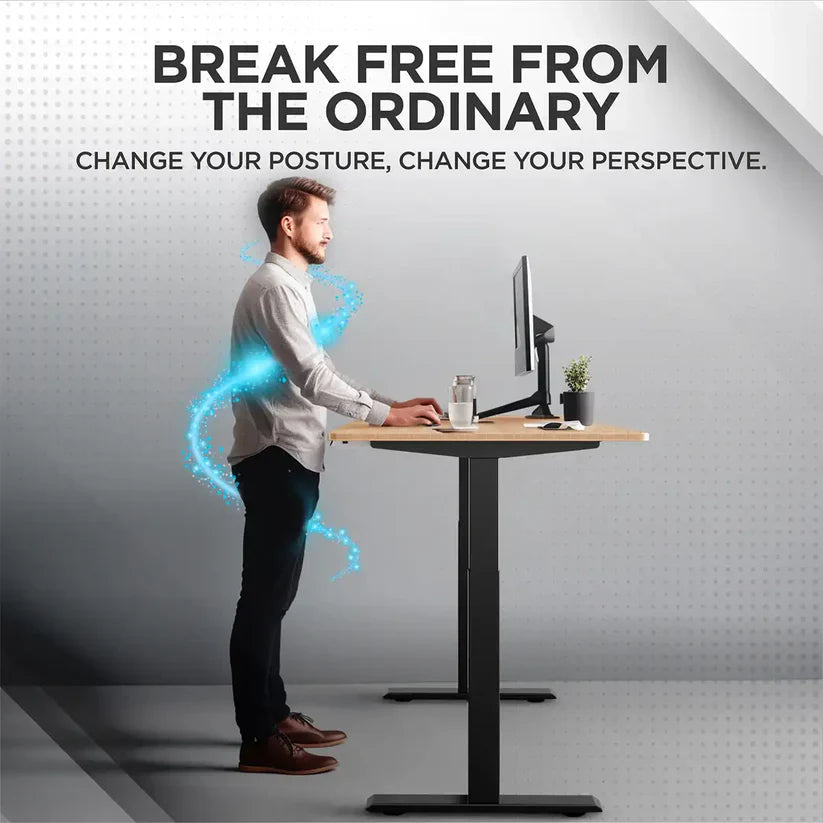
Here’s the rule that works almost every time: desk height equals elbow height. Stand tall, relax your shoulders, and bend your elbows to about 90 degrees. Raise the desk until your forearms are level with the desk and your wrists stay straight. That is your starting height.

- Elbows at ~90 degrees, close to your sides
- Wrists flat and straight, not bent up or down
- Shoulders down and relaxed, not shrugged
- Head neutral, chin level, eyes straight ahead
If anything feels tight or strained, bump the desk up or down by half an inch until it feels easy.
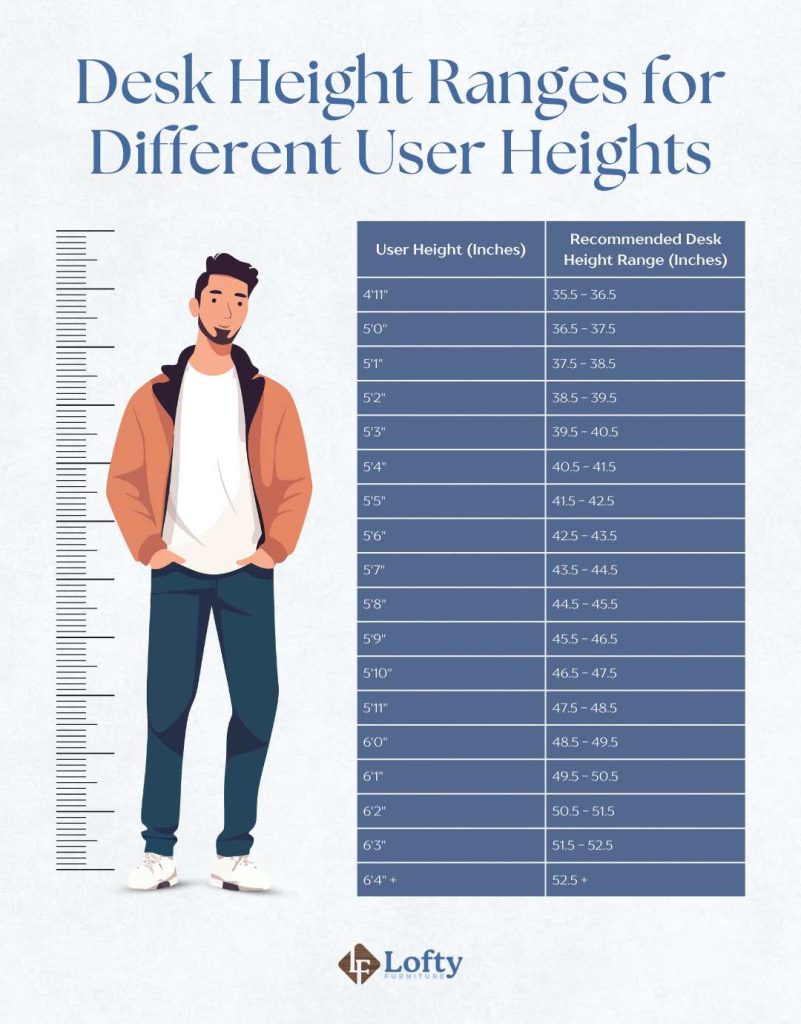
Ideal Standing Desk Height Chart for Tall Users
Use this chart as your quick start if you are between 5’10” and 6’5″. Then fine-tune based on arm length and comfort. It is normal to adjust by 0.5–1 inch after a few minutes of typing.

Height Desk Height Monitor Height
5’10” (178 cm) 42–43 inches 58–60 inches
6’0″ (183 cm) 43–44 inches 60–62 inches
6’2″ (188 cm) 44–45 inches 62–64 inches
6’4″ (193 cm) 45–46 inches 64–66 inches
6’5″ (196 cm) 46–47 inches 65–67 inches
Note: These are starting points. Adjust slightly based on arm length and comfort.
Common Mistakes Tall Users Make
A few small errors cause most pain. The good news: each one is easy to fix fast. Check these first.
- Desk too low: You hunch and bend your wrists up to type. Your shoulders creep forward and your neck rounds.
- Monitor too low: You look down. Your head pushes forward. Neck and upper back ache fast.
- Shoulders raised: You set the desk too high. Your shoulders float up to reach the keys. Traps get tight and burn.
- Keyboard too thick: A tall keyboard makes your wrists bend. Try a slim board or a negative-tilt tray.
- Standing too far: If you stand far from the desk, you reach and sway. Stand close so your elbows can hang by your sides.
How to Adjust Your Setup in 2 Minutes
You don’t need gear right now. You can fix the basics in two minutes and feel better today. Do this once, then save it as a memory height if your desk allows.

- Raise desk to elbow height
- Stand tall, feet hip-width.
- Let your shoulders drop.
- Bend elbows to about 90 degrees.
- Raise or lower the desk until the top meets your bent forearms.
- Adjust monitor
- Top of the screen at or slightly below eye level.
- Sit about an arm’s length away.
- Tilt the screen back 10–20 degrees to keep your neck neutral.
- Relax shoulders
- Shake your arms loose.
- Keep elbows close to your sides.
- If shoulders lift, lower the desk a touch.
- Check wrist angle
- Wrists straight and level with forearms.
- If wrists bend up, raise the desk or use a thinner keyboard.
- If wrists bend down, lower the desk or add a keyboard tray.
- Test and tweak
- Type for 60 seconds.
- If you feel strain, adjust by 0.5 inches and try again.
- Save the height on your desk memory if you have presets.
Extra Tips for Tall Users
Small add-ons make a big difference for comfort and stamina. These are quick wins you can layer in over time.
- Use a monitor arm: It gives you height and depth control, which tall users need. Aim for a tall post and long reach so the screen can sit at true eye level.
- Anti-fatigue mat: A 3/4-inch cushioned mat reduces pressure on your heels, knees, and back. It helps you stand longer without fidgeting.
- Keyboard tray: A tray with a slight negative tilt (front lower than back) keeps wrists straight and relaxed. Great if your desk won’t go high enough or your keyboard is thick.
- Split or low-profile keyboard: Slim boards reduce wrist extension. Split boards let your shoulders stay open and elbows close.
- Alternate stance: Shift weight often. Use a footrest or a small step to change leg load. Switch feet every few minutes.
- Shoes matter: Cushioned, flat shoes beat hard soles. Avoid high heels or heavy boots when standing long.
- Micro-breaks: Every 20–30 minutes, shake out your arms and roll your shoulders. Two deep breaths can reset posture.
- Cable slack: If you raise the desk and cables pull, you hunch and strain. Add longer cables or a cable sleeve so the desk can move freely.
Best Standing Desk Setup for Tall Users
For tall users, range and stability are the priorities. Look for a desk frame that rises high enough without wobble. Add a monitor arm that reaches both up and out so your screen stays centered and at eye level.

- Desk height range: Choose a desk with a top range of at least 48–51 inches. Three-stage legs give more range and better ergonomics for tall bodies.
- Stability: A solid frame with a crossbar or robust columns reduces shake at taller heights. Check the max height stability reviews if possible.
- Memory presets: Save a “standing” preset and a “micro-break” preset that’s 0.5 inches lower for typing-heavy days.
- Wide desktop: A 30-inch deep top gives room to place the monitor at arm’s length and still have space for a tray or notebook.
- Monitor arm features: Tall post (at least 15–17 inches), long reach (about 20 inches), and strong weight capacity for large monitors. Gas-spring arms make fine-tuning easy.
- Anti-fatigue mat: Choose a durable mat with bevelled edges to prevent trips. A textured surface helps micro-movements.
- Keyboard tray: Negative tilt of 5–15 degrees helps keep wrists neutral. Make sure it fits your desk and clears your knees.
- Optional stool: A leaning stool lets you rest without slumping. It reduces back load while keeping your hips open.
Quick Setup Checklist
Run through this list any time your body feels off. Fast checks prevent slow pain.
- Elbows at 90 degrees at desk height
- Screen top at eye level
- Shoulders down and relaxed
- Wrists straight, not bent
- Forearms level with desk
- Stand close; elbows by your sides
- Feet hip-width, weight balanced
- Anti-fatigue mat under feet
- Monitor about an arm’s length away
- Breathe and reset posture every 20–30 minutes
FAQs
What is the best standing desk height?
Set your desk to your elbow height so your elbows are at about 90 degrees with relaxed shoulders. Start there, then adjust up or down by 0.5 inches until typing feels easy and pain-free.
How high should my monitor be?
The top of the screen should be at, or slightly below, eye level. Your eyes should look straight ahead, not down. Keep the screen about an arm’s length away and tilt it back slightly.
Why does my back hurt while standing?
Your desk or screen is likely too low, which makes you hunch. Or your shoulders are raised because the desk is too high. Fix the basics: elbow-height desk, eye-level monitor, relaxed shoulders, and a cushioned mat.
Conclusion
If you are tall, small setup tweaks make a big difference. Set the desk to elbow height. Lift the monitor to eye level. Relax your shoulders and keep wrists straight. These steps cut pain fast and help you stand longer, with less effort and more focus. Fix your desk today to write this blog post.


