
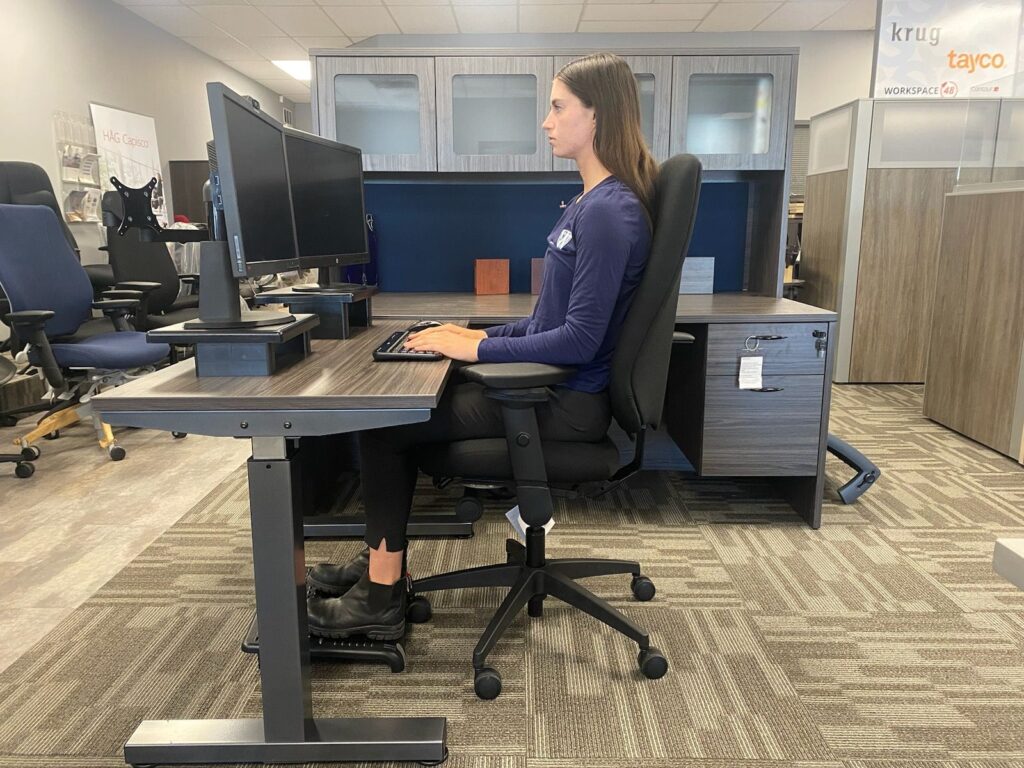
To measure an office chair for proper posture, sit with your feet flat and knees near 90°. Measure seat height from floor to the top of the cushion. Measure seat depth from the backrest to the front edge. Leave a 2–3 finger gap behind your knees. Set backrest at your lower back curve. Align armrests to support relaxed elbows at 90°.
Is your chair causing back or neck pain without you realizing it? You sit down to work, and time flies. But your body pays the price. The fix is not guesswork. It is simple measurements. With a tape measure and a few checks, you can set up your chair to fit your body. This guide shows you how.
Why Proper Chair Measurement Matters
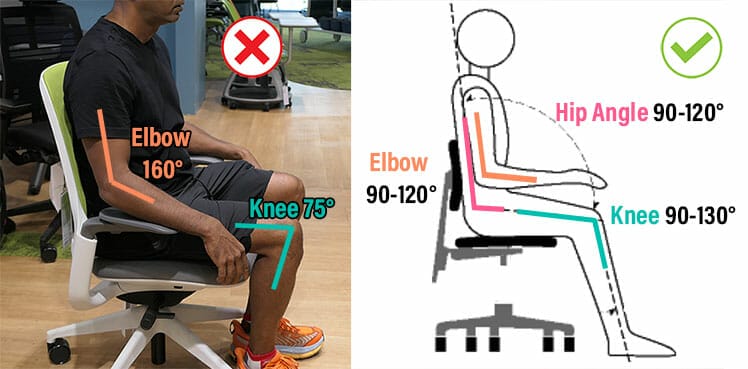
A chair that fits your body supports you in the right places. It reduces strain. It keeps your spine in a neutral curve. The right setup can ease neck, back, and hip pain avoid. It can also boost focus and energy. When your body rests well, your mind works better too.
Key Measurements for an Office Chair
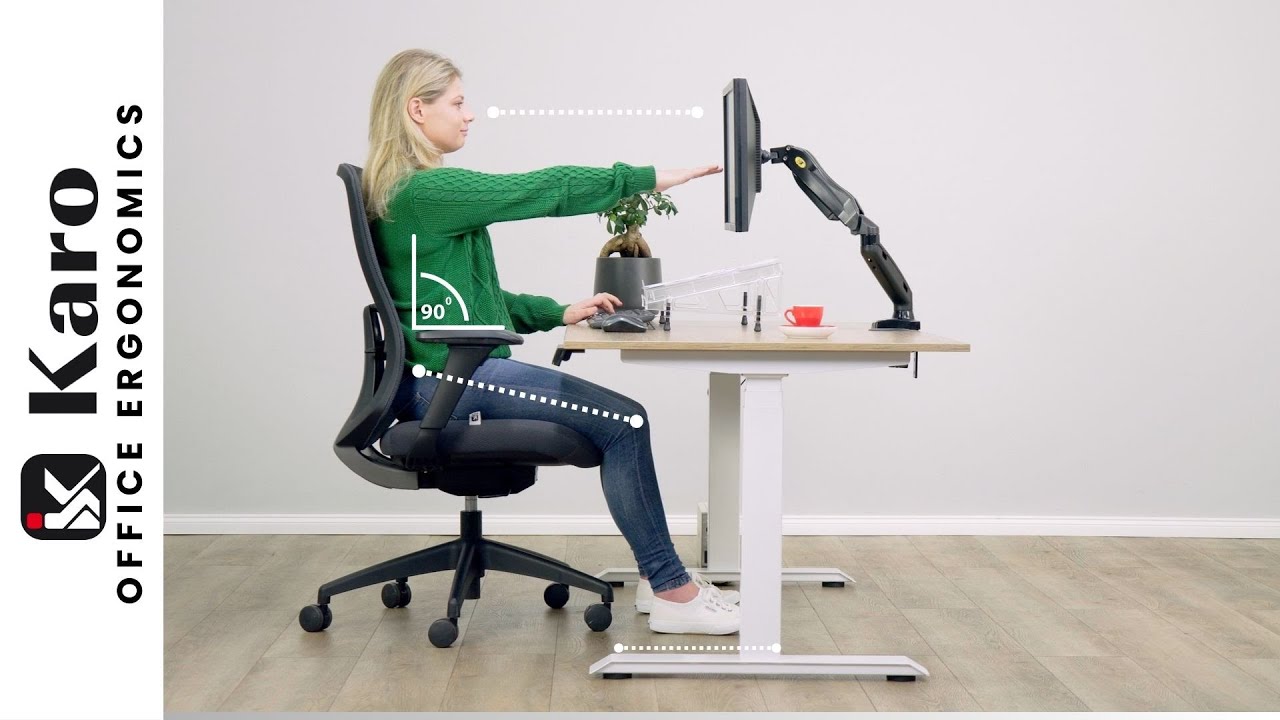
You can set up a chair the right way when you know what to measure. Focus on these points first. Seat height. Seat depth. Seat width. Backrest height. Armrest height. These “office chair measurements for posture” are the base. Get them right, and your work days will feel better fast.
Seat Height
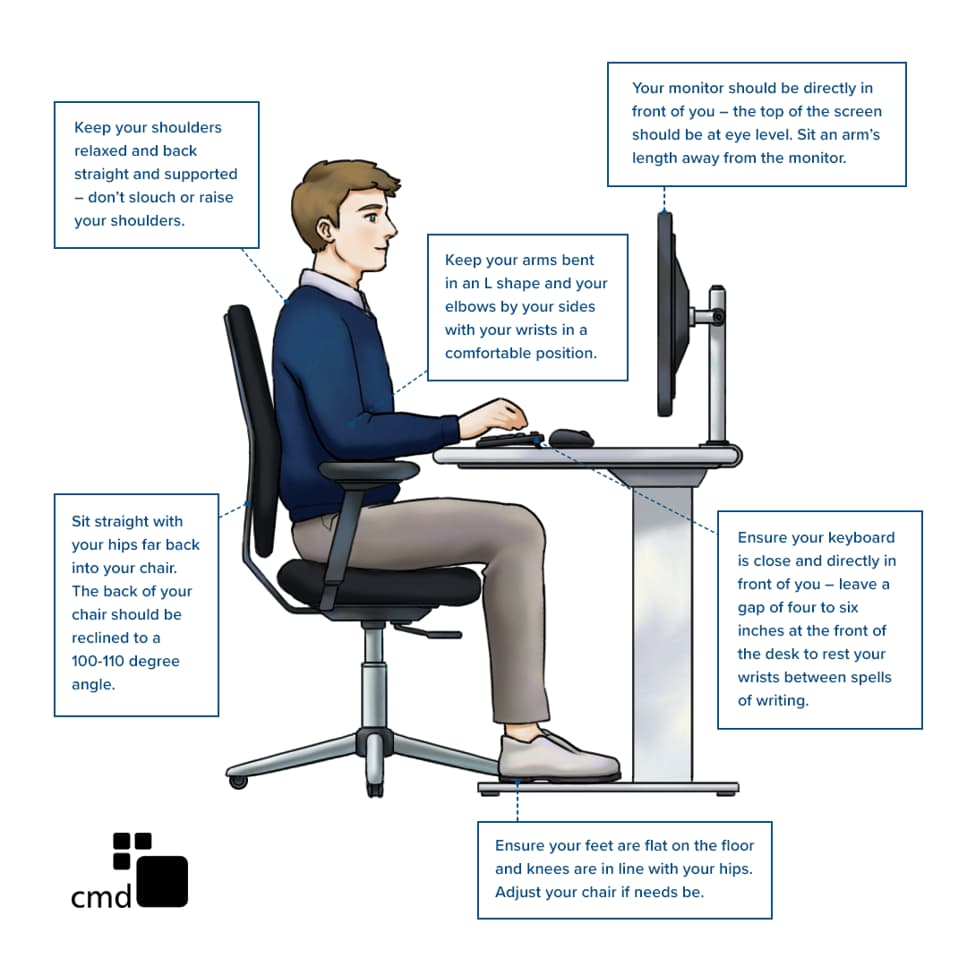
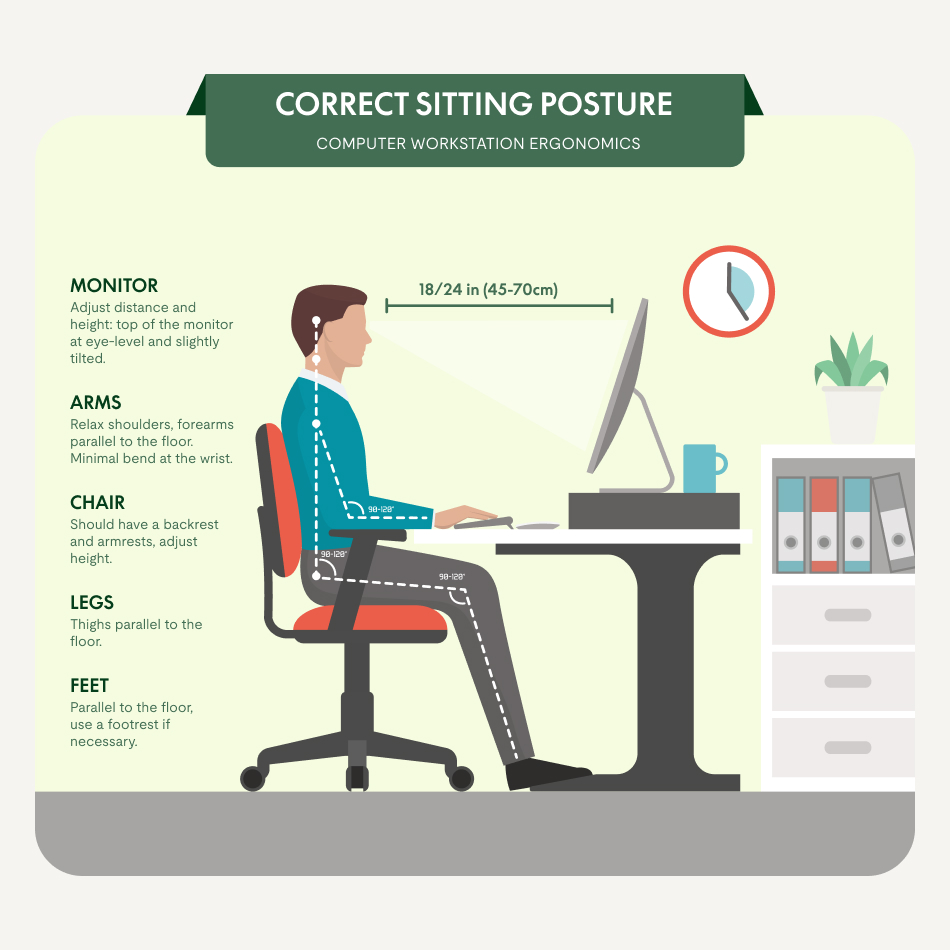
Seat height is the big one. It sets your base. The correct chair height for a desk lets your feet rest flat. Your knees should be near 90 degrees. Your thighs should be level or slope down a bit. Most people land near 16–21 inches from floor to seat. But your body and desk set the final number.
Seat Depth
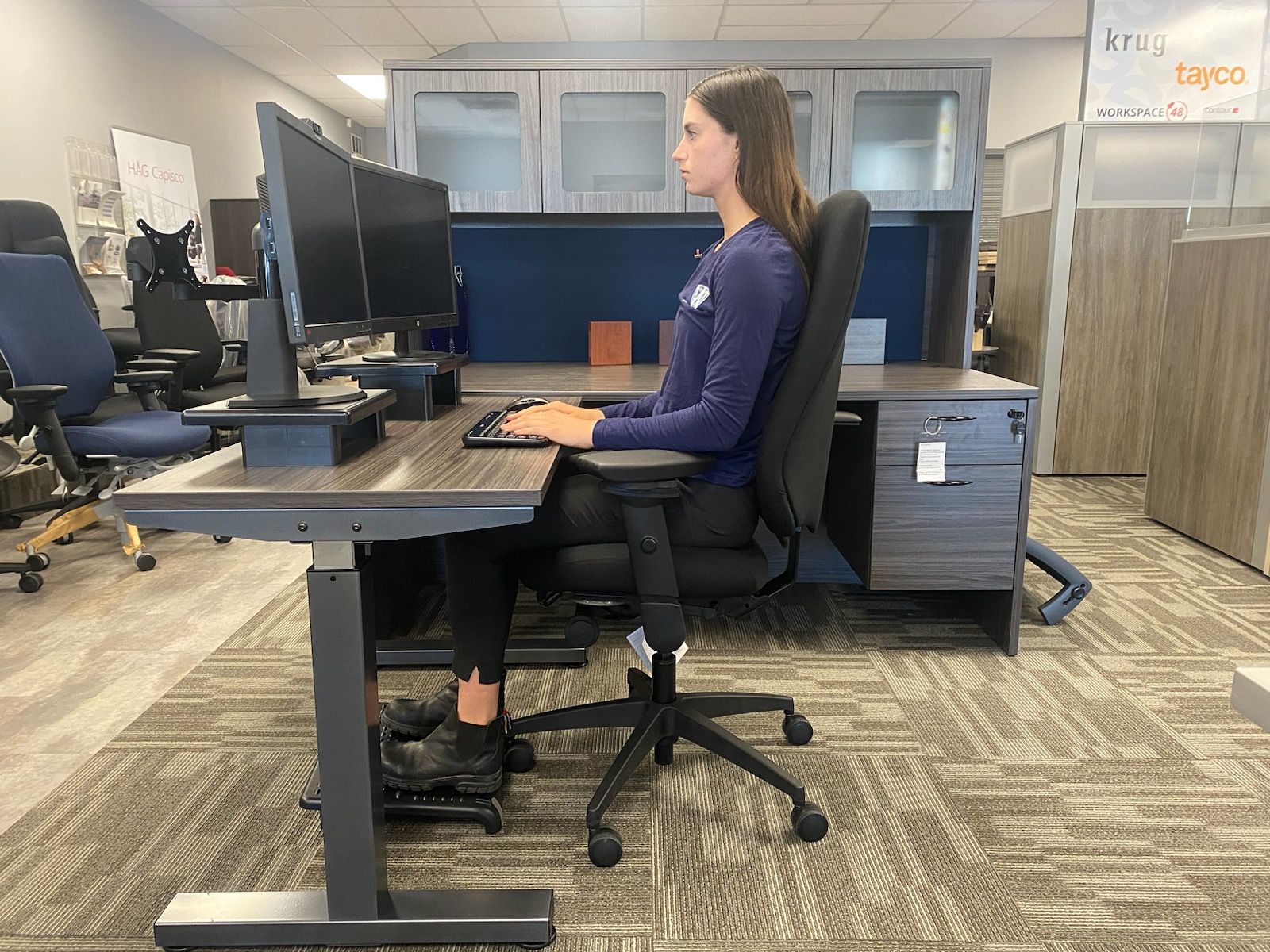
Seat depth affects your hips and knees. You should sit back, with your lower back against the support. You also need space behind your knees. Aim for a 2–3 finger gap between the seat edge and the back of your knees. That gap helps blood flow. It also helps you sit tall with less strain.
Seat Width
Seat width gives you room to move. You want width that holds your hips with a bit of space on each side. It should not press your thighs. Too tight causes pressure. Too wide can pull your arms out to the sides. Standard width is often 18–20 inches, but choose what fits your body best.
Backrest Height
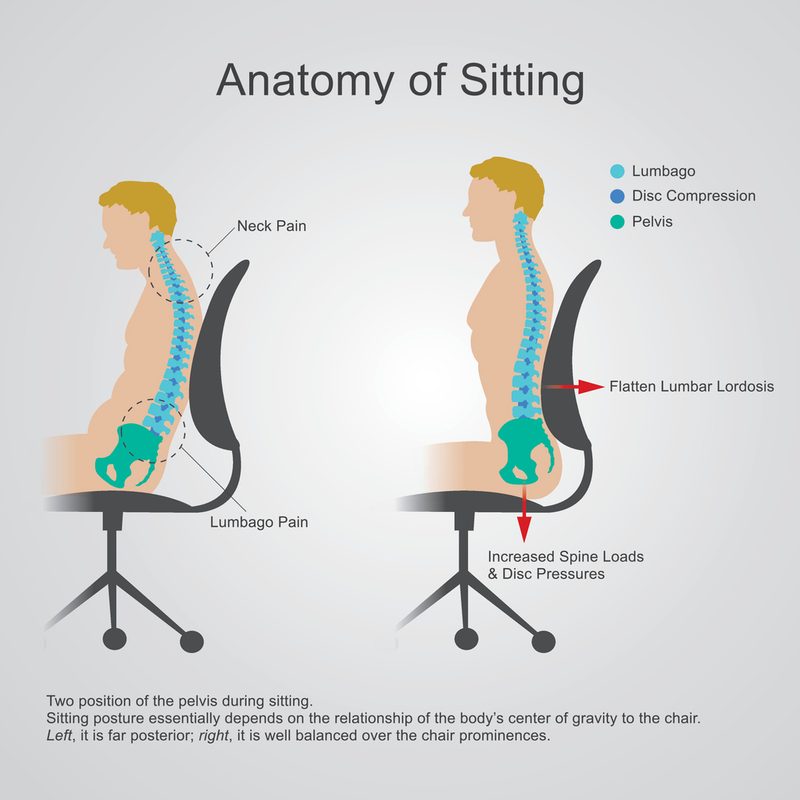
The backrest should match your spine. It should support the curve at your lower back. For mid-back chairs, the top should reach your shoulder blades. For high-back chairs, it should support your full back and neck. The key is firm, adjustable lumbar support that sits at your belt line.
Armrest Height
Armrests should meet your arms, not the other way around. Set them so your shoulders stay relaxed. Your elbows should rest near 90 degrees. Your forearms should be level with your desk. If the desk is higher, raise the chair and use a footrest. If the desk is lower, drop the chair to match.
How to Measure an Office Chair (Step-by-Step)
You do not need special tools to dial in your chair. A simple tape measure works. Set aside five minutes. Make each change one at a time. Then test it for comfort. Small shifts make a big difference.
Tools You Need
- A tape measure (inches or centimeters)
- A notebook or phone to note numbers
- Your work shoes (or the ones you wear most)
- Optional: a small ruler for gap checks
Where to Measure From and To
- Seat height: Floor to the top of the seat cushion, at the center.
- Seat depth: From the front of the backrest to the front seat edge.
- Seat width: Side to side at the widest point of the seat.
- Backrest height: From the seat surface to the top of the backrest.
- Armrest height: From the seat surface to the top of the armrest pad.
Step-by-Step Process
- Put on your work shoes. Sit back in the chair with your hips against the backrest. Keep your spine tall.
- Measure seat height. Use the tape from the floor to the top of the seat. Adjust so your feet are flat. Your knees should be near 90°. If the desk is high, raise the chair. Add a footrest if needed.
- Check seat depth. Sit all the way back. Slide two or three fingers between the seat edge and the back of your knee. If you cannot fit them, the seat is too deep. If the gap is large, the seat is too shallow.
- Measure seat depth. Use the tape from the backrest to the front edge. Aim for a depth that keeps that 2–3 finger space.
- Measure seat width. Confirm you have space on both sides of your hips. Note the number. You need room to move without squeezing your thighs.
- Set lumbar support. Move it so it rests at your lower back curve, about belt height. You should feel firm support when you sit back.
- Measure backrest height. Ensure it reaches at least your mid-shoulders for mid-back chairs. For high-back models, the top should meet the back of your head without pushing it forward.
- Adjust armrests. Let your arms hang, then bend your elbows to about 90°. Raise or lower the armrests to meet your elbows. Your shoulders should feel loose and low.
- Check desk height. With your wrists on the desk, your forearms should be level. If not, fix chair height or use a keyboard tray.
- Test and fine-tune. Work for 10 minutes. If you feel strain, mark where. Then make a small change and try again.
How to Adjust After Each Measurement
- Seat too high? Lower it until feet are flat.
- Seat too low? Raise it so knees are near 90°.
- Seat depth too long? Slide seat in or add a small back cushion.
- Seat depth too short? Slide seat out or choose a larger seat pan.
- Armrests off? Adjust height, width, depth, or pivot to keep elbows close and supported.
- Lumbar not right? Move it up or down. Change firmness if you can.
Ideal Chair Setup for Proper Posture
Once you set the numbers, check your body line. You want a stacked, easy stance. Your ear, shoulder, and hip should form a near straight line when viewed from the side. You should feel stable and free to move.
Head and Neck
Keep your head over your shoulders, not forward. Your eyes should look straight at the top third of your screen. If you wear glasses, raise the monitor so you do not tilt your chin. If the headrest pushes your head, lower it or move it back.
Shoulders and Arms
Relax your shoulders. Let them drop away from your ears. Keep elbows near your sides. Your forearms should be level and supported. If the armrests push your arms out, bring them in. If they hit the desk, lower them or slide under.
Spine and Backrest
Sit back and let the lumbar support hold you. Keep a small curve in your lower back. Do not flatten the curve. Keep your mid-back in contact with the backrest. If you need to reach forward, pull the chair closer to the desk.
Hips and Thighs
Your hips should be level or a bit higher than your knees. This opens the hip angle and eases your spine. Your thighs should rest on the seat without pressure at the front edge. If the edge bites, shorten the seat depth or add a soft edge cover.
Feet and Knees
Feet flat on the floor or a footrest. Knees bent near 90°, with no pinch at the back. Keep a 2–3 finger gap from the seat edge to the back of your knees. This protects blood flow and nerve health in your legs.
Common Mistakes to Avoid
- Chair too high. This lifts your feet and strains your lower back.
- Chair too low. This loads your hips and rounds your spine.
- Seat depth too long. This cuts blood flow behind your knees.
- Seat depth too short. This reduces thigh support and tires your legs.
- Armrests too high. This hikes your shoulders and causes neck pain.
- Armrests too low or wide. This drops your arms and bends your wrists.
- Lumbar set too low or high. This forces a slump or a sway back posture.
How to Adjust Your Chair After Measuring
You have the numbers. Now set them for daily use. Your chair should match your desk and tools. Change one thing at a time. Check how it feels. Keep what works and note the settings.
- Match chair height to desk height. Set forearms level. If the desk is fixed and tall, raise the chair and add a footrest.
- Fine-tune seat depth. Keep the 2–3 finger gap. Slide the seat pan if you can. If not, use a small lumbar pillow.
- Dial in lumbar support. Move it to belt height. Adjust firmness. You should feel steady but not poked.
- Set armrest height and width. Keep elbows at 90° and close to your body. Avoid shrugging.
- Align to your screen. Place the monitor at arm’s length. Keep the top of the screen at or just below eye level.
- Lock or free the tilt. For long focus tasks, lock the back upright. For breaks and calls, use a smooth recline to move and rest.
- Save your setup. If your chair has memory or marks, note them. Take a photo so you can reset fast.
Best Office Chairs for Proper Posture (Top Picks)
Here are chairs that shine for fit and adjustability. They make it easy to find the ideal seat height and depth, armrest position, and lumbar support. Choose the one that matches your body, desk, and budget.
- Steelcase Series 1 & 2
Great for small spaces and all-day work. LiveBack flex supports micro-moves. Height, depth, and 4D arms fit many users. The lumbar is simple and firm. Ideal if you want a light, adjustable chair at a fair price. - Herman Miller Aeron (Size A/B/C)
A classic for a reason. Comes in three sizes to fit seat width and depth needs. Mesh keeps you cool. PostureFit SL backs your lower spine. 4D arms dial in elbow support. Pricey, but built to last. - HON Ignition 2.0
Strong value with real ergonomics. Adjustable seat depth, lumbar, and 4D arms. Works well for shared desks. The seat foam is firm and supportive. A top pick for small teams on a budget. - Steelcase Gesture
Best-in-class armrests with huge range. Fits many body types and work styles. Seat depth adjusts. Back flexes with you in any posture. A smart pick if you move from typing to calls to tablet use. - Branch Ergonomic Chair
Clean look, easy setup, and solid support. Adjustable lumbar, seat height, and arms. Good for home offices. The price is fair, and the parts feel strong. A simple path to better posture.
Quick Checklist
Use this short list to set up fast. Keep it near your desk.
- Feet flat or on a footrest
- Knees near 90°, hips level or slightly higher
- Seat height: forearms level with desk
- Seat depth: 2–3 finger gap behind knees
- Backrest: lumbar at belt height, spine supported
- Armrests: elbows at 90°, shoulders relaxed
- Screen: top at or just below eye level
- Mouse and keyboard close, wrists straight
- Take a 30–60 second break every 30–45 minutes
FAQs
What is the correct chair height for a desk?
The right height keeps your feet flat and your knees near 90 degrees. Your forearms should be level with your desk when you type. If your desk is fixed and too tall, raise the chair and use a footrest.
What is the ideal seat height and depth for most people?
Seat height often falls between 16 and 21 inches from floor to seat. Seat depth should let you sit back with a 2–3 finger gap behind your knees. Body size varies, so always test and adjust to your comfort.
How do I know if my office chair measurements for posture are right?
Do a five-minute test. Type, click, and reach for your mouse. You should feel no pinch behind your knees, no shrug in your shoulders, and steady support at your lower back. If you feel strain, adjust one setting and test again.
Conclusion
Your chair should fit you, not the other way around. With a tape measure and these simple steps, you can set your seat height, depth, backrest, and arms to match your body. Choose a properly adjustable chair, note your best settings, and enjoy calm, strong posture all day.


