
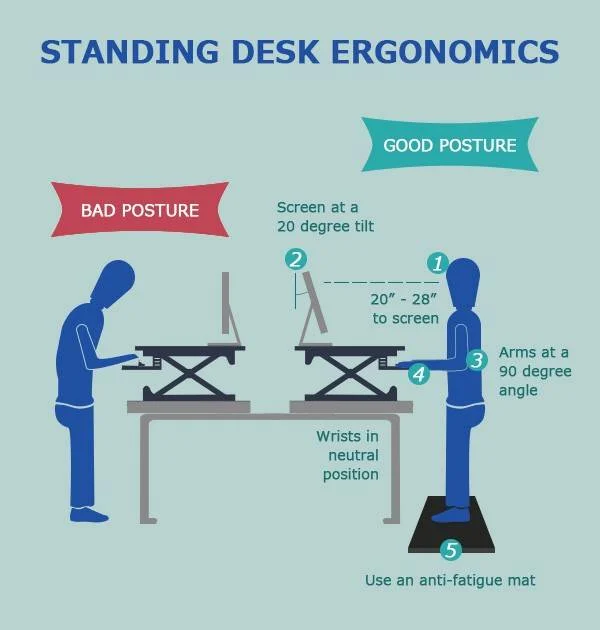
Ergonomic standing posture means standing in a way that keeps your head, shoulders, spine, hips, knees, and feet in safe alignment. It spreads load evenly, reduces strain on joints and muscles, and helps you stay alert with less pain. It matters because small posture tweaks can prevent back, neck, and leg pain and help you work longer with less fatigue.
Many of us stand in ways that feel normal but strain the body. We lean on one hip. We lock our knees. We crane our neck toward a screen. Over time, these habits add up. Tight calves, sore lower backs, and aching feet follow. The good news is that better posture is a skill you can learn. With a few simple cues and small changes to your setup, you can stand with less pain and more energy at work. Let’s walk through how to do it.

What Is Ergonomic Standing Posture?
Ergonomic standing posture is a balanced way of standing that supports your body’s natural curves. Your head stays over your shoulders, your shoulders rest over your hips, and your hips stack over your feet. The goal is even weight through both feet, soft knees, and a long, neutral spine. This reduces stress on joints, protects muscles, and boosts comfort during long hours on your feet.

How to Stand with Proper Ergonomic Posture (Step-by-Step)
Think of posture as gentle stacking. You do not need to hold a stiff pose. Aim for easy balance and small, steady cues. The checklist below guides you from head to toes.
- Head position: Keep your ears over your shoulders. Imagine a string lifting the crown of your head. Tuck your chin slightly so your gaze is level, not tilted up or down.
- Shoulders: Drop your shoulders away from your ears. Roll them up, back, and down once. Let your chest open, but do not flare your ribs.
- Spine alignment: Keep a soft S-curve in your back. Avoid a big arch or a flat back. Draw your belly button gently toward your spine to support your core.
- Hips: Stack your hips over your ankles. Avoid tucking your pelvis hard or pushing it forward. Keep your weight centered, not on one hip.
- Knees: Unlock your knees. A tiny bend is good. Locked knees reduce blood flow and can make you dizzy or sore.
- Feet placement: Stand with feet hip-width apart. Toes point forward or slightly out. Spread weight across your heels and the balls of your feet. Avoid rolling your arches in or out. Shift weight often, but keep both feet active.
Ergonomic Standing Posture at a Desk
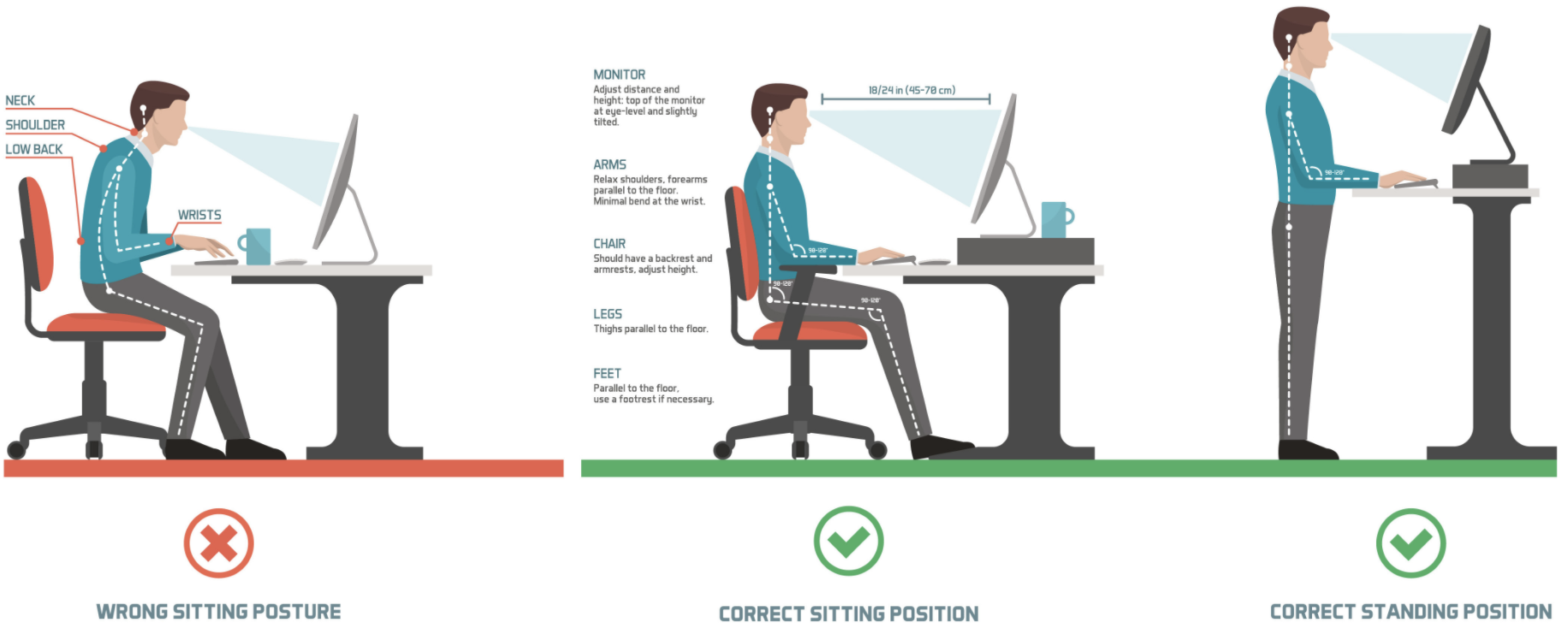
Standing posture improves when your desk setup fits you. A good setup keeps your head neutral, shoulders relaxed, and wrists straight. Think “bring work to me,” not “reach to work.”
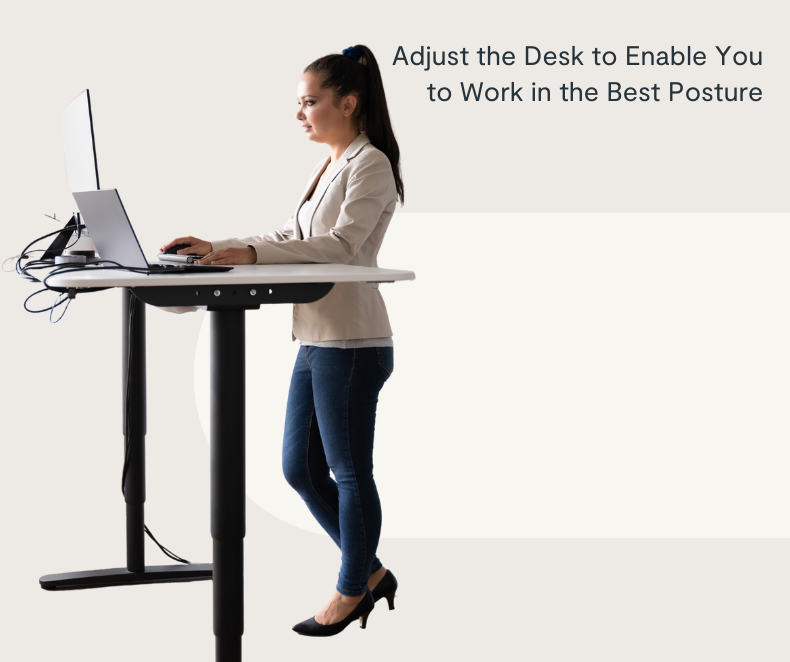
- Monitor height: The top third of the screen should be at or slightly below eye level. Keep the screen an arm’s length away. Tilt it so you can see without craning your neck.
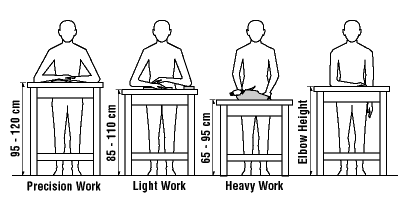
- Desk height: Set the desk so your elbows sit at about 90 to 100 degrees. Forearms should be parallel to the floor. Keep your shoulders relaxed, not hiked.
- Keyboard and mouse: Place them close. Keep wrists straight and hands close to your body. Use a light grip. Float your hands, do not press your wrists into the edge.
- Document placement: Keep papers on a sloped stand next to the monitor to cut down on neck twists.
- Accessories: Use an anti-fatigue mat to soften ground force. Wear supportive shoes with room in the toe box. Avoid high heels or worn-out soles.
Benefits of Correct Standing Posture
Good posture is not just about looks. It is a health habit with day-to-day gains you can feel.
- Back pain relief: Aligning your spine reduces strain on discs and small joints. Your core can support you better with less effort.
- Less neck and shoulder tension: A neutral head and open chest ease tight traps and reduce headaches from forward head posture.
- Better circulation: Soft knees and active feet help blood flow. This reduces swelling and the “heavy legs” feeling.
- More energy: Balanced posture cuts muscle fatigue. You use fewer “emergency” muscles and can focus longer.
- Sharper focus: Less pain means fewer distractions and better work quality.
Common Standing Posture Mistakes
These habits are small, but they add up. Spot them early and fix them fast.
- Leaning on one hip for long periods
- Locking the knees and clenching the glutes
- Craned neck or jutting chin toward the screen
- Shoulders hiked up or rolled forward
- Feet turned far out or in, with weight on the toes or heels only
Tips to Maintain Good Posture for Long Standing Hours
Posture is not a frozen pose. It is “dynamic balance.” Small, steady moves keep you fresh and stable.

- Switch positions often: Change your stance every 5–10 minutes. Shift weight side to side. Rock from heel to toe.
- Take brief breaks: Every 30–45 minutes, sit or walk for 2–3 minutes. Move your ankles, knees, and hips.
- Use a footrest: Place one foot on a 4–6 inch footrest or a low stool. Swap feet every few minutes to unload your back.
- Try micro-stretches: Roll your shoulders. Nod your head yes/no. Do calf raises. Open and close your hands.
- Engage your core: A light brace supports your spine. Breathe low and slow so you do not tense your neck.
- Choose good shoes: Supportive, cushioned shoes help. Consider a small heel drop and a wide toe box. Rotate pairs during the week.
- Stand on a mat: An anti-fatigue mat reduces pressure and improves comfort on hard floors.
- Keep tools close: Place items within easy reach. Avoid long reaches that pull your shoulder forward.
- Set posture cues: Use a timer, note, or watch alarm to reset posture during the day.
Quick Posture Checklist
Use this simple scan to reset in 10 seconds.
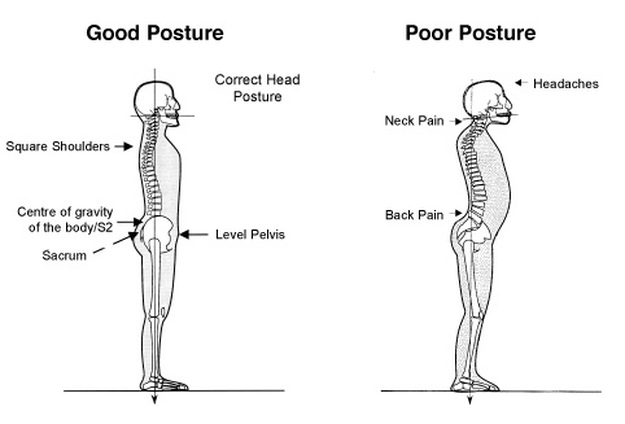
- Ears over shoulders, chin tucked
- Shoulders down and back, ribs soft
- Core on, gentle breath
- Hips stacked over ankles
- Knees soft, not locked
- Feet hip-width, weight spread
FAQs
Q1: How long should I stand at a standing desk each day?
A: Aim for a sit-stand mix. Start with 15–20 minutes of standing per hour. Build up as your body adapts. The goal is movement, not standing all day. Change positions often and take short walk breaks.
Q2: What if I feel pain when I try proper posture?
A: Ease into it. New muscle use can feel odd at first. Use small cues and short practice blocks. If pain is sharp, constant, or gets worse, talk with a clinician or a physical therapist for a check and a plan.
Q3: Do I need an expensive ergonomic chair or desk?
A: Not always. Posture and habits matter most. A stable desk at the right height, a monitor at eye level, and a good mat and shoes go far. If you can, choose gear that adjusts to your body and tasks.
Conclusion
Good standing posture is a daily practice, not a rigid pose. With a few clear cues and a smart desk setup, you can ease strain and feel more steady at work. Start small. Reset often. Mix sitting, standing, and short walks. Over time, these habits reduce pain, boost focus, and help you work with ease.


