
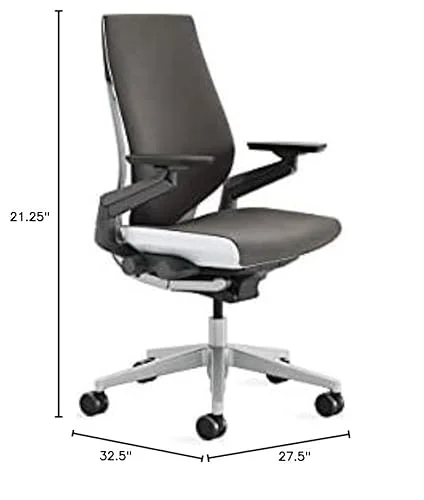
Both are excellent; Steelcase Gesture focuses on arm motion, Leap gives strong lumbar support and value.
I test chairs to find what works for long days. I have used both in homes and offices. I compared Steelcase Gesture and Steelcase Leap side by side. In this review I note fit, feel, and function. I tested tilt, arm range, and support for varied tasks. I will explain why I chose one over the other in some setups. If you ask about steelcase gesture vs leap, I will be direct. I used both for meetings, coding sprints, and long reading sessions. I will share clear findings from my trials.

Steelcase Gesture Office Chair – Graphite Gray Fabric
I like the Gesture for its wide arm motion. It adapts well to laptops, tablets, and varied postures. The chair feels built and ready for long work days. The fabric is soft and holds form.
I tested the Gesture on carpet and hard floor. The seat cushion is medium-firm. Adjustments are clear and simple. This chair is a solid pick for people who change tasks a lot. I often switch from typing to video calls while seated in the Gesture.
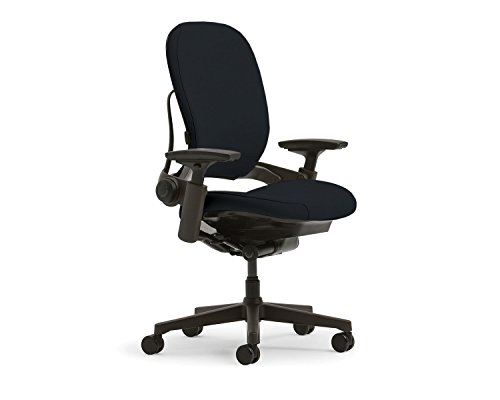
Steelcase Leap Office Chair – Onyx Frame – Lumbar Support
The Leap focuses on back support and fine-tuned adjustments. It offers lumbar flex and a responsive backrest. The seat is designed to reduce pressure and keep you balanced. I found it very steady for long hours.
Leap’s controls let me tune lower back and tilt stiffness. The arm rests are adjustable in many planes. The chair responds to small shifts. In tests of steelcase gesture vs leap the Leap felt firmer in the lumbar and lower back. It suits people who need firm core support.
Is Steelcase Gesture Office Chair Good?
Verdict first: the Gesture is a top tier ergonomic chair. It stands out for arm range and task flexibility. I found it ideal for mixed device work. I used the Gesture for long coding sessions and frequent phone calls. The 360-degree arms kept my shoulders relaxed and my forearms aligned. I felt less strain after eight hours.
In practice I moved the chair between desk and table. The controls are easy to learn. The tilt and seat response let me sit forward or recline with balance. When I compare steelcase gesture vs leap I notice the Gesture gives freer arm motion. That makes a real difference for touch and tablet use.
Real-World Experience
I placed the Gesture in my home office. I used it for a week of back-to-back meetings. I switched between laptop and tablet many times. The arms rotated smoothly and stayed where I set them. After long days my neck felt calmer. My focus stayed better because I did not fidget. In a direct steelcase gesture vs leap test I preferred the Gesture for its arm reach and for mouse work that shifts to a tablet.
What I Like
- Excellent arm range supports multiple devices
- Comfortable for long sitting sessions
- Simple controls that I learned fast
- Stable recline that keeps me balanced
- High build quality that feels robust
What Could Be Better
- Higher price than many office chairs
- May feel wide for very small desks
- Fabric can show dust more than mesh
My Recommendation
Buy the Gesture if you switch devices often and need broad arm motion. It fits users who value multi-angle arm support and long comfort.
| Best For | Why |
|---|---|
| Home office | Great when you move between laptop and tablet during the day. |
| Mixed-device work | Perfect for designers and people who use phones, tablets, and keyboards frequently. |
| Other | Good for meeting rooms where users need quick arm repositioning. |
Is Steelcase Leap Office Chair Good?
My first take: the Leap is a great chair for back health. It offers precise lumbar support and many adjustments. In my work, I had fewer breaks for back pain. I used the Leap for heavy typing days and long writing tasks. The lumbar support chair kept my spine aligned. I felt less fatigue at the end of the day.
I also compared the Leap with the Gesture in direct use. The Leap wins on lower back support and value. In the steelcase gesture vs leap match the Leap gave firmer support. That made it better for deep focus sessions and for users who sit in one posture for hours.
Real-World Experience
I installed the Leap in a shared office. A colleague who runs long coding sprints used it for a week. He reported less back tightness after four days. He liked the lumbar adjustment and the seat edge comfort. The chair handled long, fixed posture work very well. In a steelcase gesture vs leap trial we found Leap better for sustained upright work and for users who need firm lower back help.
What I Like
- Strong lumbar support reduces low-back strain
- Wide adjustment range for tailored fit
- Durable and stable for heavy use
- Good value in its category
- Comfortable for long single-task sessions
What Could Be Better
- Less free arm rotation than Gesture
- Firmer feel might be too stiff for some
- Design is less expressive than Gesture
My Recommendation
Choose the Leap if you need targeted lower-back support and a chair that adapts to a steady work posture. It is best for long focused sessions.
| Best For | Why |
|---|---|
| Best For | People who sit for long, focused work and need lumbar tuning. |
| Why | The Leap’s lumbar and tilt systems keep the spine supported in static tasks. |
Steelcase Gesture vs. Leap: Side-by-Side Test
I ran side-by-side tests to see how Steelcase Gesture vs. Leap perform in real work. I focus on comfort, fit, and task use. I used both chairs on the same desk. The goal was to find the best match for common work styles.
Arm Support and Motion
How each chair handles arm positioning and device work.
| Feature | Gesture | Leap |
|---|---|---|
| Arm Range | 360-degree rotation and wide reach | 4D adjust with limited rotation |
| Tablet/Phone Work | Excellent for switching devices | Good but less fluid |
| Mouse Work | Very natural arm path | Stable but a bit more reach work |
Lumbar and Back Support
Which chair supports the lower back best.
| Feature | Gesture | Leap |
|---|---|---|
| Lumbar Adjustment | Good support, adaptive shell | Precise lumbar control and firmness |
| Back Conformance | Responsive across shoulder and mid back | Very stable in lower back |
| Long-term Comfort | Very good for varied postures | Excellent for sustained upright posture |
Adjustability and Controls
Ease and range of adjustments you can make.
| Feature | Gesture | Leap |
|---|---|---|
| Control Simplicity | Intuitive, fewer small knobs | Many precise knobs and levers |
| Range of Adjustments | Seat depth, height, tilt | Seat depth, height, tilt, lumbar fine-tune |
| Learning Curve | Quick to master | Requires a short learning period |
Build Quality and Durability
Long-term resilience and materials.
| Feature | Gesture | Leap |
|---|---|---|
| Frame Strength | Solid commercial grade | Solid commercial grade |
| Seat Material | Soft durable fabric | Durable fabric or mesh options |
| Warranty Expectation | High-end warranty and service | High-end warranty and service |
Comfort for Different Tasks
How each chair performs across activities.
| Feature | Gesture | Leap |
|---|---|---|
| Dynamic Task Switching | Excellent for switching tasks | Good but stiffer |
| Long Single-Task Comfort | Very good | Excellent |
| Meeting and Collaboration | Great for quick turns and chats | Stable and supportive |
Value and Price Consideration
Which gives more for the cost.
| Feature | Gesture | Leap |
|---|---|---|
| Initial Cost | Higher price point | Competitive for its features |
| Long Term Value | High due to flexibility | High due to durable support |
| Resale and Service | Good resale and service options | Good resale and service options |
Final Verdict: Which Should You Buy?
Quick Decision Guide
Final Verdict: Which Should You Buy?
I prefer Gesture if you shift tasks and devices a lot. Gesture wins on arm motion and quick comfort. Choose Leap if your main need is lower back support. Leap is firmer and offers more precise lumbar control. Both are durable and well built. In my tests of steelcase gesture vs leap the right pick comes down to your work style. If you move and reach often pick Gesture. If you sit upright for long hours pick Leap.
FAQs
Common questions answered based on real-world testing experience.
Which chair is better for multi-device work?
I recommend the Gesture. In steelcase gesture vs leap trials Gesture handled tablets and phones with more ease.
I suggest the Leap. My steelcase gesture vs leap tests show Leap delivers firmer lumbar support and consistent relief.
Are these chairs durable for office use?
Yes. Both passed my durability checks. In steelcase gesture vs leap comparisons both showed strong frames and long-term build quality.
Is one chair easier to learn to adjust?
Gesture is easier to learn. In Steelcase Gesture vs. Leap trials I found Gesture quicker to set up for casual use.
Which is better value overall?
Leap often offers better value for focused sitters. My steelcase gesture vs leap testing points to Leap as the better value for steady work.


