
Desk height is set for typing and screen work. It usually sits at 28–30 inches (71–76 cm) for seated use, with thinner tops, more leg room, and options for keyboard trays or height adjustment. Table height is often similar in numbers, but it’s built for dining and general tasks, with thicker tops, aprons, and less ergonomic support.
We don’t think much about surface height until our neck hurts, our wrists ache, or our shoulders feel tight. Small height changes can make big differences in comfort. The right desk or table height helps your elbows rest at 90 degrees, keeps your wrists straight, and lets your eyes meet the screen without strain. When height fits you, your body relaxes. Work feels lighter, focus lasts longer, and pain stays away. That is why knowing the difference between desk height and table height matters.

What Is Standard Desk Height?
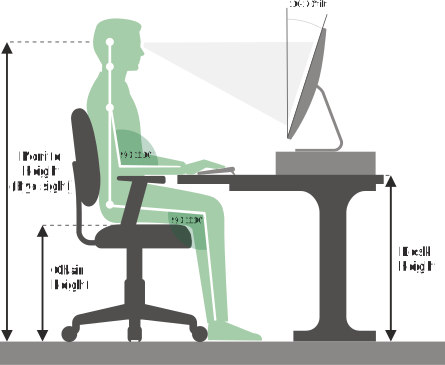
A standard seated desk is 28–30 inches (71–76 cm) high. This range suits most adults for computer work. The idea is simple: when you sit with your shoulders relaxed, your forearms should be level with the desktop. That keeps wrists straight for typing and mouse use. It also leaves space for a keyboard tray if you need one.

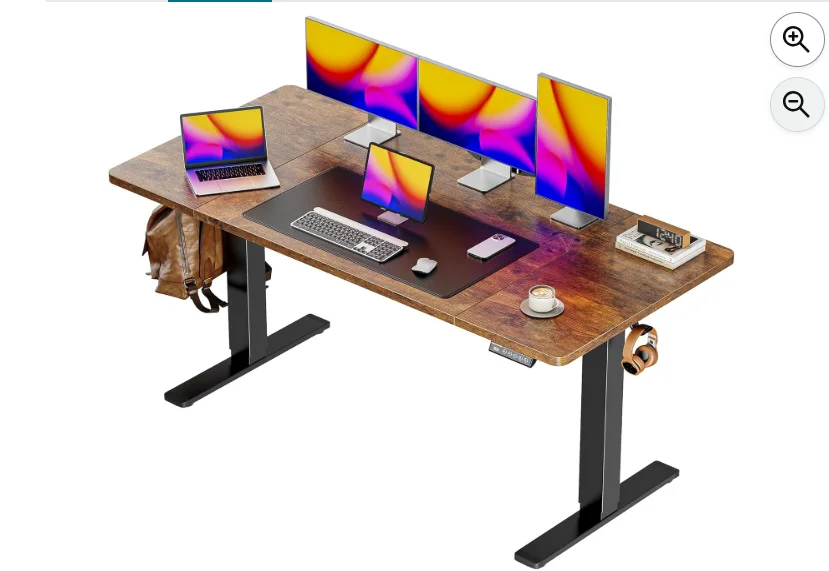
Many modern desks offer adjustability. Sit-stand desks can move from about 22 inches (56 cm) up to 48 inches (122 cm) or more. This range lets you set the surface at elbow height for both sitting and standing. Thin tops, no thick aprons, and rounded edges are common. They protect your wrists and give extra leg room, which is key during long days.

What Is Standard Table Height?
Most dining and multi-use tables also measure 28–30 inches (71–76 cm) high. The numbers look the same, but the purpose is different. Tables are built for eating, crafts, or light writing. They often have thicker tops and aprons that hang below the surface. This can cut into lap and leg space and change how your arms rest.
Because tables are not designed for screens and keyboards, they rarely include features like cable pass-throughs, keyboard trays, or height adjustment. When used as a desk, these design choices can push your shoulders up, bend your wrists, or crowd your knees. It works for short tasks, but long sessions can cause strain.

Desk Height vs Table Height (Comparison)
Yes, the stated heights often match. But the experience is not the same. Here is a quick side-by-side look to make the difference clear.

| Feature | Desk | Table |
|---|---|---|
| Typical height (seated) | 28–30 in (71–76 cm) | 28–30 in (71–76 cm) |
| Purpose | Computer and office work | Dining and general tasks |
| Top thickness | Usually thinner | Often thicker |
| Apron/rail under top | Rare | Common, reduces leg/lap clearance |
| Adjustability | Often height-adjustable (sit-stand) | Rarely adjustable |
| Ergonomic add-ons | Keyboard tray, cable grommets, monitor arms | Usually none |
| Edge design | Rounded/soft for wrists | Varies, can be sharp |
| Leg clearance | Generous | Can be tight due to apron |
| Best for long hours | Yes | Only with accessories and tweaks |
A table can work in a pinch. But for day-long typing and mousing, a true desk will usually feel better and cause less strain. If you must use a table, plan to add a few accessories to match desk-friendly ergonomics.

Which Is Better for Working Long Hours?
For long days, a desk is the safer choice. It is built for posture and repetitive hand work. The goal is neutral joints and relaxed muscles. When you sit, your elbows should be at 90 degrees, shoulders down, wrist flat, and feet supported. Your eyes should meet the top of the screen, or a bit below it.

Use these simple ergonomic checks:
- Elbows at 90–100 degrees with forearms level to the surface.
- Wrists straight, not bent up or down when typing or using the mouse.
- Monitor top at or slightly below eye level; screen about an arm’s length away.
- Hips and knees at 90–110 degrees; feet flat on the floor or on a footrest.
- Chair supports your lower back; shoulders stay relaxed.
If you work at a table, add a separate keyboard and mouse to avoid hunching over a laptop. Raise the screen with a stand or a few books. If the table is too high, raise your chair and add a footrest. If it is too low, add risers to the table legs. Small fixes go a long way.
How to Choose the Right Height for Your Workspace
The best height is personal. A simple rule works well: set the surface level with your elbows when your shoulders are relaxed. This keeps your wrists straight. It also reduces shoulder and neck tension, which often comes from working too high or too low.
- Measure elbow height while seated: Sit tall, drop your shoulders, bend elbows to 90 degrees. Measure from the floor to your elbow. Set your desk to that height. If your chair seat height changes, recheck.
- For standing: Measure elbow height while standing tall. Set your sit-stand desk so your forearms are level.
- If the surface is too high: Raise your chair and add a footrest. Or switch to a thinner keyboard or a tray.
- If the surface is too low: Add desk or table risers. Even a 1–2 inch (2.5–5 cm) lift can help your shoulders relax.
- Use a keyboard tray if space is tight: Trays drop the typing surface by 1–4 inches, which can fix a desk that is slightly too tall.
- Mind top thickness and aprons: A thin top with no apron gives more leg room and helps you sit closer without hitting your knees.
A quick comfort test can guide you. Type for 10 minutes, then scan your body. Neck tight? Forearms tense? Wrists sore? Adjust height in small steps and retest. Your body will tell you when it is right.
Common Mistakes When Using a Table as a Desk
Tables can work for a while, but small design details can trip you up. Here are common pitfalls to watch for and how to avoid them.
- Thick top and apron push your chair back. You sit farther from the keyboard and lean forward. Fix: Use a chair without bulky arms, and choose a table with no apron or a narrow one.
- Table is too high. Shoulders creep up, wrists bend, and forearms tire. Fix: Raise your chair, use a footrest, and add a keyboard tray or a low-profile keyboard.
- Screen is too low on a laptop. Your neck bends. Fix: Raise the laptop on a stand and add an external keyboard and mouse.
- Hard, sharp edge presses into wrists. Numbness or tingling can follow. Fix: Add a desk edge pad or a soft wrist rest.
- Glare from overhead lights. You squint or crane your neck. Fix: Reposition the screen, add a matte screen filter, or change the angle of the lamp.
FAQs
Is a dining table the same height as a desk?
Often yes, both are around 28–30 inches. But the desk is built for typing and screens, while the dining table is built for meals. The shape and features make a big difference.
What if my desk height is not adjustable?
Adjust the other pieces. Raise or lower your chair, add a footrest, use a thinner keyboard, or add a keyboard tray. Small tweaks can match your elbow height.
How high should a standing desk be?
Set it at your standing elbow height, so your forearms are level. This keeps wrists straight and shoulders relaxed.
Conclusion
Desk height and table height can share the same numbers, but not the same purpose. A desk supports long, focused work. A table suits shared meals and short tasks. If you switch a table into desk duty, add smart fixes: raise the screen, set elbow-height typing, and protect your wrists. Your body will thank you.


